EQLXPerf not started
Summary: The service EQLXPerf not starting in operation system.
Acest articol se aplică pentru
Acest articol nu se aplică pentru
Acest articol nu este legat de un produs specific.
Acest articol nu acoperă toate versiunile de produs existente.
Symptoms
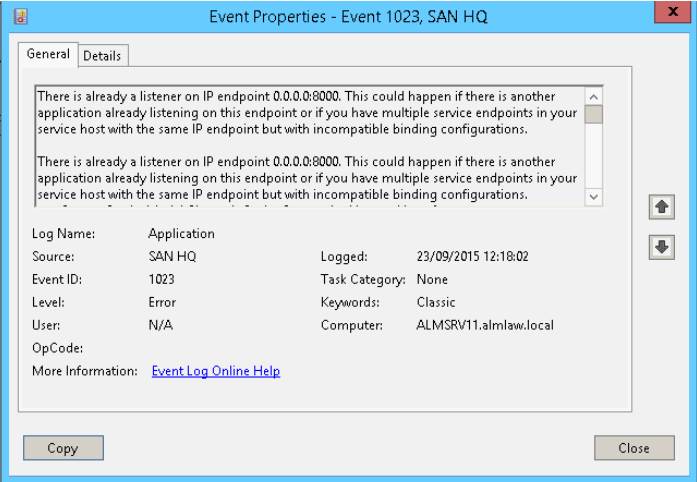
Service EQLXPerf not starting and generating Event ID: 1023 in system event Logs in Operation System.
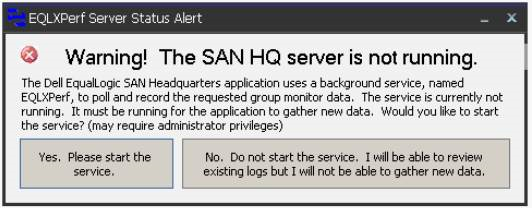
Trying to start it manually, this error will be displayed after a few seconds:
In the Operating System Event Logs, the event ID: 1023 is recorded. There is already a listener on IP endpoint 0.0.0.0:8000.
Trying to start it manually, this error will be displayed after a few seconds:
In the Operating System Event Logs, the event ID: 1023 is recorded. There is already a listener on IP endpoint 0.0.0.0:8000.
Resolution
Use the Command netstat -an in prompt to verify the ports and programs running.

After, search in the archive for 0.0.0.0:8000 and verify the state.
If the state is LISTENING, another application is already using this port.
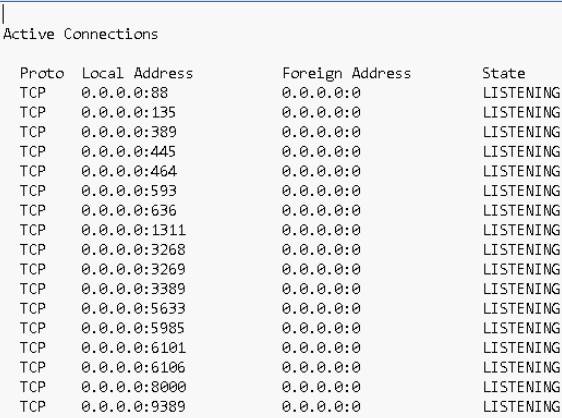
In this case we must change the port of San HeadQuarters or the application that is using port 8000.
To change the port in San Headquarters access the option:
Settings -> Server Settings.
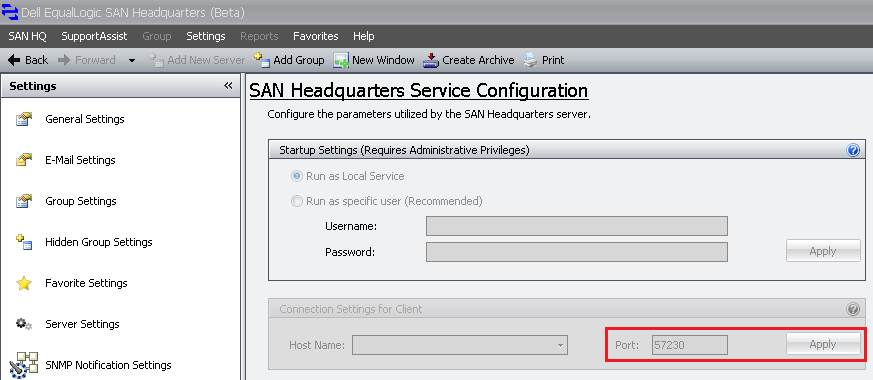
After changing the port, start the EQLXPerf service in the Operatig System.
After, search in the archive for 0.0.0.0:8000 and verify the state.
If the state is LISTENING, another application is already using this port.
In this case we must change the port of San HeadQuarters or the application that is using port 8000.
To change the port in San Headquarters access the option:
Settings -> Server Settings.
After changing the port, start the EQLXPerf service in the Operatig System.
Produse afectate
Legacy Storage ModelsProprietăți articol
Article Number: 000136708
Article Type: Solution
Ultima modificare: 01 Jun 2026
Version: 4
Găsiți răspunsuri la întrebările dvs. de la alți utilizatori Dell
Servicii de asistență
Verificați dacă dispozitivul dvs. este acoperit de serviciile de asistență.