Eject Drive Does Not Work on Boot Drive in Precision xx20 and xx60 Workstations
Summary: The following article provides information about the FlexBay features of the Precision xx20 and xx60 Tower Workstations. It explains how this affects those bootable drives installed with the operating system. ...
Instructions
Table of Contents:
- The Eject Drive option cannot be used on a boot drive?
- What is the Dell FlexBay feature?
- Do not remove a boot drive that is in use
The Eject Drive option cannot be used on a boot drive?
The hard drive bays on the front of Precision xx20 and xx60 Tower workstations are configured as Dell FlexBay's.
The Eject Drive or Safely Remove Hardware and Eject Media messaging is shown against the drives installed in these front bays. (This is using the Windows 11 or Windows 10 Pro 64bit operating system.)
This includes any boot drive installed in these front bays. The desktop fails to complete the task and displays an error using this feature to remove the boot drive.
What is the Dell FlexBay feature?
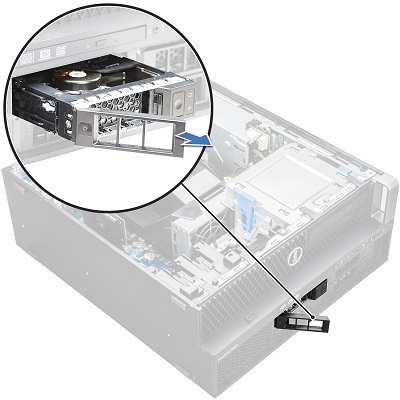
The Dell FlexBay features are Hot-Swappable drive bays that come in several configurations at the point of purchase. (They only work with drives of that configuration.)
Switch the configuration of the FlexBay for different drive types using the customer conversion kits. See the following link for more information:
What does Hot-Swap mean?
Hot-Swap in this case means:
- Storage drive bays that are accessible
- Where any Data and Storage drives can be removed or added while the desktop is up and running
- Swapped while running the operating system and the operating system continues to function
This removal or replacement can be to add additional storage space, add data, replace faulty drives or move data to another location or device.
Do not remove a boot drive that is in use
Installing a bootable operating system on a hot-swappable drive, turns it into a boot drive. However the desktop hardware still sees it as a hot-swappable drive.
However, using a boot drive in a hot-swap bay and booting to the operating system the drive cannot be removed. Trying to remove the drive while that operating system is still running does not work. The drive is in use - constantly.
Swap the boot drive with another boot drive once the desktop is tuned off. Both bootable drives must be set up for that particular device and its drivers.
When the operating system does not eject a bootable drive that is in use, it is working as expected.