OptiPlex 3040 MFF Microphone Not Recognized
Summary: This article provides information about how to resolve an issue with the microphone not recognized on your Dell OptiPlex 3040 Micro Form Factor (MFF) system.
Acest articol se aplică pentru
Acest articol nu se aplică pentru
Acest articol nu este legat de un produs specific.
Acest articol nu acoperă toate versiunile de produs existente.
Symptoms
OptiPlex 3040 MFF systems may encounter an issue with the microphone not getting recognized when it is connected to the system.

Figure 1: Microphone settings
Cause
Generally this issue is related to an audio configuration issue in the audio software settings.
Resolution
-
Right-click the Dell audio speaker icon and select Sound Manager.

-
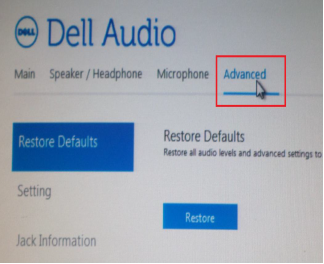
Click Advanced.
-
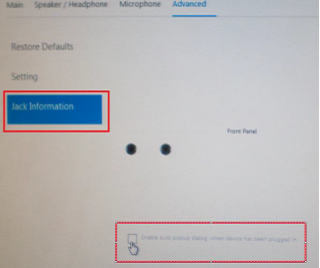
Click Jack Information and check the box next to Enable auto popup dialog when a device has been plugged on.
- Connect the microphone to the system.
- In the menu that appears, select Mic-In.
- Test the Microphone.
Produse afectate
OptiPlex 3040 MicroProprietăți articol
Article Number: 000149418
Article Type: Solution
Ultima modificare: 07 Oct 2024
Version: 7
Găsiți răspunsuri la întrebările dvs. de la alți utilizatori Dell
Servicii de asistență
Verificați dacă dispozitivul dvs. este acoperit de serviciile de asistență.