How to Obtain the MSI Installer Package for Dell Command Update
Summary: Learn more about retrieving the MSI installer package from the Dell Command | Update (DCU) executable.
Acest articol se aplică pentru
Acest articol nu se aplică pentru
Acest articol nu este legat de un produs specific.
Acest articol nu acoperă toate versiunile de produs existente.
Instructions
MSI Installer Package
The following steps can be used to get the MSI installer package:
-
Go to Dell Command | Update product page.
-
Download the latest version available.
Note: The links in this table automatically identify the computer. If this is not the preferred choice, go to the installation section to install the preferred choice.DCU 5.7 for Computers with Intel or AMD Processors (Released April 2026) DCU 5.6 for Computers with ARM Processors (Released November 2025) -
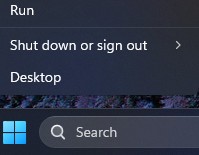
Right-click the Windows start menu icon and select Run.
-
In the Run Box, type
CMDand press Ctrl + Shift + Enter keys simultaneously to run an elevated command prompt.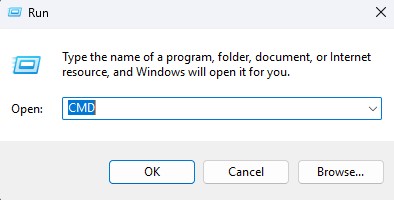
-
If prompted for the User Account Control (UAC), click Yes to proceed.
-
Browse to the folder location of the downloaded executable.
-
Type the following command, then press the Enter key:
Note: Switches are case-sensitive.Dell-Command-Update-Application_[VERSION].exe /passthrough /X /B”[EXTRACTION PATH]” Example: C:\Dell>Dell-Command-Update-Application_5CR1Y_WIN64_5.6.0_A00.exe /passthrough /X /B”C:\Dell\DCU_Extracted”
-
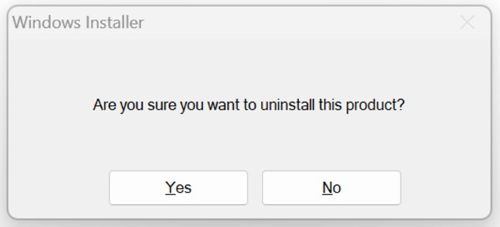
Click No if prompted to uninstall.
-
In Windows Explorer, go to the
[EXTRACTION PATH], and locate the MSI Installer Package.
Produse afectate
Dell Command | UpdateProprietăți articol
Article Number: 000177292
Article Type: How To
Ultima modificare: 08 May 2026
Version: 17
Găsiți răspunsuri la întrebările dvs. de la alți utilizatori Dell
Servicii de asistență
Verificați dacă dispozitivul dvs. este acoperit de serviciile de asistență.