Connectrix B-Series: The Web Browsers Report "Cipher Mismatch, No Matching Ciphers" When Accessing WebTools UI Using HTTPS
Summary: AES256-SHA256 (0x3d) and AES128-SHA256 (0x3c) is blocked for TLS.
Acest articol se aplică pentru
Acest articol nu se aplică pentru
Acest articol nu este legat de un produs specific.
Acest articol nu acoperă toate versiunile de produs existente.
Symptoms
The web browsers (Chrome, New Edge, or Firefox) refused to open the WebTools using HTTPS.
The error message contains "Cipher Mismatch" or "No Matching Ciphers."
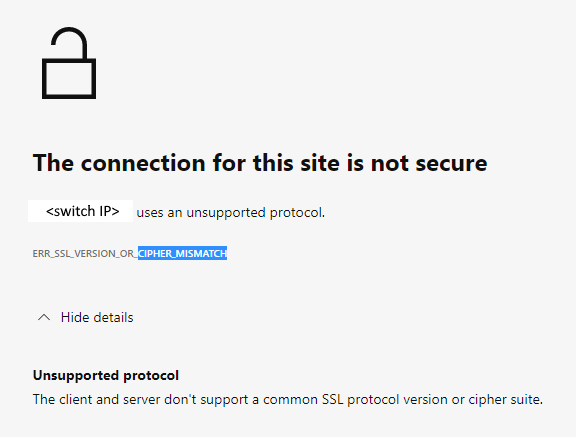
Figure 1: Screenshot of Error Message Showing Connection Not Secure, Unsupported Protocol
The switch is running in FOS 8.1 or 8.2 firmware.
The error message contains "Cipher Mismatch" or "No Matching Ciphers."
Figure 1: Screenshot of Error Message Showing Connection Not Secure, Unsupported Protocol
The switch is running in FOS 8.1 or 8.2 firmware.
Cause
The switch HTTPS cipher setting only allows AES256-SHA256 and AES128-SHA256 for TLS 1.2 (the "default_generic" or "default_strong templates" of FOS 8.1 or 8.2).
The Wireshark dump shows that the client does not accept AES256-SHA256 (0x3d) or AES128-SHA256 (0x3c), hence the TLS handshake fails.
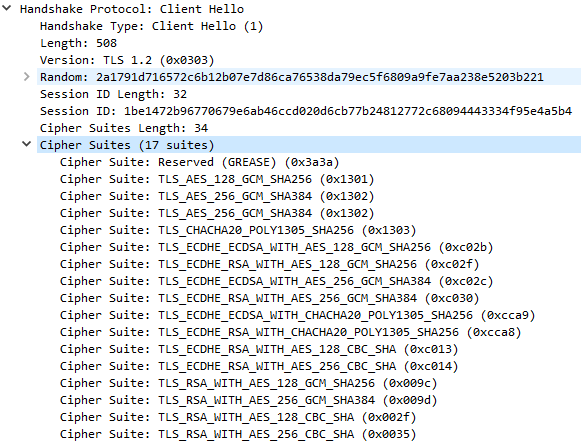
Figure 2: Screenshot of Wireshark Dump Showing Handshake Failure
<switchname>:root> seccryptocfg --show | grep HTTPS
HTTPS                    : !ECDH:!DH:HIGH:-MD5:!CAMELLIA:!SRP:!PSK:!AESGCM:!SSLv3
HTTPS                    : TLSv1.2

<switchname:root> openssl ciphers -v '!ECDH:!DH:HIGH:-MD5:!CAMELLIA:!SRP:!PSK:!AESGCM:!SSLv3'
AES256-SHA256           TLSv1.2 Kx=RSA      Au=RSA  Enc=AES(256)  Mac=SHA256
AES128-SHA256           TLSv1.2 Kx=RSA      Au=RSA  Enc=AES(128)  Mac=SHA256
The Wireshark dump shows that the client does not accept AES256-SHA256 (0x3d) or AES128-SHA256 (0x3c), hence the TLS handshake fails.
Figure 2: Screenshot of Wireshark Dump Showing Handshake Failure
Resolution
Modify the switch HTTPS cipher setting to cover the client.
Example:
In this example, the current HTTPS cipher setting is "!ECDH:!DH:HIGH:-MD5:!CAMELLIA:!SRP:!PSK:!AESGCM:!SSLv3"
To enable AES256-GCM-SHA384 (0x9d) and AES128-GCM-SHA256 (0x9c), remove "!AESGCM" from the setting with the command:
Example:
In this example, the current HTTPS cipher setting is "!ECDH:!DH:HIGH:-MD5:!CAMELLIA:!SRP:!PSK:!AESGCM:!SSLv3"
To enable AES256-GCM-SHA384 (0x9d) and AES128-GCM-SHA256 (0x9c), remove "!AESGCM" from the setting with the command:
seccryptocfg --replace -type https -cipher '!ECDH:!DH:HIGH:-MD5:!CAMELLIA:!SRP:!PSK:!SSLv3'
Additional Information
Map OpenSSL cipher names (displayed in the OpenSSL command) with IANA cipher names (displayed in Wireshark dump) using the Mozilla document, Security/Cipher Suites - MozillaWiki

Produse afectate
Connectrix B-SeriesProprietăți articol
Article Number: 000213633
Article Type: Solution
Ultima modificare: 18 May 2026
Version: 6
Găsiți răspunsuri la întrebările dvs. de la alți utilizatori Dell
Servicii de asistență
Verificați dacă dispozitivul dvs. este acoperit de serviciile de asistență.