Precision Workstations Have Slow Performance Under Low Workloads
Summary: Information about certain Precision workstations having intermittent slow performance issues.
Symptoms
Dell Precision workstation Users might experience intermittent slow response under low workload conditions in both the Operating System (OS), or in the BIOS, while the Processor speed is stuck at 0.8 GHz.
Examples of this behavior are slow or lagging mouse and keyboard operation while typing in text applications, normal use of Excel, or Word applications. Slow response in the BIOS when changing settings happens as well.
Affected Models:
- Precision 5860 Tower
- Precision 5860 XL Tower
- Precision 7960 Tower
- Precision 7960 XL Tower
- Precision 7960 Rack
- Precision 7960 XL Rack
Cause
This is a known Intel issue. Intel’s Energy Preference Bias (EPB) settings are causing the slow performance as the processor stays at low speeds if the workload is not high enough.
Resolution
BIOS and Patch Fix
This is an industry-wide problem, and Intel has issued a patch to address it. Download and upgrade the Precision BIOS to the version listed below or newer to fix the issue.
- Precision 5860 Tower: 1.1.15 or newer
- Precision 5860 XL Tower: 1.1.15 or newer
- Precision 7960 Tower: 1.1.14 or newer
- Precision 7960 XL Tower: 1.1.14 or newer
Workaround:
A short-term workaround is to change the "Power Mode" setting to "High Performance."
- Use the following Microsoft steps to go to the "Power Options": Change the Power Mode for your Windows PC
- Change the "Power Plan" mode to "High Performance" (Figure 1).
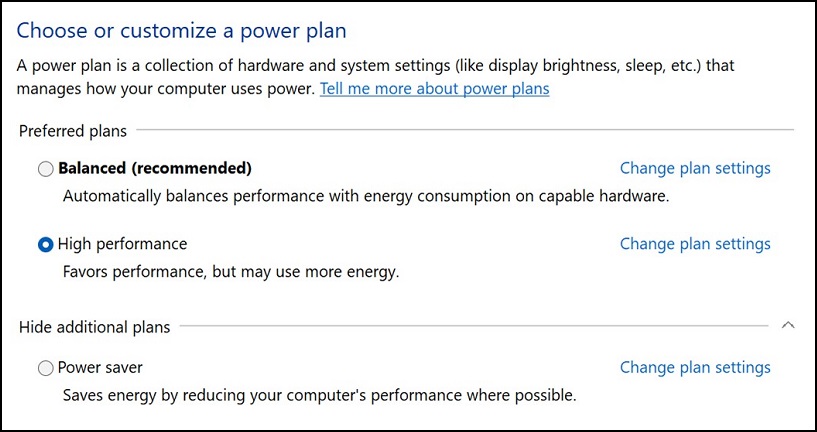
Figure 1
- Reboot the Precision workstation.
