Error in Device Manager After Installing the Intel Chipset Device Software After a Windows 10 Install
Summary: Information about a Device Manager error (yellow exclamation mark) after installing the Intel Chipset Device Software.
Acest articol se aplică pentru
Acest articol nu se aplică pentru
Acest articol nu este legat de un produs specific.
Acest articol nu acoperă toate versiunile de produs existente.
Symptoms
Device Manager will have an error in the Device Manager on "PCI Data Acquisition and Signal Processing Controller" after installing the Intel Chipset Device Software on a system with a new install of Windows 10.
Affected Systems:
- Latitude 5340
- Latitude 5440
- Latitude 7340
- Latitude 7440
- Latitude 7640
- Latitude 9440 2-in-1
- Precision 3580
- Precision 3581
- Precision 5480
- Precision 5680
- Precision 7680
- Precision 7780
Cause
No cause information is available.
Resolution
Intel Chipset Device Software Driver
The following two methods can be used to resolve this issue.
- Connect the system to the Internet and do a "Windows Update" to install the latest driver.
- Uninstall the Intel chipset driver and install an older version.
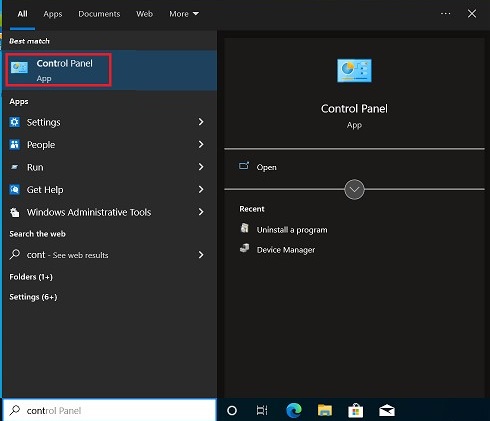
- Press the "Windows" key, search, and choose "Control Panel."
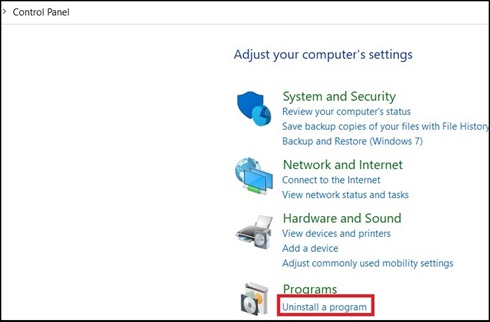
- Choose "Uninstall a program."
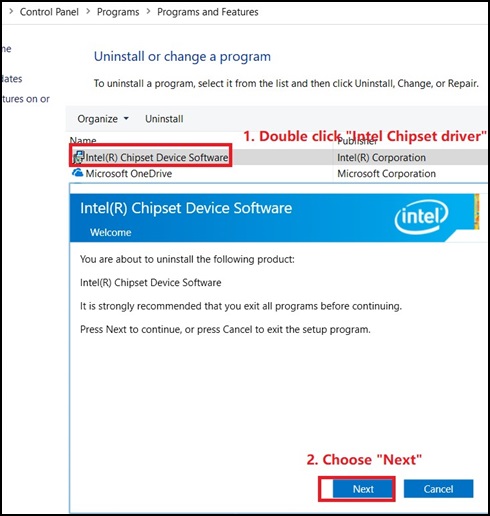
- Double-click "Intel Chipset Device Software and choose "Next" in the new window to uninstall the Chipset driver.
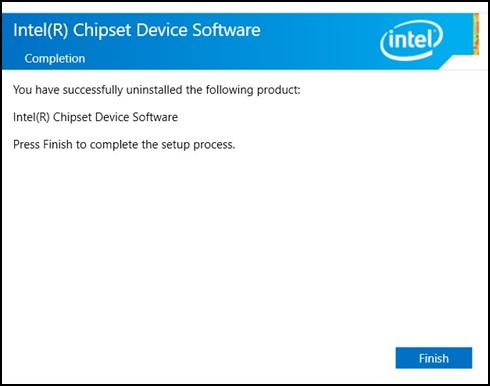
- In the Intel Chipset Device Software Window, click "Finish."
- No "Intel chipset driver" should be shown in the Control Panel.

- Download the old chipset driver from the following link: Intel Chipset
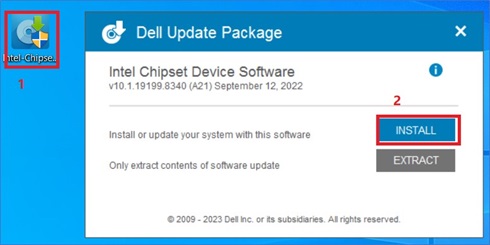
- Double-click the downloaded package and then click "Install," begin the installation.
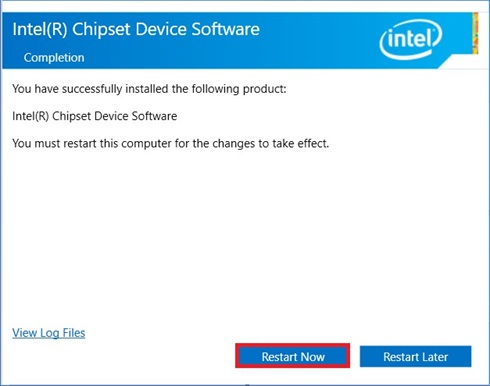
- Follow the install wizard, until the pop up complete message appears, then choose "Restart Now."
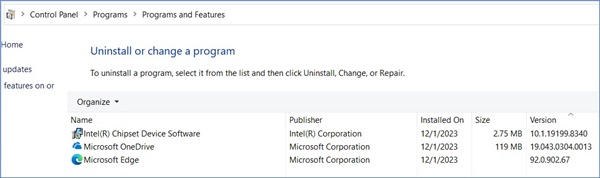
- After the system reboot, open "Control Panel" to check if the older chipset driver is installed.
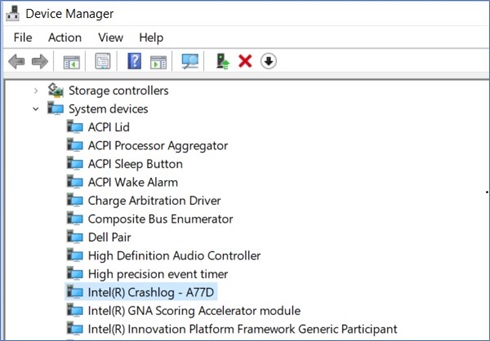
- There should be no errors in the Device Manager.
- Press the "Windows" key, search, and choose "Control Panel."
A new driver, version 10.1.19600.8418 should be available on the Dell Driver site on January 16, 2024 (Pending).
Produse afectate
Latitude 5340, Latitude 7340, Latitude 7440, Latitude 9440 2-in-1, Latitude 5540, Latitude 7640, Precision 5480, Precision 3580, Precision 3581, Precision 5680, Precision 7680, Precision 7780Proprietăți articol
Article Number: 000220565
Article Type: Solution
Ultima modificare: 12 Jan 2026
Version: 3
Găsiți răspunsuri la întrebările dvs. de la alți utilizatori Dell
Servicii de asistență
Verificați dacă dispozitivul dvs. este acoperit de serviciile de asistență.