The Call Control Button Does Not Function When Used with Zoom or Teams Over the Dock
Summary: Learn about the call control button not working as expected when the headset is hot plugged into another dock or USB hub.
Acest articol se aplică pentru
Acest articol nu se aplică pentru
Acest articol nu este legat de un produs specific.
Acest articol nu acoperă toate versiunile de produs existente.
Symptoms
Dell headsets cannot answer incoming calls from Unified Communications (UC) platforms like Microsoft Teams or Zoom by pressing the call control button. The issue occurs when the following sequence of steps is performed:
- The headset or dongle is initially connected to a dock or USB hub, which is connected to a computer.
- The dock or USB hub is disconnected from the computer.
- The headset or dongle is then reconnected to another dock or USB hub, which is later reconnected to the same computer.
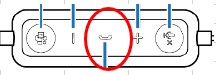
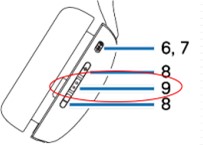
Affected Headsets and Location of the Call Control Button:
- Dell Pro Plus Wired ANC Headset WH5024
- Dell Pro Wired Headset WH3024
- Dell Pro Plus Wireless ANC Headset WL5024
Cause
The headset is locked in the previous state of its plugged condition to the first dock and hence could not revert to its initial condition when plugged to the second dock.
Resolution
- Answer the call directly from the UC app's user interface, and the headset's call control button properly functions upon the next incoming call.
- Unplug the headset and plug it to another USB port of the dock or computer.
Produse afectate
Dell Pro Wired Headset WH3024, Dell Pro Plus Wired ANC Headset WH5024, Dell Pro Plus Wireless ANC Headset WL5024Proprietăți articol
Article Number: 000223841
Article Type: Solution
Ultima modificare: 25 Nov 2025
Version: 6
Găsiți răspunsuri la întrebările dvs. de la alți utilizatori Dell
Servicii de asistență
Verificați dacă dispozitivul dvs. este acoperit de serviciile de asistență.