Vxrail: VM Migration Fails after NSX-T Manager Uninstall
Summary: VM migration fails as the switch (vDS) shows the port group on an unavailable network and reports down status. This occurs when the NSX‑T Data Center (NSX‑T) manager is removed, leaving N‑vDS down. ...
Acest articol se aplică pentru
Acest articol nu se aplică pentru
Acest articol nu este legat de un produs specific.
Acest articol nu acoperă toate versiunile de produs existente.
Symptoms
The customer is unable to migrate the VM from the original host to another host.
VDS shows the target port group:
Currently connected network interface "Network adapter 1" uses network XXXXX (Vmware HCIA Distributed Switch)", which is not accessible.
Checking the vDS status, all nodes show "down" status of vDS.
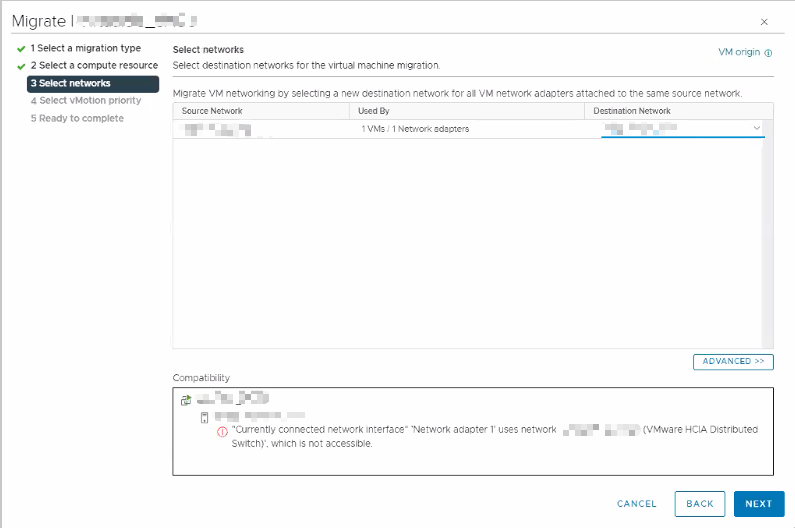
Figure 1: Dell migration tool showing network selection step
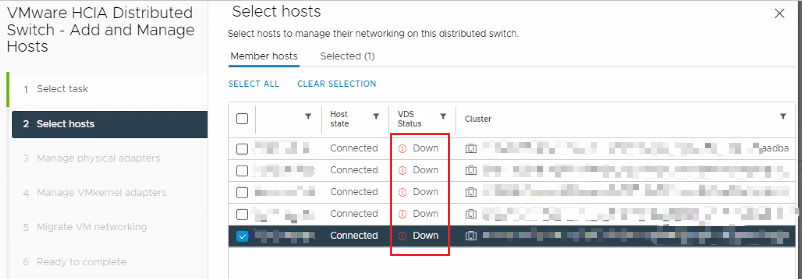
Figure 2: VMware HCIA Distributed Switch hosts management interface showing host statuses.
Cause
There could be several causes for this issue:
- Customer may not have followed the VMware procedure to uninstall NSX‑T.
- When deleting the NSX‑T manager, the N‑vDS continues to try and communicate with the NSX‑T manager. This causes the vDS status of the host to show a status of "down."
See Broadcom document VMware NSX 4.1 Installation Guide (External Link) for more information.
Resolution
If the customer has an NSX-T VM backup, restore NSX-T manager. Follow the VMware procedure to safely remove NSX-T solution afterwards.
If the customer has no backup, create a new vDS and migrate all VMkernel of the hosts and VM networking to a new vDS.
Produse afectate
VxRail, VxRail Appliance SeriesProprietăți articol
Article Number: 000225929
Article Type: Solution
Ultima modificare: 19 Aug 2026
Version: 3
Găsiți răspunsuri la întrebările dvs. de la alți utilizatori Dell
Servicii de asistență
Verificați dacă dispozitivul dvs. este acoperit de serviciile de asistență.