Data Domain:如何重新初始化和清理 SDPM |NVRAM
Summary: 本文介绍如何在 BIOS 中清理和重新配置软件定义的永久性内存 (SDPM) 设置,并在系统返回 DDOS 后验证初始化是否成功。
Acest articol se aplică pentru
Acest articol nu se aplică pentru
Acest articol nu este legat de un produs specific.
Acest articol nu acoperă toate versiunile de produs existente.
Instructions
适用对象:
- 更换 NVRAM (VOSS) 模块后的 DD9910、DD9410、DD6410 DD9910F 系统。
- 在 VOSS 模块上使用 SDPM 的 PowerProtect Data Domain 系统。
- iDRAC 事件
SDPM7108 - Critical Diagnostic Event (Sanitize Required) - 所有支持的软件 (DDOS) 版本
所需操作:
重新初始化 SDPM:
- 重新启动系统
- 访问系统 BIOS <F2>: 系统 BIOS > 内存设置 > 永久性内存
- 将清理所有 NVDIMM设置为
Enabled
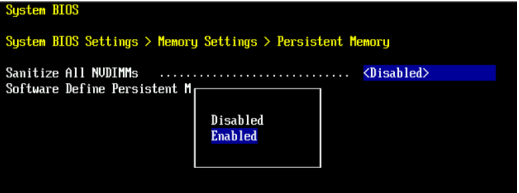
- 将 SDPM 内存大小设置为
32 GB
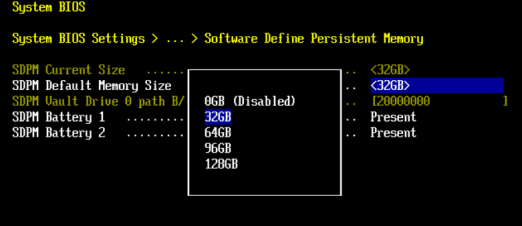
- 确认 SDPM 清理并 重新启动。
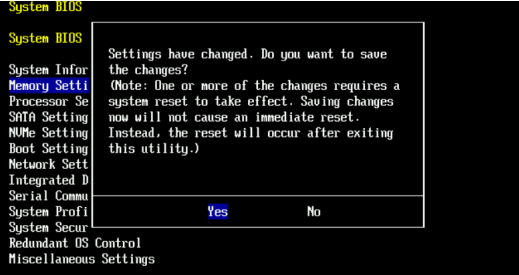
- 允许系统重新启动至 DDOS
- 通过检查 NVRAM 故障警报并确保已启用文件系统来验证 SDPM。
-
# alerts show current
-- There should be no outstanding alert relating to the NVRAM subsystem.
Caution: It may take one to two minutes for the system to clear the NVRAM failure alert.

# system show nvram
Note: The battery must be at least 80% charged for the file system to start.

# filesys status
-- The Filesystem should be Enabled & Running
-
验证核对表:
确认以下所有项:
-
- SDPM 清理已成功完成。
- 不存在与 NVRAM 相关的活动警报。
- NVRAM 状态报告正常。
- NVRAM 电池电量至少为 80%。
- 未启用文件系统。
- DD 系统正在运行 。
如果任何验证步骤失败,请收集支持包并联系 Dell Data Protection 支持。
Additional Information
这些操作可以在 iDRAC 中进行配置。
Configuration > BIOS Settings > Memory Settings > Persistent Memory- 设置。
Sanitize All NVDIMMs至ENABLED>- 确保“SDPM 默认内存大小”设置为 <
32GB> 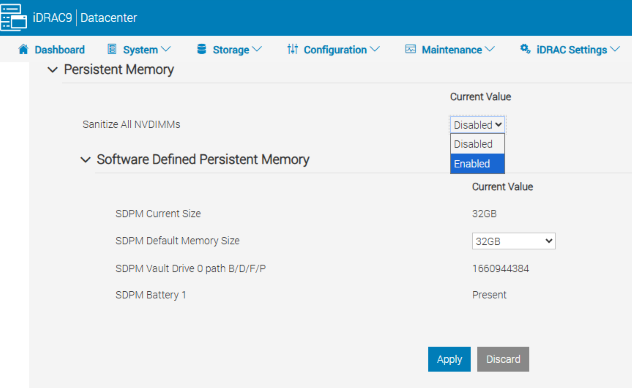
- 确保“SDPM 默认内存大小”设置为 <
- 选择 APPLY。然后单击“OK”。
- 选择“At Next Reboot”(页面底部)
- 设置。
- 继续重新启动 DD 单元(例如使用 DD-CLI:
#system reboot)
参考资料:
Data Domain:如何诊断和解决 SDPM |NVRAM 警报
Data Domain:NVRAM 硬件故障警报 |EVT-NVRAM-00201
iDRAC (v7.x) 错误和事件消息参考指南
Produse afectate
Data Domain, DD6410 Appliance, DD9410 Appliance, DD9910 Appliance, DD9910F ApplianceProduse
Data Domain Deduplication Storage SystemsProprietăți articol
Article Number: 000283787
Article Type: How To
Ultima modificare: 27 Jul 2026
Version: 2
Găsiți răspunsuri la întrebările dvs. de la alți utilizatori Dell
Servicii de asistență
Verificați dacă dispozitivul dvs. este acoperit de serviciile de asistență.