Dell Desktops Intermittently Reboot After Changing Watchdog Timer Setting in BIOS
Summary: This article provides information about Dell desktops restarting automatically after modifying the Watchdog Timer support in BIOS.
Acest articol se aplică pentru
Acest articol nu se aplică pentru
Acest articol nu este legat de un produs specific.
Acest articol nu acoperă toate versiunile de produs existente.
Symptoms
Affected Platforms:
- Dell Pro 24 All-in-One
- Dell Pro Max
- Dell Pro Micro
- Dell Pro Slim
- Dell Pro Tower
- OptiPlex
- Precision Desktops
Note: This article affects any desktop with the Watchdog Timer Support setting enabled in the BIOS.
Cause
The Watchdog Timer driver is not installed after enabling the Watchdog Timer Support setting in BIOS.
Resolution
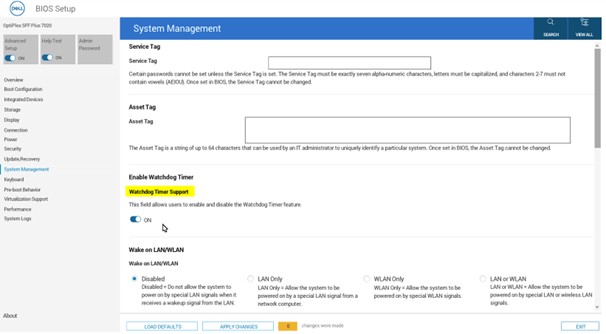
Users should download and install the Watchdog Timer driver from the Dell website (go to the Drivers & Download page of the computer that the Watchdog Timer Support setting is being enabled on), following Watchdog Timer Support activation in the BIOS, to prevent automatic restarts.
Produse afectate
Dell Pro All-in-One, Dell Pro Max Slim, Dell Pro Max Tower, Dell Pro Micro, Dell Pro Slim, Dell Pro Tower, OptiPlex, Fixed WorkstationsProprietăți articol
Article Number: 000361683
Article Type: Solution
Ultima modificare: 18 Dec 2025
Version: 2
Găsiți răspunsuri la întrebările dvs. de la alți utilizatori Dell
Servicii de asistență
Verificați dacă dispozitivul dvs. este acoperit de serviciile de asistență.