DPSearch 19.1: Search Fails if NBD Transport is Used for Avamar Virtual Machine Backups
Summary: Virtual Machine (VM) backups within Avamar are not searchable if "[avvcbimage]transport=nbd:nbdssl" parameter is set in the Avamar Administrator Console.
Acest articol se aplică pentru
Acest articol nu se aplică pentru
Acest articol nu este legat de un produs specific.
Acest articol nu acoperă toate versiunile de produs existente.
Symptoms
Virtual Machine backups within Avamar are not searchable if
[avvcbimage]transport=nbd:nbdssl parameter is set up in the Avamar Administrator Console. No errors are displayed in the Collection activities, there is a successful job with no backup items processed. Therefore any files present in these backups are not found in the Search page as no files are indexed.Cause
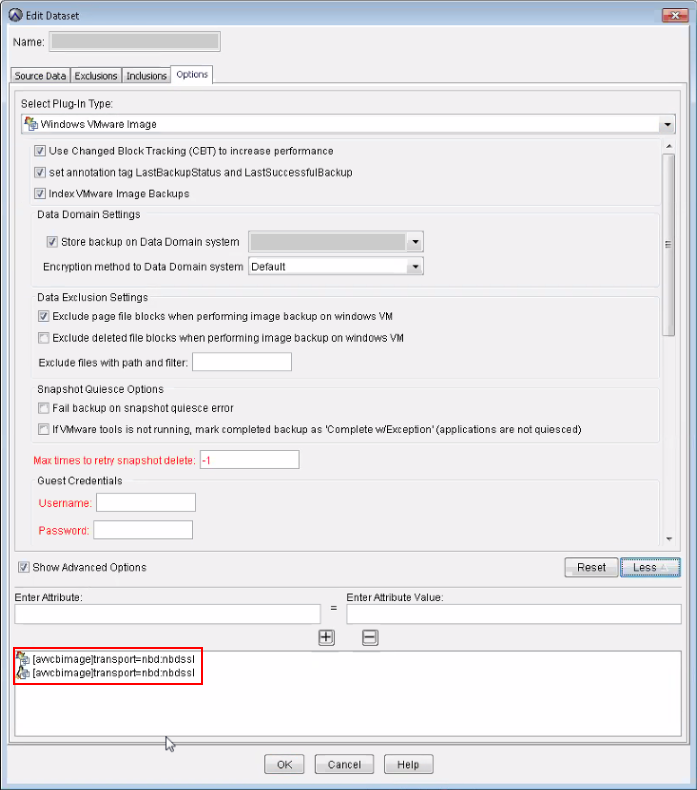
The [avvcbimage]transport=nbd:nbdssl transport protocol parameter is set up in the Client Properties in the Avamar Administrator Console, in the Manage Dataset for Windows VMware image, as shown below.
The individual files are not indexed when Avamar VM backups are taken with the NBD transport protocol.
For Virtual Machine backups made with Avamar, DPSearch requires the following file from the backup to get the metadata:
VMFiles/1/zMetadata.sql.
This is the internal SQL file that contains the VMDK metadata (file list). However, when doing it with NBD transport, this file does not exist, so the VM image backups cannot be processed.
Resolution
- Remove the
[avvcbimage]transport=nbd:nbdsslsetting in the Dataset Manager page from the Avamar Administration Console. - Create a new backup for the client.
- Trigger a collection for the Avamar Source in the Search Administrator. Wait for its completion.
- Run a new search from the Search Console.
Produse afectate
Data Protection SearchProduse
Data Protection SearchProprietăți articol
Article Number: 000044366
Article Type: Solution
Ultima modificare: 19 mar. 2026
Version: 4
Găsiți răspunsuri la întrebările dvs. de la alți utilizatori Dell
Servicii de asistență
Verificați dacă dispozitivul dvs. este acoperit de serviciile de asistență.