하드 드라이브 교체 후 BitLocker를 활성화할 수 없음
Summary: 하드 드라이브 교체 후 BitLocker가 활성화되지 않을 수 있습니다.
Acest articol se aplică pentru
Acest articol nu se aplică pentru
Acest articol nu este legat de un produs specific.
Acest articol nu acoperă toate versiunile de produs existente.
Symptoms
BitLocker가 활성화된 드라이브에서 하드 드라이브 장애가 발생한 경우 드라이브를 교체한 후 문제 없이 새 운영 체제에서 BitLocker를 활성화할 수 있습니다.
Cause
어떤 이유로든 컴퓨터가 TPM(신뢰할 수 있는 플랫폼 모듈)과 통신할 수 없는 오류가 발생하면 TPM 칩을 지운 다음 BitLocker를 구성해야 합니다.
Resolution
- TPM을 지우려면 BIOS로 부팅하고 TPM 컨트롤을 사용하여 해당 영역을 찾습니다. (TPM과 동일한 위치에 있지만 TPM에 다양한 옵션이 있을 수 있음)
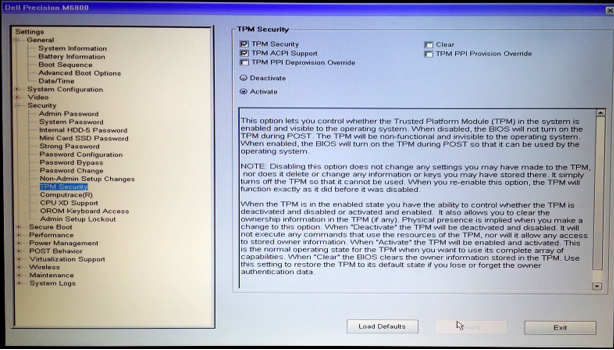
- TPM을 지우도록 선택한 다음 예를 클릭하여 TPM에서 모든 키를 제거합니다. (TPM이 활성 상태로 유지되어야 함)

- 이제 종료하고 BIOS로 재부팅한 후 TPM이 여전히 활성 상태로 표시되는지 확인합니다.
- 운영 체제를 종료했다가 재부팅한 후 일반적인 프로세스에 따라 BitLocker를 구성합니다.
Produse afectate
Desktops & All-in-Ones, Alienware, Dell All-in-One, Dell Pro All-in-One, Dell Pro Max Micro, Dell Pro Max Slim, Dell Pro Max Tower, Dell Pro Micro, Dell Pro Slim, Dell Pro Tower, Dell Slim, Dell Tower, Inspiron, Legacy Desktop Models, OptiPlex
, Vostro, XPS, G Series, G Series, Alienware, Dell Plus, Dell Pro, Dell Pro Max, Dell Pro Plus, Dell Pro Premium, Inspiron, Latitude, Dell Pro Rugged, Vostro, XPS, Legacy Laptop Models, Fixed Workstations, Mobile Workstations, Dell Pro Max Micro XE FCM2250, Dell Pro Max Slim XE FCS1250, Dell Pro Max Tower T2 XE FCT2250, Dell Pro Max 16 XE MC16250, Dell Pro Micro Plus XE QBM1250, Dell Pro Slim Plus XE5 QBS1250, Dell Pro Tower Plus XE5 QBT1250
...
Proprietăți articol
Article Number: 000137422
Article Type: Solution
Ultima modificare: 13 mai 2025
Version: 5
Găsiți răspunsuri la întrebările dvs. de la alți utilizatori Dell
Servicii de asistență
Verificați dacă dispozitivul dvs. este acoperit de serviciile de asistență.