PowerScale: AD Sudo Commands Stop Working After Upgrade
Summary: Upon upgrading PowerScale OneFS, sudo commands ask for a password three times and then fail to execute the command with "sudo: 3 incorrect password attempts"
Symptoms
The Active Directory user (in this case the AD username is "PowerScale") in a 'System Admin' role still allows SSH entry, command fails as follows:
cluster-1# ssh DOMAIN\\PowerScale@cluster-1
(DOMAIN\PowerScale@cluster-1) Password:
PowerScale OneFS 9.12.0.1
Could not chdir to home directory /ifs/home/DOMAIN/PowerScale: No such file or directory
cluster-1% sudo -s

We trust you have received the usual lecture from the local System
Administrator. It usually boils down to these three things:

    #1) Respect the privacy of others.
    #2) Think before you type.
    #3) With great power comes great responsibility.

For security reasons, the password you type will not be visible.

Password:
Sorry, try again.
Password:
Sorry, try again.
Password:
sudo: 3 incorrect password attempts
cluster0-1%
Errors in /var/log/auth.log are similar to:
2026-01-09T14:08:46.964341-05:00 <4.6> isi-9510-1(id1) sshd[9292]: Accepted keyboard-interactive/pam for DOMAIN\PowerScale from 10.20.48.1 port 31599 ssh2
2026-01-09T14:09:02.165862-05:00 <4.1> isi-9510-1(id1) sudo[9315]: DOMAIN\PowerScale : 3 incorrect password attempts ; TTY=pts/1 ; PWD=/ ; USER=root ; COMMAND=/bin/zs
Cause
An update to sudo caused upper case Active Directory usernames to fail. Note this is only for environments that need Active Directory users to get prompted for a password, passwordless sudo commands should be unaffected. Password protected prompts have entries in 'isi_visudo' like this:
DOMAIN\\powerscale ALL=(ALL) PASSWD: ALLResolution
PowerScale Engineering has identified this issue and is working on a permanent fix. Users can edit the username in Active Directory so that it is in all lowercase:
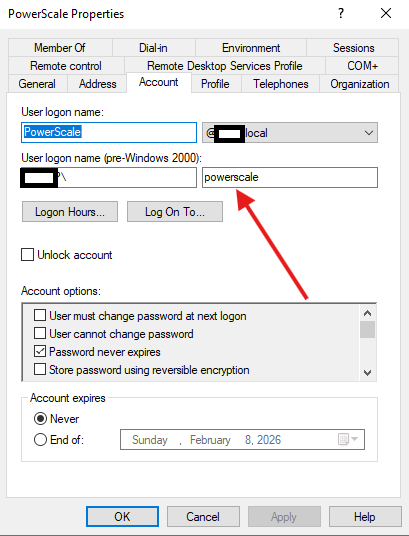
As with any Active Directory edits it may take time to propagate. If the user is still not working, initiate a log gather and contact PowerScale Support.