Avamar: VMware Image backups using DD VM Capacity instead of the expected performance mode
Сводка: Avamar: VMware Image backups using DD VM Capacity instead of the expected performance mode
Симптомы
Affected Workloads:
1. Instant Access Restored VM Performance: The performance of some virtual machines is slower than expected. While the instant access job completes quickly, the bootup times and guest disk performance of the restored VMs in vSphere are slow. This occurs while the virtual machine is still running on the Data Domain Instant Access temporary NFS mount.
2. VM Replication Performance: The replication performance is slower than expected for some virtual machines.3. File level restore Performance: The FLR performance is slower than expected for some virtual machines.
Note: Other VMware workflows, such as VM image restore and vSphere storage vMotion of the same backup, are faster, and performance is considered acceptable or normal.
Причина
Issue: The performance issue results from the VM backup being stored in Capacity segmentation mode rather than the expected Performance mode. This is due to Avamar Primary issue #327257.
Background: When performing VM image backups to Data Domain, there are two possible VM segmentation modes:
- Legacy Mode:
- Preferred Mode:
The segmentation mode is set by the "ddr_vm_segmentation_mode" setting.
The following screenshot explains the two possible values (0 or 8), and the configuration states if the Avamar server is a new installation compare with an upgraded server. 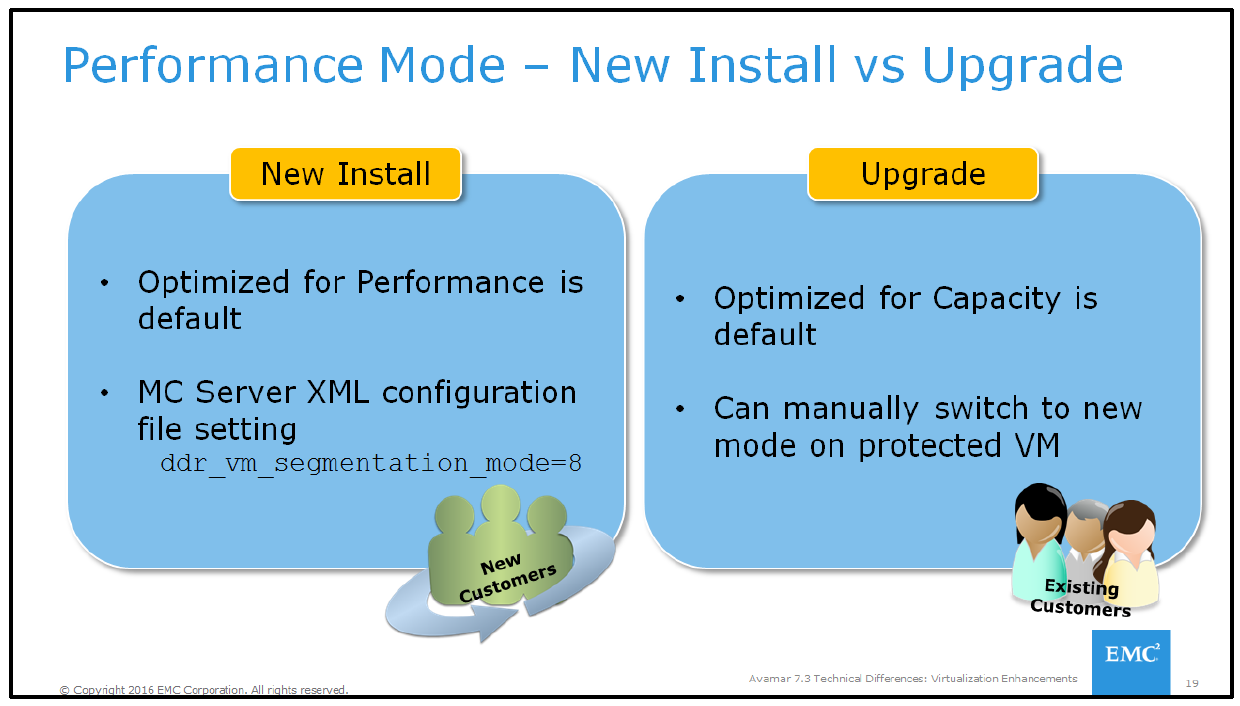
Note: If Avamar hardware was upgraded using "root to root migration" or Avamar was upgraded from version 7.3, the mcserver.xml would have the legacy setting. This behavior is expected for this legacy use case. Having both backup types for the same client increases Data Domain capacity space.
On a new Avamar/IDPA server, backups should use the default "performance" mode, also known as FSS.
On the Avamar server, the mode is set to 8/FSS in the MCS mcserver.xml settings file:
<entry key="ddr_vm_segmentation_mode" value="8" />
However, the backup log contains the following warning message indicating VSS mode (0) due to the CBT base backup being of VSS type:
Avtar Warning <41436>: The caller requested FSS for CBT backup but the base file was not generated using FSS (segment type is 0). Defaulting to value zero which means use variable segment size (VSS)
OR if this is the first CBT backup, the backup log would contain "0" instead of the expected "8":
<agent_directives>
<flag type="string" value="0" name="ddr-vm-segmentation-mode" />
</agent_directives>
MC REST API Issue: Avamar issue #327257 esc 39381: AUI - MOD VM backups and datasets created in AUI do not have the correct ddr-vm-segmentation-mode setting.
This problem has two triggers, both related to the use of Avamar Web UI/AUI or MC REST API:
- Cause #1: When a backup is started in AUI's Asset Management menu, the job does not contain the hidden flag:
ddr-vm-segmentation-mode=default. - Cause #2: When a new VMware dataset is created using AUI, the new dataset does not contain the hidden flag:
ddr-vm-segmentation-mode=default. - The absence of the hidden flag causes both backup types to revert to legacy Capacity mode, instead of the expected Performance mode.
Note: The Legacy Avamar Java user interface (Avamar MC GUI) is not affected by either issue.
Разрешение
Avamar 19.7+ will include an integrated fix for problem 327257. With this update, any manual backup job or dataset creation operation in AUI will automatically include a hidden flag. Due to potential capacity concerns, a fix for earlier Avamar releases is not planned. For more information, contact Dell Technologies.
1. To determine whether a backup is using Capacity or Performance mode, perform the following commands on the Avamar server:
Step 1. Get the CID (client id) for the VM client that you want to check using the Goav command: Example: Replace "win2016-demo-vm" with your VM's name in this command:
./goav vm show --fields id,name --name win2016-demo-vmExample output:
admin@ave199:~/>: ./goav vm show --fields id,name --name windows-simple-mbr
+------------------------------------------+--------------------+---------------+
|                    id                    |        name        |     tags      |
+------------------------------------------+--------------------+---------------+
| a5d2a240a7d01ea0de9813b3f8da9aa48d3e1075 | win2016-demo-vm   | No Tags Found |
+------------------------------------------+--------------------+---------------+
admin@ave199:~/>:
Step 2. Run ddrmaint list-backup using the client "id":
ddrmaint list-backups --client=<Id from step1> --days=2 | grep has
Example output:
admin@ave199:~/>: ddrmaint list-backups --client=a5d2a240a7d01ea0de9813b3f8da9aa48d3e1075 --days=2 | grep has
    a5d2a240a7d01ea0de9813b3f8da9aa48d3e1075 has 1 backup (1  Cap, 0 Perf) vsize 11.00 GB in 12 files on datadomain.example.com
Alternatively, if you want to check every client on Avamar, use the
--client=* flag.
ddrmaint list-backups --client=* --days=2 | grep has
Note: The output might be extensive on large systems with many clients:
Example output
admin@ave199:~/>: ddrmaint list-backups --client=* --days=2 | grep has
    02cc32a60dfa26131bf5905439e7aaa24e06c0ec has 1(*) backup (0  Cap, 0 Perf) vsize 0 bytes in 0 files on datadomain.example.com
    9242c902649e0c470b1a98bd46ad778e6a8e5528 has 21(*) backups (0  Cap, 0 Perf) vsize 0 bytes in 0 files on datadomain.example.com
    7f5011b4bd4e0c6a78b8cd1bc11d1241c015892d has 86(*) backups (6  Cap, 2 Perf) vsize 336.0 GB in 104 files on datadomain.example.com
    f8960360fbb970a86ee87a37c18a1470b955c698 has 10(*) backups (0  Cap, 2 Perf) vsize 84.00 GB in 24 files on datadomain.example.com
    f4efd8722938a87b5ec661059f6c01510c633207 has 13(*) backups (0  Cap, 2 Perf) vsize 84.00 GB in 30 files on datadomain.example.com
    63f17bea8e24dafd20392f94c0978af01c53651e has 11(*) backups (1  Cap, 4 Perf) vsize 100.0 GB in 45 files on datadomain.example.com
    9bce10133632e34b591245d81793f0b86d1bab35 has 1(*) backup (0  Cap, 0 Perf) vsize 0 bytes in 0 files on datadomain.example.com
    a8a9c0b20ebf62eaf9304d4b039733ddc8d1e3cd has 1 backup (1  Cap, 0 Perf) vsize 1.034 MB in 9 files on datadomain.example.com
2. Changing the segmentation mode is a two-step process.
WARNING: Having both backup types for the same client may affect Data Domain capacity space, potentially doubling the capacity usage per client.
Step 1: Reset CBT at the Avamar and VMware layer to force a CBT L0 backup using the Goav support tool:
./goav vm cbt reset --name<vm client name>
Example output
Run the following goav command to reset cbt for the vm:
admin@ave199~/>:
===========================================================
GoAv    :        1.69
Date    :        27 Jan 2024 15:14 EST
===========================================================
NOTE: This is not an official tool
===========================================================
✔ Yes
Processing : vcsa-cloud.burlington.lab [====================================================================] 100%
        Vm        |          Vcenter          |   Reset   | Error
------------------+---------------------------+-----------+--------
  win2016-demo-vm | vcsa-cloud.example.lab | Completed |
Note: The VM cannot have any snapshots; otherwise, it is skipped.
Step 2: Start a new backup of the VM win2016-demo-vm to initiate a new CBT L0 chain using the new segmentation mode:
- In Legacy java user interface, start a new manual backup from the "Backup Restore and Manage" menu.
- In AUI, start a policy backup using the integrated VMware image dataset or modify a non-integrated dataset by adding the following advanced flag for Windows and Linux VMware image plugins:
ddr-vm-segmentation-mode=defaultOR
ddr-vm-segmentation-mode=8