NetWorker:REST APIリクエストが失敗し、次のエラー メッセージが表示されます。HTTPステータス404 - Not Found「リクエストされたリソースは使用できません」
Сводка: NetWorker REST API(アプリケーション プログラミング インターフェイス)クエリーが失敗し、次のエラー メッセージが表示されます。HTTP status 404 - Not Found "要求されたリソースは使用できません。オリジン サーバーは、ターゲット リソースの現在の表現を見つけられなかったか、その存在を開示する意思がありません。
Данная статья применяется к
Данная статья не применяется к
Эта статья не привязана к какому-либо конкретному продукту.
В этой статье указаны не все версии продуктов.
Симптомы
NetWorker REST APIリクエストが失敗し、「HTTP status 404 - Not Found "The requested resource is not available"」というエラー メッセージが表示されます。
[root@NETWORKER_SERVER]:~# curl -ik GET -u **userid**:'***Password***' -H "Content-Type: application/json" 'https://NETWORKER_SERVER:9090/nwrestapi/v3/global/clients'
curl: (6) Could not resolve host: GET; Name or service not known
HTTP/1.1 404
Content-Type: text/html;charset=utf-8
Content-Language: en
Content-Length: 790
Date: Tue, 04 Jul 2023 12:11:41 GMT
Server: NSR SERVICES for Authentication


<!doctype html><html lang="en"><head><title>HTTP Status 404 – Not Found</title><style type="text/css">body {font-family:Tahoma,Arial,sans-serif;} h1, h2, h3, b {color:white;background-color:#525D76;} h1 {font-size:22px;} h2 {font-size:16px;} h3 {font-size:14px;} p {font-size:12px;} a {color:black;} .line {height:1px;background-color:#525D76;border:none;}</style></head><body><h1>HTTP Status 404 – Not Found</h1><hr class="line" /><p><b>Type</b> Status Report</p><p><b>Message</b> The requested resource [/nwrestapi/v3/global/clients] is not available</p><p><b>Description</b> The origin server did not find a current representation for the target resource or is not willing to disclose that one exists.</p><hr class="line" /><h3>Apache Tomcat/9.0.52</h
NetWorkerサーバーのインストールに、 nwrestapi ディレクトリーを削除します。
Linux:
Windows:
/nsr/authc/webapps/nwrestapi/
Windows:
C:\Program Files\EMC NetWorker\nsr\authc-server\tomcat\webapps\nwrestapi
restapi.log 存在しないか、更新されていません:
Linux:
Windows:
/nsr/logs/restapi/restapi.log
Windows:
C:\Program Files\EMC NetWorker\nsr\logs\restapi\restapi.log
Причина
『オペレーティングシステム』ディスクはオプションなので、同梱されていないコンピューターもあります。 nwrestapi パスが存在しません。REST APIクエリーでは、エンドポイントを見つけることも、他のNetWorkerデータベースからのデータを表示する方法を関連づけることもできません。
Разрешение
nwrestapi NetWorkerの authc Java Runtime Environment (JRE) を使用するサービス。構成時に発生する可能性のあるJava関連の問題を回避するために、NetWorker Runtime Environment (NRE)を使用することをお勧めします。 authc。最新のNREパッケージは、 DellサポートのNetWorkerのドライバーおよびダウンロード ページからダウンロードできます。
Linux:
- NetWorkerサーバーにログインし、rootに切り替えます。
sudo su -
- NREがインストールされているかどうか、およびNetWorkerが使用するように構成されているJavaインスタンスを確認します。
rpm -qa | grep nre
cat /nsr/authc/conf/installrc

[root@networker-mc]:~# rpm -qa | grep nre
nre-8.0.15-1.x86_64
[root@networker-mc]:~#
[root@networker-mc]:~# cat /nsr/authc/conf/installrc
JAVA_HOME=/opt/nre/java/latest
メモ: Javaの複数のインスタンスがインストールされています。たとえば、NREとOracle JREの両方をサーバーにインストールできます。上記の手順では、NetWorkerが使用しているJavaインストールを確認します。
- 次のスクリプトを実行してNetWorkerを再構成します。
authcサーバー。
/opt/nsr/authc-server/scripts/authc_configure.sh

[root@networker-mc]:~# /opt/nsr/authc-server/scripts/authc_configure.sh

Specify the directory where the Java Standard Edition Runtime Environment (JRE) software is installed [/opt/nre/java/latest]:

The installation process will install an Apache Tomcat instance. For optimum security, EMC NetWorker Authentication Service will use a non-root user (nsrtomcat) to start the Apache Tomcat instance.
If your system has special user security requirements, ensure that proper operational permissions are granted to this non-root user (nsrtomcat).
Please refer to NetWorker Installation Guide.

WARNING: Port 9090 is already in use.

Do you wish to specify a different port number [y]? n

The Apache Tomcat will use "networker-mc.emclab.local" as the host name.
The Apache Tomcat will use "9090" as the port number.

The NetWorker Authentication Service requires a keystore file to configure encryption and to provide SSL support.

EMC recommends that you specify a keystore password that has a minimum of six characters.

Do you want to use the existing keystore /nsr/authc/conf/authc.keystore [y]?

Specify password for the existing keystore:
The install will use the existing certificate "emcauthctomcat" for Apache Tomcat.
The install will use the existing certificate "emcauthcsaml" for Authentication Service.

Creating the installation log in /opt/nsr/authc-server/logs/install.log.

Performing initialization. Please wait...

The installation completed successfully.
メモ: 再ロードするには、NetWorkerサービスを再起動する必要があります
authc。これは、次のように実行できます。 systemctl コマンド:
systemctl stop networker
and
systemctl start networker
- 次のフォルダーが作成されたことを確認します。
/nsr/authc/webapps/nwrestapi

[root@networker-mc]:~# ls -l /nsr/authc/webapps/nwrestapi/
total 0
drwx------. 2 nsrtomcat nsrtomcat  44 Jul  6 12:22 META-INF
drwx------. 3 nsrtomcat nsrtomcat  21 Jul  6 12:22 v1
drwx------. 3 nsrtomcat nsrtomcat  21 Jul  6 12:22 v2
drwx------. 3 nsrtomcat nsrtomcat  21 Jul  6 12:22 v3
drwx------. 6 nsrtomcat nsrtomcat 107 Jul  6 12:22 WEB-INF
- 「Fusion」
nwrestapiディレクトリーが作成されたら、REST APIクエリーを実行します。
Windows:
- NREがインストールされているかどうか、およびNetWorkerが使用するように構成されているJavaインスタンスを確認します。
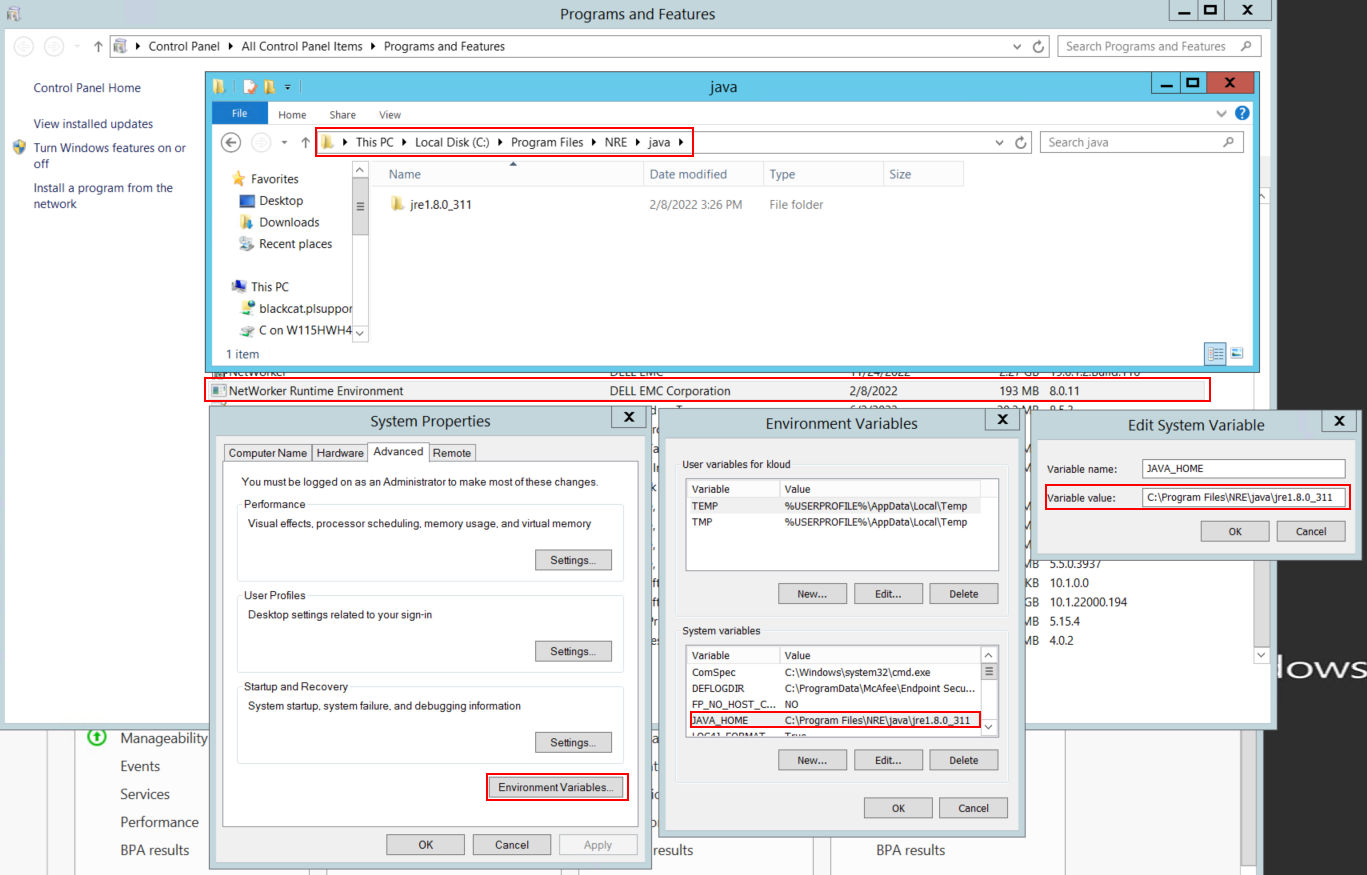
図1: NetWorkerが使用しているJavaインスタンスを確認します。変数は次のように表示されます。 JAVA_HOME または NSR_JAVA_HOME。
メモ: Javaの複数のインスタンスがインストールされています。たとえば、NREとOracle JREの両方をサーバーにインストールできます。上記の手順では、NetWorkerが使用しているJavaインストールを確認します。
- NetWorkerパッケージをアンインストールします。これによってNetWorkerデータベースや構成リソースが削除されることはありません。
- 既存のインストール パスを使用してNetWorkerを再インストールします。NetWorkerを再インストールすると、NetWorkerの認証サービスが再構成されます。
- 次のパスが存在することを確認します。
C:\Program Files\EMC NetWorker\nsr\authc-server\tomcat\webapps\nwrestapi
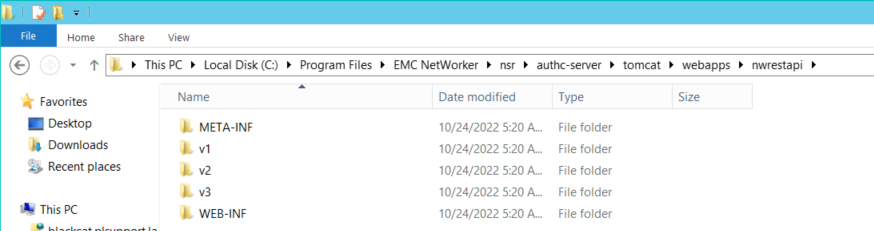
図2:Dellの nwrestapi パスが存在します。
- 「Fusion」
nwrestapiディレクトリーが作成されたら、REST APIクエリーを実行します。
Дополнительная информация
Затронутые продукты
NetWorkerПродукты
NetWorker Family, NetWorker SeriesСвойства статьи
Номер статьи: 000215602
Тип статьи: Solution
Последнее изменение: 29 Jun 2026
Версия: 9
Получите ответы на свои вопросы от других пользователей Dell
Услуги технической поддержки
Проверьте, распространяются ли на ваше устройство услуги технической поддержки.