Dell Encryption Agent Reporting a Different Hostname in Dell Data Security Server Console
Сводка: This article provides steps to correct an issue with inventory reporting as the wrong hostname with Windows clients.
Данная статья применяется к
Данная статья не применяется к
Эта статья не привязана к какому-либо конкретному продукту.
В этой статье указаны не все версии продуктов.
Симптомы
Affected Products:
- Dell Encryption
- Dell Endpoint Security Suite Enterprise
Affected Operating Systems:
- Windows
Причина
Dell Data Security products can report the wrong hostname during inventory uploads to the server if there is a different hostname in the hosts file before the current hostname.
Разрешение
- Edit the hosts file located at C:\Windows\System32\drivers\etc.
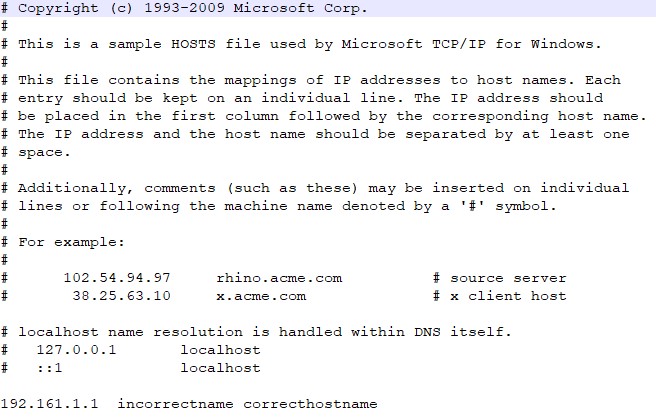
- Change the order to reflect the current hostname to be the first entry in the hosts file.

Note: You can still have other aliases in the hosts file that have to be after the current hostname.
- When finished, click File > Save.
- The hostname will change within the server upon the next inventory upload.
To contact support, reference Dell Data Security International Support Phone Numbers.
Go to TechDirect to generate a technical support request online.
For additional insights and resources, join the Dell Security Community Forum.
Затронутые продукты
Dell Encryption, Dell Endpoint Security Suite EnterpriseСвойства статьи
Номер статьи: 000187320
Тип статьи: Solution
Последнее изменение: 20 May 2024
Версия: 4
Получите ответы на свои вопросы от других пользователей Dell
Услуги технической поддержки
Проверьте, распространяются ли на ваше устройство услуги технической поддержки.