NetWorker: How to uninstall vProxy FLR agent from a virtual machine
Zhrnutie: This article provides the proper procedure for uninstalling the NetWorker VMware Protection (NVP) vProxy FLR agent from Linux and Windows Virtual Machines.
Tento článok sa vzťahuje na
Tento článok sa nevzťahuje na
Tento článok nie je viazaný na žiadny konkrétny produkt.
V tomto článku nie sú uvedené všetky verzie produktov.
Pokyny
The following are situations where you may be asked to uninstall vProxy FLR agent from a Virtual Machine (VM):
1. If the agent in the new build carries the same version as the old, but must be reinstalled.
2. If the vProxy is being downgraded.
Steps:
1. If the agent in the new build carries the same version as the old, but must be reinstalled.
2. If the vProxy is being downgraded.
Steps:
Create a VMware Snapshot of the Virtual Machine. If any issue arises, the VM can be reverted to the Snapshot.
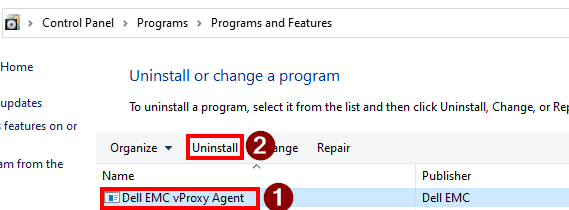
For Windows VM:
Go to 'Add or remove programs' (
Then, remove the '
appwiz.cpl)
Then, remove the '
Dell EMC vProxy FLR Agent'.
For Linux VMs:
Run the agent's pre-remove script first:
/opt/emc/vproxyra/bin/preremove.sh
NOTE: this command shuts down the agent properly to avoid conflicts in the socket file (or a stale running process).
Ensure that not agent processes are running:
ps -eaf | grep vflr
Remove the .sock file if present.
rm /var/run/vflragentd.sock
Get the exact name of the installed FLR agent:
CentOS, Red Hat, SUSE:
rpm -qa | grep -i vProxy-FLRAgent
Debian, Ubuntu:
dpkg -l | grep -i vProxy-FLRagent
Uninstall the FLR agent:
CentOS, Red Hat, SUSE:
rpm -e vProxy-FLRAgent-package-name
Debian, Ubuntu:
dpkg -r vProxy-FLRAgent-package-nameĎalšie informácie
The following articles provide alternate processes for installing the FLR agent on Linux and Windows virtual machines:
Dotknuté produkty
NetWorkerProdukty
NetWorkerVlastnosti článku
Číslo článku: 000010300
Typ článku: How To
Dátum poslednej úpravy: 02 jan 2026
Verzia: 6
Nájdite odpovede na svoje otázky od ostatných používateľov spoločnosti Dell
Služby podpory
Skontrolujte, či sa na vaše zariadenie vzťahujú služby podpory.