EqualLogic: How to change a hard disk on a 48 Disk EQL PS65x0 Array
Zhrnutie: This guide explains how to access the disk drawer in a Dell EqualLogic PS65x0 array.
Tento článok sa vzťahuje na
Tento článok sa nevzťahuje na
Tento článok nie je viazaný na žiadny konkrétny produkt.
V tomto článku nie sú uvedené všetky verzie produktov.
Pokyny
The PS6500 is a 48 disk drive platform. The disks are inserted from the top once the chassis has been carefully pulled out of the rack.
The top cover should not be removed unless when servicing the array. If the cover is left off for an extended length of time, then it disturbs the air flow consistency within the chassis.

The bezel can be removed by inserting the bezel key to unlock it. Then push the bezel release latch to release the bezel from the chassis. This then reveals the front panel.
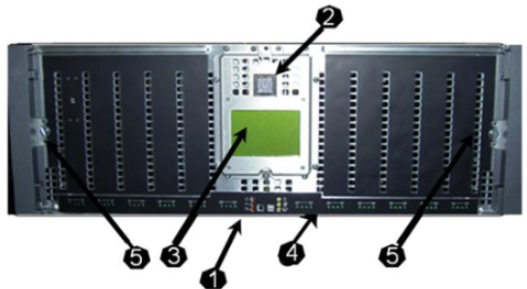
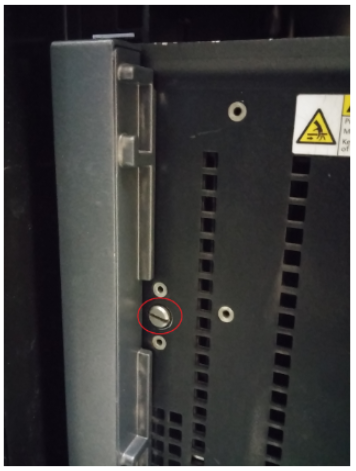 Once the screws on each side have been removed, pull the front panel to be able to access the disks.
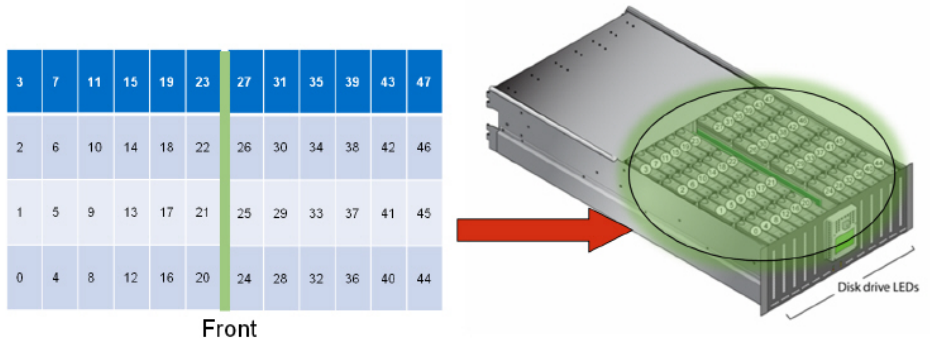 Disk drive numbering Disks are numbered from 0-47. The disk drives are separated into two 24 sections with the channel card between the disk drive sections.
The left section has disk drives 0-23 with disk 0 being in the front row lower left.
The right section has disk drives 24-47. Disk 47 is located in the far upper right.
The top cover should not be removed unless when servicing the array. If the cover is left off for an extended length of time, then it disturbs the air flow consistency within the chassis.
The bezel can be removed by inserting the bezel key to unlock it. Then push the bezel release latch to release the bezel from the chassis. This then reveals the front panel.
- Array Hardware Status LEDs
- Six LEDs
- Located on each side of the Power switch
- Power button
- Blue when on
- LCD Panel
- Identifies hardware failures
- Disk Drive LEDs
- Green indicates that the disk is present and powered up
- Flashing indicates activity
- Cam Screws
- Secures the front panel
The left section has disk drives 0-23 with disk 0 being in the front row lower left.
The right section has disk drives 24-47. Disk 47 is located in the far upper right.
Dotknuté produkty
Equallogic PS6500, Equallogic PS6500e, EqualLogic PS6500ES, EqualLogic PS6500X, Equallogic PS6510, Equallogic PS6510e, EqualLogic PS6510XVlastnosti článku
Číslo článku: 000105242
Typ článku: How To
Dátum poslednej úpravy: 09 júl 2025
Verzia: 4
Nájdite odpovede na svoje otázky od ostatných používateľov spoločnosti Dell
Služby podpory
Skontrolujte, či sa na vaše zariadenie vzťahujú služby podpory.