PowerFlex 3.5: How to manually upgrade PowerFlex Manager
Zhrnutie: Offline upgrade of PowerFlex Manager How to manually upgrade PowerFlex Manager without Secure Remote Services.
Tento článok sa vzťahuje na
Tento článok sa nevzťahuje na
Tento článok nie je viazaný na žiadny konkrétny produkt.
V tomto článku nie sú uvedené všetky verzie produktov.
Pokyny
This article explains offline upgrade of PowerFlex Manager versions:
- 3.5.x >> 3.6.x
- 3.6.x >> 3.7.x **
- 3.7.x >> 3.8.x
- 3.8.x >> 3.8.x
** - See KB PowerFlex Manager: How to expand the /var filesystem by 100 GB on an existing 3.6.1 appliance prior to upgrade to 3.7.x to expand file system prior to 3.7.x upgrade.
Take note of the current version by going to? -> About in upper right
Example output: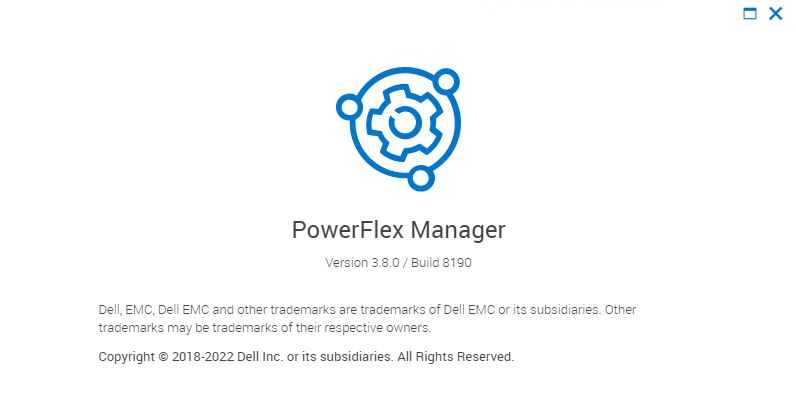
Procedure:
1) Perform a backup of the appliance. See PowerFlex 3.X: How to backup PowerFlex Manager appliance
2) Take a snapshot of PFxM appliance.
3) To download the PFxM .zip file needed for upgrade go here: Dell Support Downloads
Go to the software by selecting PowerFlex Manager version:
4) Once there, download the appropriate PFxM .zip file.
5) Copy the Dell-PFxM-3.x.x.xxxx.zip file to an NFS share on your jump server or WinSCP to PowerFlex Manager in directory /home/delladmin.
6) If using WinSCP to PFxM directory /home/delladmin
>
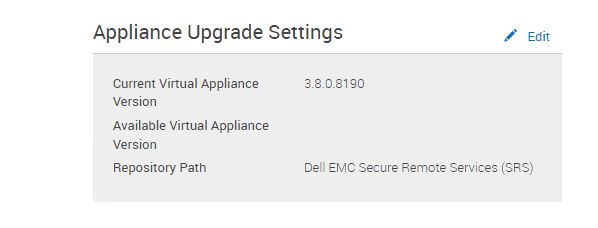
7) log in to the PFxM Web UI and go to Settings -> Virtual Appliance Management and click Edit next to Appliance Upgrade Settings.
3) To download the PFxM .zip file needed for upgrade go here: Dell Support Downloads
Go to the software by selecting PowerFlex Manager version:
4) Once there, download the appropriate PFxM .zip file.
5) Copy the Dell-PFxM-3.x.x.xxxx.zip file to an NFS share on your jump server or WinSCP to PowerFlex Manager in directory /home/delladmin.
6) If using WinSCP to PFxM directory /home/delladmin
>
  sudo su -
    > mkdir -p  /var/lib/razor/repo-store/upgrade
    > cp /home/delladmin/Dell-PFxM-3.8.2.8203.zip  /var/lib/razor/repo-store/upgrade
    > rm /home/delladmin/Dell-PFxM-3.8.2.8203.zip
7) log in to the PFxM Web UI and go to Settings -> Virtual Appliance Management and click Edit next to Appliance Upgrade Settings.
8) Select the second radio button "Update Appliance from local repository path"
9) Enter the path to the file: \\<IP>\d$\PFxM\Dell-PFxM-3.8.2.8203.zip where <IP> is the IP address of jump server and d:\PFxM is the NFS share where the .zip file resides on the jump server OR use http://localhost:8080/svc/repo/upgrade/Dell-PFxM-3.8.2.8203.zip if .zip file was transferred using WinSCP to PFxM as per step 6.
10) Enter jump server creds or PFxM creds depending on where the .zip file is stored.
11) Click save

12) In the Appliance Upgrade Settings, User will now see the new version that you want to upgrade to it listed as the Available Virtual Appliance Version.

13) When ready to perform the upgrade, click the Update Virtual Appliance button in the Virtual Appliance Management settings page.

Note: Update can take up to 30 minutes and will reboot the PFxM appliance during the process.
14) Once update completes, the login page comes back up and you can log in and verify that the version has been updated? -> About in upper right
Note: This upgrade does not affect any services that have been added to PFxM it only affects access to the PFxM Web UI.
9) Enter the path to the file: \\<IP>\d$\PFxM\Dell-PFxM-3.8.2.8203.zip where <IP> is the IP address of jump server and d:\PFxM is the NFS share where the .zip file resides on the jump server OR use http://localhost:8080/svc/repo/upgrade/Dell-PFxM-3.8.2.8203.zip if .zip file was transferred using WinSCP to PFxM as per step 6.
10) Enter jump server creds or PFxM creds depending on where the .zip file is stored.
11) Click save
12) In the Appliance Upgrade Settings, User will now see the new version that you want to upgrade to it listed as the Available Virtual Appliance Version.
13) When ready to perform the upgrade, click the Update Virtual Appliance button in the Virtual Appliance Management settings page.
Note: Update can take up to 30 minutes and will reboot the PFxM appliance during the process.
14) Once update completes, the login page comes back up and you can log in and verify that the version has been updated? -> About in upper right
Note: This upgrade does not affect any services that have been added to PFxM it only affects access to the PFxM Web UI.
Dotknuté produkty
PowerFlex rack, PowerFlex Appliance, PowerFlex appliance Intelligent Catalog SoftwareProdukty
VxFlex Ready Nodes, PowerFlex custom node, PowerFlex appliance R650, PowerFlex appliance R6525, PowerFlex appliance R660, PowerFlex appliance R6625, Powerflex appliance R750, PowerFlex appliance R760, PowerFlex appliance R7625, PowerFlex custom node
, PowerFlex custom node R650, PowerFlex custom node R6525, PowerFlex custom node R660, PowerFlex custom node R6625, PowerFlex custom node R750, PowerFlex custom node R760, PowerFlex custom node R7625, PowerFlex rack connectivity, PowerFlex rack HW, PowerFlex rack RCM Software, PowerFlex Software, VxFlex Ready Node, VxFlex Ready Node R640, VxFlex Ready Node R740xd, PowerFlex appliance R640, PowerFlex appliance R740XD, PowerFlex appliance R7525, PowerFlex appliance R840, VxFlex Ready Node R840
...
Vlastnosti článku
Číslo článku: 000183041
Typ článku: How To
Dátum poslednej úpravy: 25 nov 2025
Verzia: 9
Nájdite odpovede na svoje otázky od ostatných používateľov spoločnosti Dell
Služby podpory
Skontrolujte, či sa na vaše zariadenie vzťahujú služby podpory.