Cloudlink sftp backup store error “auth fail” fixing
Zhrnutie: Resolving error “Auth fail” when testing access to an sftp backup store.
Tento článok sa vzťahuje na
Tento článok sa nevzťahuje na
Tento článok nie je viazaný na žiadny konkrétny produkt.
V tomto článku nie sú uvedené všetky verzie produktov.
Symptómy
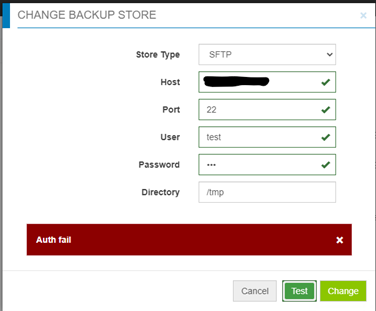
Auth fail” when testing access to an sftp backup store:
Príčina
- Password is incorrect.
- Password authentication on the target server is disabled (only Challenge response is enabled) - Cloudlink is using password authentication for sftp backup store, but not challenge response.
Riešenie
If it is not the incorrect password case, check the file /etc/ssh/sshd_config on the target server, find “PasswordAuthentication” setting.
If PasswordAuthentication is set to “no”, change to “yes”, then restart the ssh service.
For example: “systemctl restart sshd.service”.
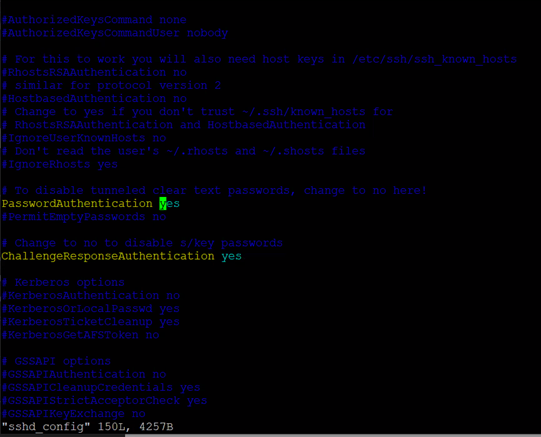
If PasswordAuthentication is set to “no”, change to “yes”, then restart the ssh service.
For example: “systemctl restart sshd.service”.
Dotknuté produkty
CloudLink SecureVM, CloudLinkVlastnosti článku
Číslo článku: 000210190
Typ článku: Solution
Dátum poslednej úpravy: 16 máj 2026
Verzia: 6
Nájdite odpovede na svoje otázky od ostatných používateľov spoločnosti Dell
Služby podpory
Skontrolujte, či sa na vaše zariadenie vzťahujú služby podpory.