Cloudlink sftp backup store error "auth fail" fixing
Zhrnutie: Fout Auth fail oplossen bij het testen van toegang tot een SFTP-back-upstore.
Tento článok sa vzťahuje na
Tento článok sa nevzťahuje na
Tento článok nie je viazaný na žiadny konkrétny produkt.
V tomto článku nie sú uvedené všetky verzie produktov.
Symptómy
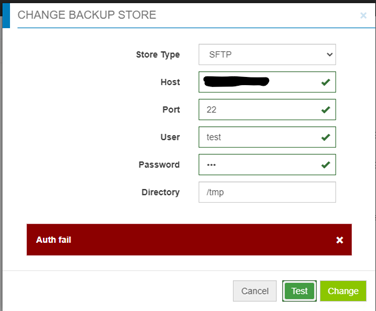
Auth fail" bij het testen van toegang tot een SFTP-back-upstore:
Príčina
- Wachtwoord is onjuist.
- Wachtwoordverificatie op de doelserver is uitgeschakeld (alleen Challenge response is ingeschakeld) - Cloudlink gebruikt wachtwoordauthenticatie voor sftp backup store, maar niet voor Challenge Response.
Riešenie
Als het niet het onjuiste wachtwoord is, controleer dan het bestand /etc/ssh/sshd_config op de doelserver en zoek de instelling "PasswordAuthentication".
Als PasswordAuthentication is ingesteld op "no", wijzigt u dit in "yes" en start u de ssh-service opnieuw.
Bijvoorbeeld: "systemctl restart sshd.service".
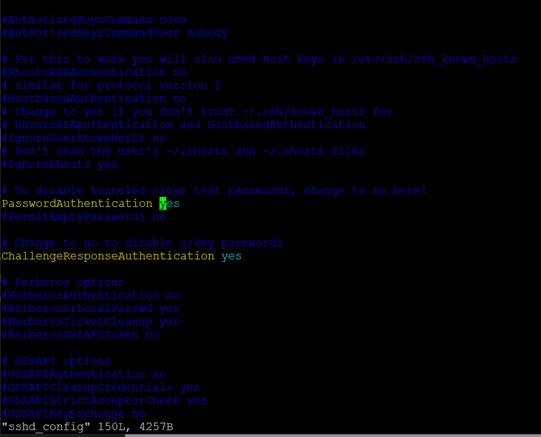
Als PasswordAuthentication is ingesteld op "no", wijzigt u dit in "yes" en start u de ssh-service opnieuw.
Bijvoorbeeld: "systemctl restart sshd.service".
Dotknuté produkty
CloudLink SecureVM, CloudLinkVlastnosti článku
Číslo článku: 000210190
Typ článku: Solution
Dátum poslednej úpravy: 16 máj 2026
Verzia: 6
Nájdite odpovede na svoje otázky od ostatných používateľov spoločnosti Dell
Služby podpory
Skontrolujte, či sa na vaše zariadenie vzťahujú služby podpory.