Data Domain: Reboot loop at "NVRAM driver load and initialization"
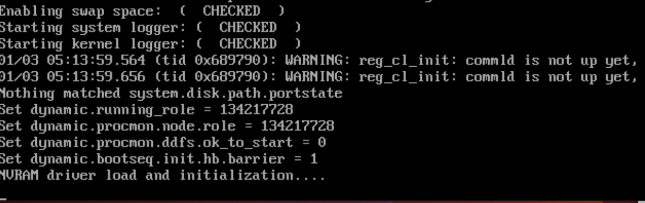
Sammanfattning: PowerProtect Data Domain systems have reported being stuck in a reboot loop. The NVRAM driver fails to load or initialize successfully resulting in a system reboot.
Den här artikeln gäller för
Den här artikeln gäller inte för
Den här artikeln är inte kopplad till någon specifik produkt.
Alla produktversioner identifieras inte i den här artikeln.
Instruktioner
Affected Systems:
- PowerProtect DD6400 | DD6900 | DD9400 | DD9900
- All DDOS versions
Symptoms:
- Unable to boot into DDOS
- Serial output (Virtual Console - iDRAC) shows Boot process restarts after "NVRAM driver load and initialization"
Cause:
- The DIMM located on the NVRAM card is not seated or installed correctly.
- OR
- The NVRAM card is not installed correctly or is faulty.
Required Action:
With the system powered off:
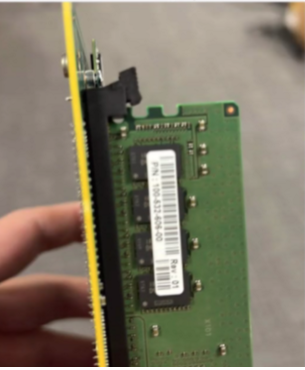
- Check and reseat the DIMM on the NVRAM card.
- Here is a image showing the NVRAM DIMM not clipped in correctly
- Ensure the NVRAM card or PCI riser are seated securely.
- Power up and retry booting the system.
- If symptoms persist, replace the NVRAM (Part Number: DGK85).
Berörda produkter
Data Domain, DD6400 ApplianceProdukter
Data Domain, Data Domain Deduplication Storage Systems, DD6900 Appliance, DD9400 Appliance, DD9900 ApplianceArtikelegenskaper
Artikelnummer: 000208323
Artikeltyp: How To
Senast ändrad: 16 maj 2026
Version: 6
Få svar på dina frågor från andra Dell-användare
Supporttjänster
Kontrollera om din enhet omfattas av supporttjänster.