Microsoft Excel Pivot Table Issues after Installing Dell Encryption
Summary: Issues related to Microsoft Excel pivot tables when Dell Encryption is in use.
Symptoms
Affected Products:
- Dell Encryption
Affected Operating Systems:
- Windows
Cause
Users may encounter an error in Microsoft Excel when attempting to refresh data, after saving and reopening a Microsoft Excel file with pivot tables in use.
Examples of errors:
We could not refresh the connection: XML parsing failed
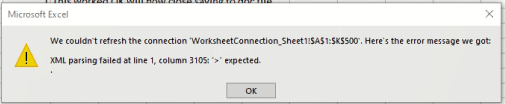
Figure 1: (English Only) Microsoft Excel Error
Or
An issue with the Data Model is preventing Microsoft Excel from opening this workbook. Try restarting Microsoft Excel.
Resolution
During the use of pivot tables, temporary files are rapidly created and updated in the %Userprofile%\AppData\Local\Temp directory. During this process, our metadata file must be synchronized and updated simultaneously to reflect the proper encryption status of every file in the folder. During these rapid file create, delete, and update operations, we have observed through a DebugView capture that file corruption appears to be occurring during the updating of the metadata in the temp folder that Dell Encryption relies on to provide proper encryption status for each file.
The current workaround excludes this directory for affected users with the following policy under Common Encryption.
-^3%ENV:Userprofile%\appdata\local\Temp
To contact support, reference Dell Data Security International Support Phone Numbers.
Go to TechDirect to generate a technical support request online.
For additional insights and resources, join the Dell Security Community Forum.