Avamar: VM image backups fail "No Proxy" because VM lacks a hard disk
摘要: Avamar VM image backups fail with "No Proxy" error because the VM lacks any hard disk.
本文适用于
本文不适用于
本文并非针对某种特定的产品。
本文并非包含所有产品版本。
症状
The Activity Monitor in the Avamar UI shows 'No Proxy'.
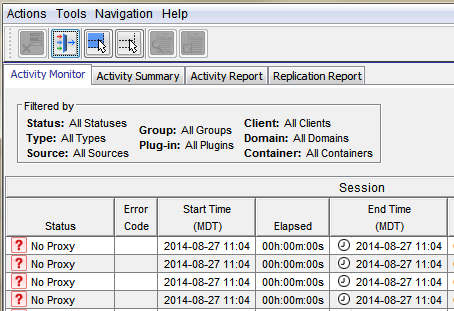
On-demand VMware Image backup fails with the following:
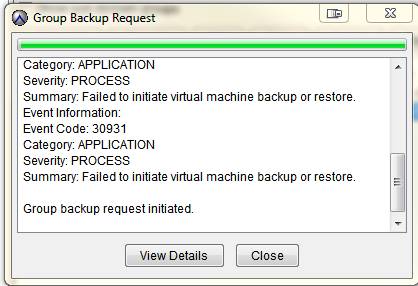
Category: APPLICATION
Severity: PROCESS
Summary: Failed to initiate virtual machine backup or restore.
Event Information:
Event Code: 30931
Category: APPLICATION
Severity: PROCESS
Summary: Failed to initiate virtual machine backup or restore.
If a group backup request is initiated:
原因
The VM itself has no Hard Disks. This usually affects one or a couple of VMs.
解决方案
- Open vCenter
- Find the VM that is failing with 'No Proxy'
- Edit the VM settings and verify if there are any Hard Disks
- If there are no Hard Disks, check with the VM Administrator and contact VMware support. If a backup of the VM is no longer required, retire the VM object in Avamar.
其他信息
The following articles discuss issues which have the same generic "No Proxy" error.
- Avamar VM image backups fail with "No Proxy" because no proxy servers are configured to protect the datastore holding the client’s VMDKs
- Avamar VM image backups fail with "No Proxy" error due to interrupted vCenter connection
- Avamar VM image backups fails with "No Proxy" error due to the VM not having any hard disks
- Avamar VM image backups fail with "No Proxy" because the proxy is powered off in vCenter
- Avamar VM image backups fail with "No Proxy" error due to proxies not resolving in DNS
受影响的产品
Avamar产品
Avamar文章属性
文章编号: 000035426
文章类型: Solution
上次修改时间: 05 2月 2025
版本: 4
从其他戴尔用户那里查找问题的答案
支持服务
检查您的设备是否在支持服务涵盖的范围内。