Dell UnityVSA: 不支援修改 UnityVSA VM
摘要: 除了新增用於資料儲存的虛擬磁碟外,不支援使用 vSphere 修改 Dell UnityVSA 虛擬機器 (VM) 的實體組態。
本文适用于
本文不适用于
本文并非针对某种特定的产品。
本文并非包含所有产品版本。
症状
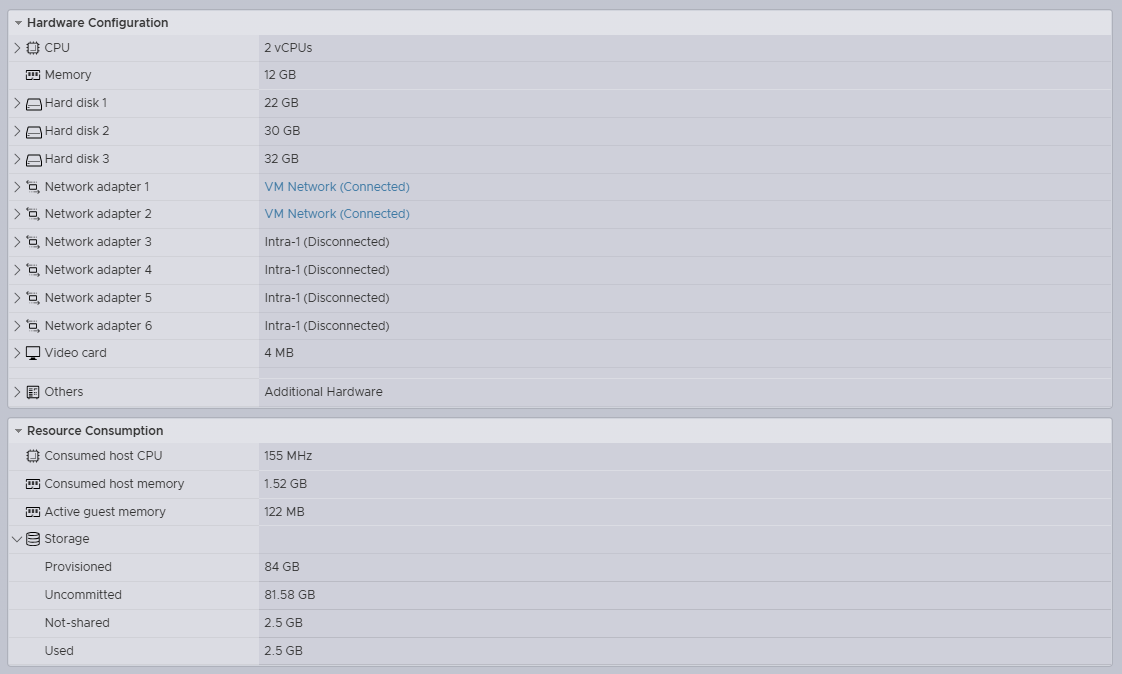
- 系統管理員從 Dell Unity 的實體組態中移除 vNIC
- 在不中斷升級 (NDU) 期間重新開機
- 因此,在升級程序期間,儲存處理器 (SP) 重新開機後,資料將變為無法使用 (D/U)
- SP 無法在 Dell UnityVSA 上開機進入正常模式,且處於服務模式
/var/log/boot.out2016-10-31 13:53:14.649 Area from 00000001a1600000 ( 6678M), size 0000000020000000 ( 512M), name GmsPersistWrCa.1, checksum c51b07002016-10-31 13:53:14.654 Completely in E820 region from <0000000100000000> to <000000033fffffff> type <usable>2016-10-31 13:53:14.892 Refreshing registry, see /var/log/registry_load_dump.txt for details.2016-10-31 13:53:15.353 ===== virtual_hw_checks =====2016-10-31 13:53:16.789 Got bogus speed line in ethtool output for 'eth1' ( Speed: Unknown!). at /EMC/Platform/bin/virtual_hw_check.pl line 196.2016-10-31 13:53:17.058 0xFC1B3001 Virtual hardware configuration doesn't match supported profiles. Going to service mode.2016-10-31 13:53:17.144 12016-10-31 13:53:17.361 =================================================================2016-10-31 13:53:17.370 === *** Going into service mode because of a fault *** ===2016-10-31 13:53:17.379 =================================================================2016-10-31 13:53:17.387 === When escalating to platform services, please make sure to ===2016-10-31 13:53:17.398 === include the messages ABOVE this notice. You can ignore ===2016-10-31 13:53:17.408 === any errors below. ===2016-10-31 13:53:17.416 =================================================================
原因
在 vSphere 中修改 Dell UnityVSA 實體組態不受支援,並可能導致資料無法使用的問題。問題通常會在 SP 重新開機後觸發。
「除了新增虛擬磁碟來儲存使用者資料外,不支援使用 vSphere 修改 UnityVSA VM 的實體組態 (例如新增或移除網路介面,或是修改 VM 的快取大小)。Dell EMC UnityVSA 安裝指南 5.x 2021 年 6 月 (第 13 頁)
解决方案
- 使用 vSphere 重新新增移除的 vNIC,然後將 SP 重新開機
- 復原在 vSphere 中所做的所有實體變更,然後將 SP 重新開機
受影响的产品
Dell EMC Unity, Dell EMC Unity Family |Dell EMC Unity All Flash, Dell EMC Unity Hybrid文章属性
文章编号: 000052850
文章类型: Solution
上次修改时间: 08 10月 2025
版本: 3
从其他戴尔用户那里查找问题的答案
支持服务
检查您的设备是否在支持服务涵盖的范围内。