Data Domain: Common SNMP configuration and Issues causing Monitoring Services disabled in Integrated Backup Software or DPA
摘要: Troubleshoot common SNMP issues. SNMP configuration and Issues in Data Domain causing Monitoring Services disabled in Integrated Backup Software or DPA. All the steps are sequential and mandatory till the resolution. ...
本文适用于
本文不适用于
本文并非针对某种特定的产品。
本文并非包含所有产品版本。
症状
Common SNMP configuration Issues in Data Domain causing Monitoring Services disabled in Integrated Backup Software or DPA. All the steps are sequential and mandatory till the resolution.
1. In Avamar MCS, the DD status will show unresponsive and in Server Management it will show below errors:- Unable to get SNMP file system status
- Unable to get file system information
- File system is disabled
- Missing SNMP community string on Data Domain system
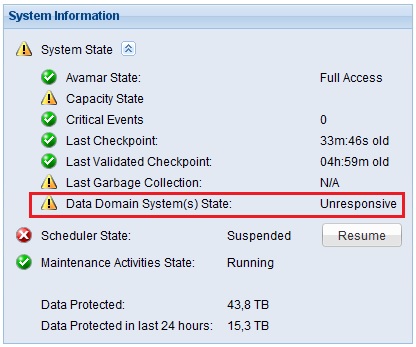
3. DPA will not be able to run any report and states either host<dd_name> is down or invalid credentials has been provided.
原因
- Communication channel is broken Between DD and the Backup Software/DPA due to internal network issue
- Port # 161 and 163 are blocked in organization firewall
- DDBOOST user Password is expired due to auto password expiry policy after 90 Days of password change/create.
- SNMP configuration is invalid in Data Domain
解决方案
Communication channel is broken Between DD and the Backup Software/DPA due to internal network issue
- Login to the DD CLI and drop down to SE Mode
- Ping/net lookup Backup software IP and hostname from DD
# ping 10.0.0.1# net lookup avamar.domain.local
- Do the same from the backup software end
# ping 10.0.0.10# nslookup datadomain.domain.local
- If you are not getting a ping reply or the net lookup is not working then inform the customer the DD and backup software are no more communicating to each other. Customer needs to contact his local network team to resolve.
- Run a tracepath or traceroute, to see where exactly it is freaking.
# se tracepath 10.0.0.1# se traceroute 10.0.0.1
Port # 161 and 163 are blocked in organization firewall
- Login to the DD CLI and drop down to SE Mode
- Do a telnet to Trap-Host IP for port 161 and 163
# se telnet 10.0.0.1 161# se telnet 10.0.0.1 163
- Also try fwchk command to see the SNMP ports:
# se fwcheck 10.0.0.1
If you see, Connection Timed Out in telnet or PORT 161 NOK, PORT 163 NOK in fwcheck, then it indicates organization firewall is blocking the SNMP ports. Customer needs to check with his network/Firewall team to allow these ports bidirectional.
DDBOOST user Password is expired due to auto password expiry policy in DD after 90 Days of password change/set
- Login to the DD with Admin Mode
- Check the ddboost users available
# ddboost user show
- If there are many ddboost users available, Check in Backup software/DPA, which ddboost user is used?
- Check it password status:
# user show detailed <ddboost_username>
- Change the password or extend the password age, however extending the password age would be the shortest route.
# user password aging set <ddboost_username> max 999999
- Then refresh the DD in the Backup software/DPA.
- We recommend Avamar, DPA to use read-only community strings
- Avamar community should not be shared with other backup software
- It is better to keep the default SNMP ports for trap
- If the Data Domain version is greater or equal to 5.5.x, please do not enable the trapd service
- To see the current SNMP configuration and status:
# snmp status# snmp sh config
- Add a ro-community for Ex: Avamar-only:
# snmp add ro-community Avamar-only
- Add a trap-host to the Avamar-only community with v2c:(With Default Port)
# snmp add trap-host avamar.domain.local version v2c community Avamar-only
- Add a trap-host to the Avamar-only community with v2c:(With Dedicated Port)
# snmp add trap-host avamar.domain.local:163 version v2c community Avamar-only
- Deleting trap host(s):
- If all the trap hosts are needed to be deleted:
# snmp reset trap-hosts - To delete a single trap-host:
# snmp del trap-host <trap_hostname> - To delete a community you need to release all its trap hosts. Then you can delete the community as:
# snmp del ro <community_name>
- An example of Healthy SNMP V2C configuration for Avamar, Networker, DPA should look like:
ddboostadmin@dd-hostname# snmp show config
 General Configuration
 ---------------------
 SNMP sysLocation: Databacenter
 SNMP sysContact: suportebackup@customername.com.br
 SNMP sysNotes:
 SNMP v2c Configuration
 ----------------------
 Community           Access      Hosts
 -----------------   ---------   -----
 Avamar-only         read-only
 Networker           read-only
 Dpa                 read-only
 -----------------   ---------   -----
 Trap Host                        Port       Community
 ------------------------------   -------   ---------
 avamar.domain.local              Default    Avamar-only
 networker.domain.local           Default    Networker
 dpa.domain.local                 Default    dpa
 ------------------------------   -------   ---------
 SNMP v3 Configuration
 ---------------------
 User   Access   Authentication Protocol   Privacy Protocol
 ----   ------   -----------------------   ----------------
 ----   ------   -----------------------   ----------------
 Trap Host   Port   User
 ---------   ----   ----
 ---------   ----   ----
- If all the trap hosts are needed to be deleted:
其他信息
Note: If you change the ddboost password, do not forget to update the same in backup software, else backups will fail.
Note: You may need to restart the SNMP service in Avamar if you see there in no change in DD status after 5 minutes. This needs a 5 min of downtime for Avamar. Drop down to Avamar root mode and run:
# mcddrsnmp restart
Reference Material:
- Avamar Administrator GUI Reports Incorrect Data Domain Status Due to SNMP Configuration Issues.(Login with Dell account required)
- Data Domain shows Unresponsive due to expired DDboost user password
- How To Retrieve and Understand the Data Domain system Details from an Avamar System (Login with Dell account required)
- SNMP troubleshooting Guide (Login with Dell account required)
- (Login with Dell account required)
- NetWorker cannot gather SNMP events and usage information from Data Domain (Login with Dell account required)
受影响的产品
Data Domain产品
Avamar, Data Protection Advisor, DD OS, NetWorker文章属性
文章编号: 000063895
文章类型: Solution
上次修改时间: 15 1月 2025
版本: 5
从其他戴尔用户那里查找问题的答案
支持服务
检查您的设备是否在支持服务涵盖的范围内。