Dell Security Management Server Virtual Server log commands
摘要: This article provides an overview of the command-line language that is used in the Dell Security Management Server Virtual (formerly Dell Data Protection | Virtual Edition Server) "View Logs" menu screen. ...
本文适用于
本文不适用于
本文并非针对某种特定的产品。
本文并非包含所有产品版本。
症状
Affected Products:
- Dell Security Management Server Virtual
- Dell Data Protection | Virtual Edition
原因
Not Applicable
解决方案
The Dell Security Management Server Virtual gives the Server Administrator quick access to log files for troubleshooting. From the GNU nano screen, server issues may be reviewed and resolved by checking the Dell Security Management Server Virtual View Logs and select System logs, Server logs, or Databasesecustomizer log.
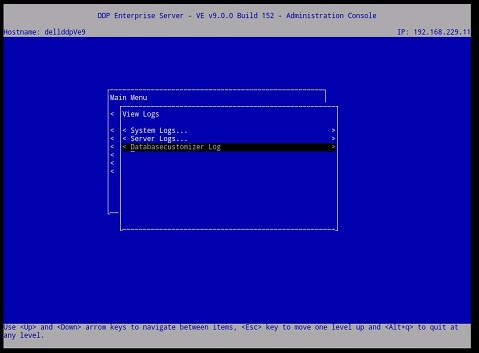
Figure 1: (English Only) Virtual Edition Server's View Logs menu
Once a log is selected, it opens in the GNU Nano text editor.
The GNU Nano is a text editor that is suited to working in UNIX, as it does not rely on the mouse, but still has many useful features.
Most nano commands are invoked by holding down the Ctrl key (that is, the control key), and pressing one of the other keys. In this text, the control key is referenced using ^ (for example, ^G means hold down the CTRL key and press the g key). Most of the important Dell Security Management Server Virtual commands are listed below Figure 2.
For example, enter ^G (CTRL+G) for the GNU nano's help menu.
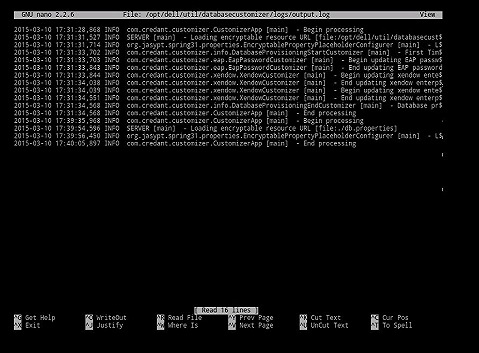
Figure 2: (English Only) Virtual Edition GNU nano user interface
Most commonly used commands:
| Commonly used commands | Keyboard combination |
|---|---|
| Get Help | Crtl G |
| Exit | Crtl X |
| Where is | Crtl W |
| Write Out | Crtl O |
| Prev Page | Crtl Y |
| Cur Pos | Crtl C |
Other available commands:
- Justify = Crtl J
- Read File = Crtl R
- Cut Text = Crtl K
- UnCut Text = Crtl U
- To Spell = Crtl T
To contact support, reference Dell Data Security International Support Phone Numbers.
Go to TechDirect to generate a technical support request online.
For additional insights and resources, join the Dell Security Community Forum.
受影响的产品
Dell Encryption文章属性
文章编号: 000130664
文章类型: Solution
上次修改时间: 08 3月 2023
版本: 8
从其他戴尔用户那里查找问题的答案
支持服务
检查您的设备是否在支持服务涵盖的范围内。