Latitude 5410: Keyboard Function Key Guide
摘要: The following guide lists the keyboard shortcuts available and the functions they perform on the Dell Latitude 5410 Laptop.
本文适用于
本文不适用于
本文并非针对某种特定的产品。
本文并非包含所有产品版本。
症状
Keyboard Shortcut Key Functions
The below table is a list of combination short-cut key functions available on the Latitude 5410 laptop.
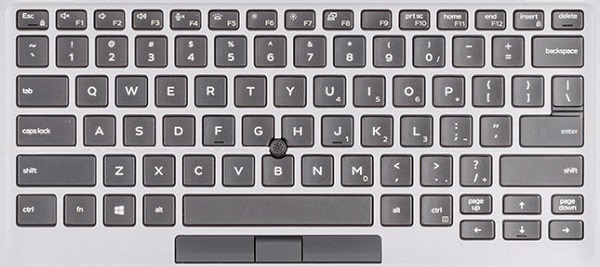
(Figure.1 Latitude 5410 US Keyboard Layout)
原因
| Keys | Primary behavior | Secondary behavior (Fn + Key) |
|---|---|---|
| Fn + Esc | Escape |
Toggle Fn-key lock |
| Fn + F1 |
Mute audio |
F1 |
| Fn + F2 |
Decrease volume |
F2 |
| Fn + F3 |
Increase volume |
F3 |
| Fn + F4 |
Mute microphone |
F4 |
| Fn + F5 |
Turn on/off keyboard backlight |
F5 |
| Fn + F6 |
Decrease brightness |
F6 |
| Fn + F7 |
Increase brightness |
F7 |
| Fn + F8 |
Switch to external display |
F8 |
| Fn + F10 |
Print screen |
F10 |
| Fn + F11 |
Home |
F11 |
| Fn + 12 |
End |
F12 |
| Fn + Ctrl |
Open application menu |
-- |
解决方案
 Visit our Keyboard knowledge base for additional resources and information.
 For additional articles and information visit our Touchpad support page.
 Additional articles and information can also be found on our Mouse support page.
受影响的产品
Latitude 5410文章属性
文章编号: 000133658
文章类型: Solution
上次修改时间: 04 6月 2025
版本: 6
从其他戴尔用户那里查找问题的答案
支持服务
检查您的设备是否在支持服务涵盖的范围内。