Inspiron 灵越笔记本电脑诊断指示灯参考指南
摘要: 这篇文章是有关每款 Inspiron 灵越笔记本电脑上的可用诊断代码和这些代码实际含义的参考指南。
本文适用于
本文不适用于
本文并非针对某种特定的产品。
本文并非包含所有产品版本。
说明
Dell Inspiron 笔记本电脑具有集成诊断指示灯,例如哔声码或 LED 代码。它们有助于诊断和解决您的笔记本电脑在启动过程中可能遇到的问题。这样它们就能指出设备在开机自检 (POST) 过程中出现问题的时间点。这些可以是:
- 蜂鸣音
- 显示不同状态和颜色的电源按钮
- 特定诊断 LED
- 这一切的组合
下面的文章是有关 Insiron 灵越笔记本电脑上的可用代码和这些代码实际含义的参考指南。诊断指示灯可能因不同型号而异,请参阅您的戴尔笔记本电脑的说明文件,了解特定于设备的信息。这些指示灯只是寻找解决启动问题的故障处理步骤的起点。
目录:
- Inspiron 灵越笔记本电脑系列的诊断 LED 指示灯(2020 年至 2025 年)
- Inspiron 灵越笔记本电脑系列的诊断 LED 指示灯(2016 年至 2020 年)
- Inspiron 灵越笔记本电脑系列的诊断 LED 指示灯(2006 年至 2016 年)
- Inspiron 灵越笔记本电脑系列的诊断 LED 指示灯(2006 年之前)
- Inspiron 灵越笔记本电脑可听见的哔声码
- 首字母缩写词术语表
下表中的诊断 LED 指示灯用作开机自检过程的进度指示。这些 LED 指示灯不指示导致 POST 故障的问题。
提醒:笔记本电脑无法引导至与开机自检问题无关的操作系统的可能原因是什么?笔记本电脑完成开机自检,未停在特定错误代码处,然后显示黑屏。
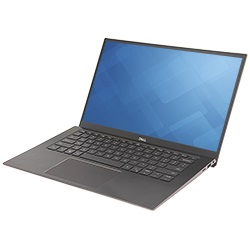
Inspiron 灵越系列(2020 年至今)的诊断 LED 指示灯
在最新系列中,电源或电池 LED 指示灯状态现在增加了闪烁次数和颜色转换模式,以指示出现问题的位置。
单击下面您想要打开的部分的标题,以查看相关内容。
诊断错误代码始终取代任何其他 LED 指示灯的使用。例如,诊断错误代码显示时,将不会显示电池电量不足或电池故障情况的电池代码。
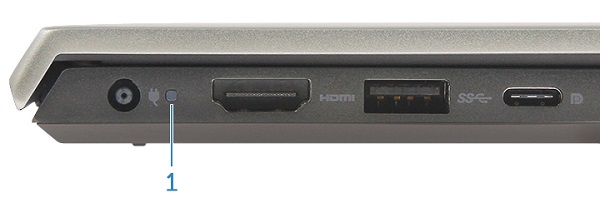
电源或电池按钮 LED 指示灯
电源状态
| 电源 LED 指示灯状态 | 说明 |
|---|---|
Solid White |
|
On |
|
Flashing White |
Standby |
Off |
Hibernate |
Off |
Soft Off |
Off |
No AC Power or Battery |
电池 LED 指示灯
| 电源 LED 指示灯状态 | 说明 |
|---|---|
Alternatively Flashing Amber and then White |
An unsupported Non-Dell AC Adapter or Battery is attached to your PC. |
Constantly Flashing Amber |
Below Low Battery Level |
LEDs Off |
Battery in full charge mode with AC Adapter present |
Constant White |
Battery in charge mode with AC Adapter present |
闪烁模式由两组方式表示(第一组:琥珀色闪烁,第二组:白色闪烁)。
例如:未检测到内存 (2, 3)。例如,未检测到内存 (2, 3),电池 LED 指示灯呈琥珀色闪烁两次后暂停,然后呈白色闪烁三次,暂停。此模式将持续进行下去,直至笔记本电脑电源关闭。
- 电池 LED 指示灯呈琥珀色闪烁最多九次,暂停 1.5 秒钟,然后再运行第二组。
- 电池 LED 指示灯呈白色闪烁最多九次,暂停 3 秒钟,然后再次运行第一组。
例如:未检测到内存 (2, 3)。例如,未检测到内存 (2, 3),电池 LED 指示灯呈琥珀色闪烁两次后暂停,然后呈白色闪烁三次,暂停。此模式将持续进行下去,直至笔记本电脑电源关闭。
| 电源 LED 状态指示灯 | 问题描述 | 建议的解决方案 | |
|---|---|---|---|
| 琥珀色 | 白色 | ||
1 |
1 |
M-BIST: Trusted Platform Module failure |
|
1 |
2 |
M-BIST: SPI Flash Unrecoverable |
|
1 |
5 |
I-Fuse failure |
|
1 |
6 |
EC Internal failure |
|
2 |
1 |
CPU Failure |
|
2 |
2 |
System Board: BIOS, ROM Failure |
|
2 |
3 |
No Memory/RAM detected |
|
2 |
4 |
Memory/RAM failure |
|
2 |
5 |
Invalid Memory Installed |
|
2 |
6 |
System board, Chipset Error |
|
2 |
7 |
LCD failure |
|
2 |
8 |
LCD Power Rail failure |
|
3 |
1 |
CMOS battery failure |
|
3 |
2 |
PCI or Video card/chip failure |
|
3 |
3 |
BIOS Recovery 1 |
|
3 |
4 |
BIOS Recovery 2 |
|
3 |
5 |
Power Rail Failure |
|
3 |
6 |
SBIOS Flash Corruption |
|
3 |
7 |
ME Error |
|
4 |
1 |
Memory Dual Inline memory modeul (DIMM) power rail failure |
|
4 |
2 |
CPU Power Cable Connection issue |
|
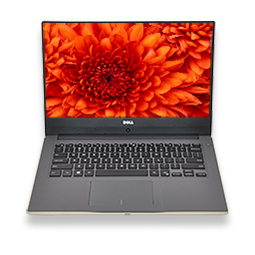
Inspiron 灵越笔记本电脑系列的诊断 LED 指示灯(2016 年至 2020 年)
在此系列中,诊断指示灯哔声已被移除。现在,电源按钮的状态指示灯会以闪烁和颜色转换的方式指出问题所在。
单击下面您想要打开的部分的标题,以查看相关内容。
诊断错误代码始终取代任何其他 LED 指示灯的使用。例如,诊断错误代码显示时,将不会显示电池电量不足或电池故障情况的电池代码。
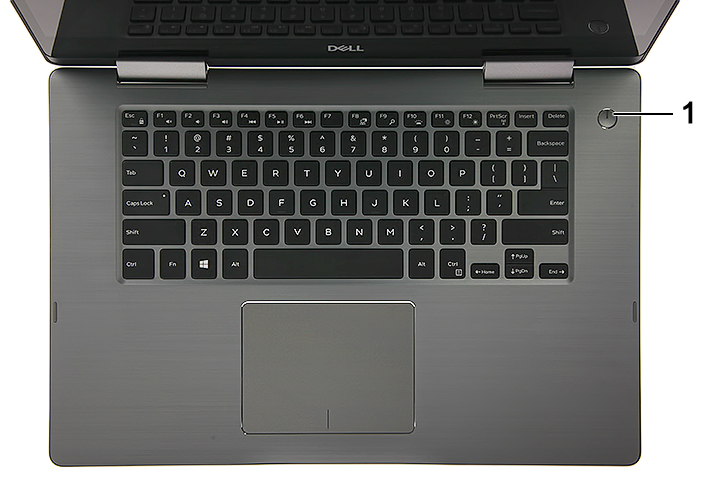
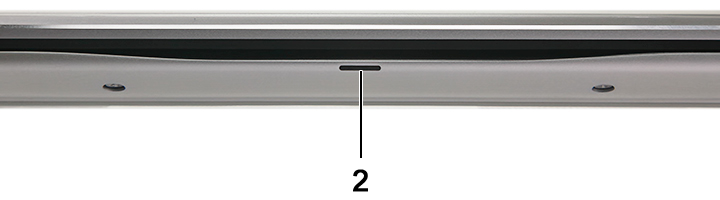
1 |
Power Button LED |
2 |
Front Battery LED |
电源状态
| 电源 LED 指示灯状态 | 说明 |
|---|---|
Solid White |
On |
Flashing White |
Standby |
Off |
Hibernate |
Off |
Soft Off |
Off |
No AC Power or Battery |
电池管理
| 电源 LED 指示灯状态 | 说明 |
|---|---|
Alternatively Flashing Amber and then White |
An unsupported Non-Dell AC Adapter or Battery is attached to your PC |
Constantly Flashing Amber |
Below Low Battery Level |
LEDs Off |
Battery in full charge mode with AC Adapter present |
Constant White |
Battery in charge mode with AC Adapter present |
闪烁模式由两组方式表示(第一组:琥珀色闪烁,第二组:白色闪烁)。
例如:未检测到内存 (2, 3)。例如,未检测到内存 (2, 3),电池 LED 指示灯呈琥珀色闪烁两次后暂停,然后呈白色闪烁三次,暂停。此模式将持续进行下去,直至笔记本电脑电源关闭。
- 电池 LED 指示灯呈琥珀色闪烁最多九次,暂停 1.5 秒钟,然后再运行第二组。
- 电池 LED 指示灯呈白色闪烁最多九次,暂停 3 秒钟,然后再次运行第一组。
例如:未检测到内存 (2, 3)。例如,未检测到内存 (2, 3),电池 LED 指示灯呈琥珀色闪烁两次后暂停,然后呈白色闪烁三次,暂停。此模式将持续进行下去,直至笔记本电脑电源关闭。
| 电源 LED 状态指示灯 | 问题描述 | 建议的解决方案 | |
|---|---|---|---|
| 琥珀色 | 白色 | ||
2 |
1 |
CPU Failure |
|
2 |
2 |
System Board: BIOS, ROM Failure |
|
2 |
3 |
No Memory/RAM detected |
|
2 |
4 |
Memory/RAM failure |
|
2 |
5 |
Invalid Memory Installed |
|
2 |
6 |
System board, Chipset Error |
|
2 |
7 |
LCD failure |
|
3 |
1 |
CMOS battery failure |
|
3 |
2 |
PCI or Video card/chip failure |
|
3 |
3 |
BIOS Recovery 1 |
|
3 |
4 |
BIOS Recovery 2 |
|
3 |
5 |
Power Rail Failure |
|
3 |
6 |
SBIOS Flash Corruption |
|
3 |
7 |
ME Error |
|
Inspiron 灵越笔记本电脑系列的诊断 LED 指示灯(2006 年至 2016 年)
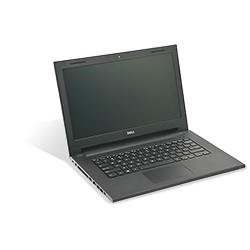
在这段时间内,系统只会使用 LED 指示灯状态显示电池和硬盘的状态。查看报警音部分的报警音表。
单击下面您想要打开的部分的标题,以查看相关内容。
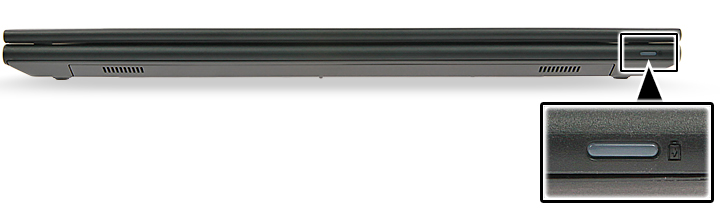
| 系统 LED 指示灯状态 | 系统状态 |
|---|---|
White |
The power adapter is connected, and the battery is being charged. |
Amber |
The battery charge is low or critical. |
Off |
Off
|
Inspiron 灵越笔记本电脑系列的诊断 LED 指示灯(2006 年之前)
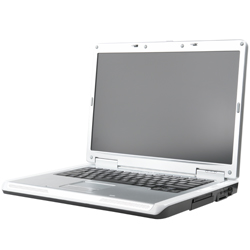
这些笔记本电脑使用键盘按钮 LED。这些系统使用键盘按钮 LED 指示灯,但与 Inspiron 灵越 1501 不同,所有其他 Inspiron 灵越型号在这段时间内使用报警音作为其笔记本电脑上的诊断指示灯。
单击下面您想要打开的部分的标题,以查看相关内容。
这些型号在机箱正面有一组键盘状态LED指示灯,它们会呈绿色常亮、呈绿色闪烁或熄灭。
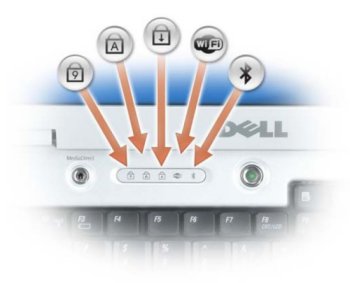
| 键盘 LED 指示灯图标 | 说明 |
|---|---|
|
Caps Lock light - Turns on when the Caps Lock is engaged. |
|
Scroll Lock light - Turns on when the Scroll Lock is engaged. |
|
Number Lock light - Turns on when the Number Lock is enabled. |


| 数字锁定 | 大写锁定 | Scroll lock | 说明 | 下一步 |
|---|---|---|---|---|
Off |
Flash |
Off |
The memory is believed to be good, but it is about to be exercised (such as when shadowing the BIOS and when testing or zeroing all memory). |
|
Off |
On |
Off |
The system is performing diskette and hard disk initialization. |
|
Off |
On |
Flash |
Flash USB controller initialization. |
|
Off |
On |
On |
No DIMM is installed. |
|
Flash |
On |
On |
EC turn on Pentium. |
|
Flash |
Flash |
On |
Call option ROM for Video. |
|
Flash |
Flash |
Flash |
CMOS initialization, SMI initialization, timer, gate A20, and mouse. |
|
On |
On |
On |
POST has completed, and the BIOS is about to go to the PSA module. |
|
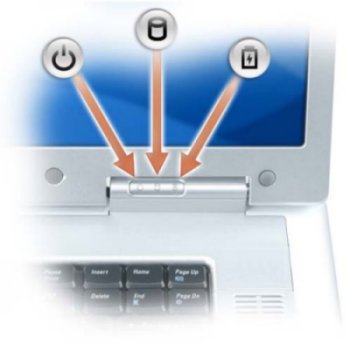
如果笔记本电脑已连接至电源插座,则电池指示灯将呈现以下几种状态:
- 呈绿色稳定亮起 — 电池正在充电。
- 呈绿色闪烁 — 电池已基本充满电。
如果计算机在电池模式下运行,则电池指示灯的运行方式如下所示:
- 熄灭 — 电池已充满电(或计算机已关闭)。
- 呈琥珀色闪烁 — 电池电量不足。
- 呈琥珀色稳定亮起 — 电池电量严重不足。
Inspiron 灵越笔记本电脑可听见的哔声码
除了各种类型的诊断 LED 指示灯之外,在这些系统的型号上都有许多蜂鸣音代码。
这些代码得到各制造商的认可并在一段时间内保持不变。
下表中显示了这些代码的要点。
单击下面您想要打开的部分的标题,以查看相关内容。
| 诊断哔声码 | ||
|---|---|---|
| 代码 | 原因 | 建议的解决方案 |
1 |
BIOS ROM Checksum in progress or failure |
Contact Technical Support |
2 |
No memory modules detected |
Learn How to Diagnose and Resolve Common Memory Issues on a Dell Desktop Computer. |
3 |
Chipset Error
Time-of-day clock test failure
Gate A20 Failure
Super I/O chip Failure
Keyboard controller test failure |
Contact Technical Support |
4 |
RAM read/write error |
Learn How to Diagnose and Resolve Common Memory Issues on a Dell Desktop Computer. |
5 |
Real-Time Clock Failure |
Replace the CMOS Battery, Contact Technical Support if problem persists. |
6 |
Video BIOS test Failure |
Learn How to Run a Preboot Diagnostic Test on a Dell Computer. |
7 |
CPU Cache Test Failure |
Contact Technical Support |
8 |
LCD Failure |
Contact Technical Support |
首字母缩写词术语表:
请参阅表以了解本文中的首字母缩写词的定义。
| 缩略词 | 定义 |
|---|---|
BIOS |
Basic Input/Output System |
CFG |
Resource Configuration |
CPU |
Central Processing Unit |
DIMM |
Dual In-line Memory Module |
DMA |
Direct Memory Access |
EC |
Embedded Controller |
HECI |
Host Embedded Controller Interface |
LCD |
Liquid Crystal Display |
LED |
Light Emitting Diode |
MBF |
Motherboard Failure |
MBIST |
Memory Built-in Self Test |
ME |
Management Engine |
MEM |
Memory |
NVRAM |
Non-Volatile Random Access Memory |
PCI |
Peripheral Component Interconnect |
POV |
Post-video Activity |
PRV |
Pre-video Activity |
PSU |
Power Supply Unit |
RAM |
Random Access Memory |
RCM |
Recovery Mode |
ROM |
Read Only Memory |
RTC |
Real-Time Clock |
S0 |
System Power State S0 - This is the Working State, where your Windows PC is awake. |
S1 |
System Power State S1 - In this sleep state, the CPU is stopped, and your computer is in standby mode. |
S2 |
System Power State S2 - This state is similar to S1 except that the CPU and system cache are lost because the processor loses power. |
S3 |
System Power State S3 - In this state, data is saved to RAM, hard drives, and other hardware are shut down. |
S4 |
System Power State S4 - In this state, RAM, and other data are saved to the hard disk. |
S5 |
System Power State S5 - The System is off. |
SBIOS |
Small Board Interface Operating System |
SPI |
Serial Peripheral Interface |
STD |
Boot Hand Off |
STO |
Storage Device |
TPM |
Trusted Platform Module |
USB |
Universal Serial Bus |
VID |
Video |
提醒:
如果您看到本文中列出的错误代码,请按照说明排查并解决问题。
如果您看到本文中列出的错误代码,请按照说明排查并解决问题。
如果您看到的错误代码未在本文或您的戴尔笔记本电脑文档中列出,请通过您的首选渠道联系支持部门,并提供错误代码信息。
其他信息
受影响的产品
Inspiron文章属性
文章编号: 000140521
文章类型: How To
上次修改时间: 01 9月 2026
版本: 16
从其他戴尔用户那里查找问题的答案
支持服务
检查您的设备是否在支持服务涵盖的范围内。