NVE: Installation fails with "Error: Could not validating password policy"
摘要: The NetWorker Virtual Edition (NVE) installation progress fails when configuring the NetWorker Services with a password policy violation.
本文适用于
本文不适用于
本文并非针对某种特定的产品。
本文并非包含所有产品版本。
症状
The NetWorker Virtual Edition (NVE) environment is being configured after a successful deployment of the OVA. The NetWorker Installation Manager (avigui) is used to enter the NetWorker Configuration details for the various account passwords. The installation progress fails on step when configuring the NetWorker Authc Service with "Error: Could not validating password policy."
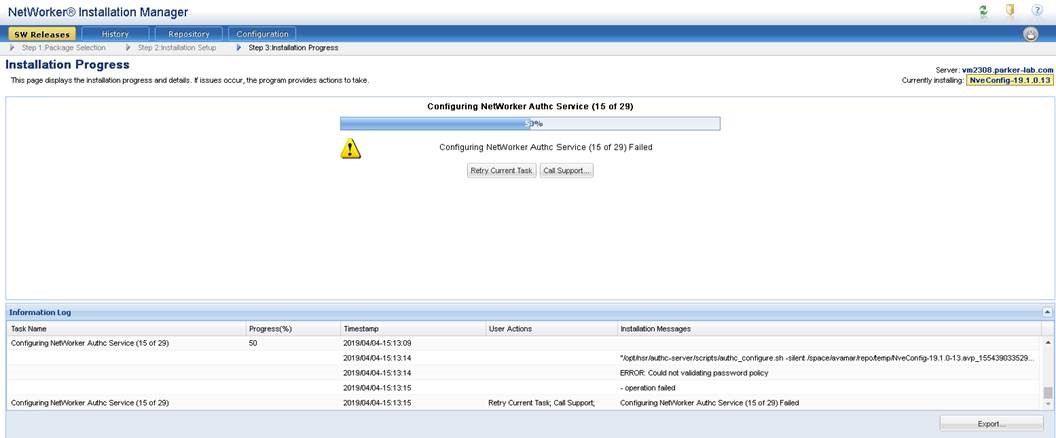
Figure 1: NVE avinstaller interface shows install stops at 50%.
原因
The "Authc Admin Password" contains an equal (=) sign and it is not a valid special character for the NVE password complexity check. The requirement is indicated in the "Authc Admin Password" description details:
Enter the password for the Authc Service admin user (nine or more characters with at least one digit, one lowercase, one uppercase, and one character that is not a digit, lowercase, uppercase, or equal sign).
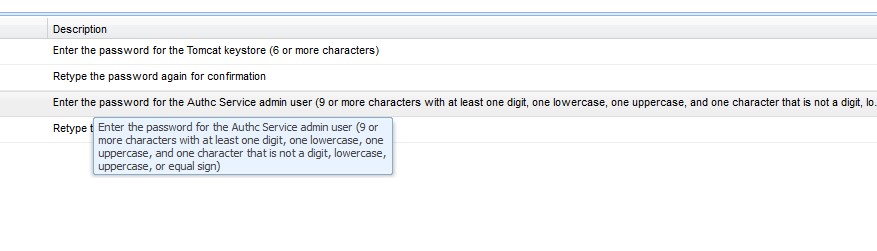
Figure 2: Password requirements for the authentication service
解决方案
Redeploy the NVE OVA in the vSphere environment and ensure to use the correct password requirements.
- Nine or more characters
- At least one number
- Lowercase letter
- Uppercase letter
- One special character (do not use the equal (=) sign in the password).
文章属性
文章编号: 000170284
文章类型: Solution
上次修改时间: 27 10月 2025
版本: 4
从其他戴尔用户那里查找问题的答案
支持服务
检查您的设备是否在支持服务涵盖的范围内。