DPA: Error message 'Error 401: Unauthorized Action' appears in UI
摘要: A 401 Unauthorized Action error appears in the Data Protection Advisor (DPA) UI after a user stays logged in for many hours; it is caused by the session being automatically closed due to inactivity. ...
本文适用于
本文不适用于
本文并非针对某种特定的产品。
本文并非包含所有产品版本。
症状
User sees an error message on the DPA UI and has to log back in again:
Error 401: Unauthorized Action 原因
This error happens when a user is logged into the DPA UI for hours at a time and the open session is being closed due to inactivity or some other environment factor closes the session.
解决方案
The error can be ignored as it has no impact on DPA functionality.
User can log in to DPA again and continue as normal.
The following setting can be configured on the UI to force a clean logoff after a specific period:
Administration > User & Security > Security Settings
The Session Expiration parameter can be set to example for 6 hours (the default is off):
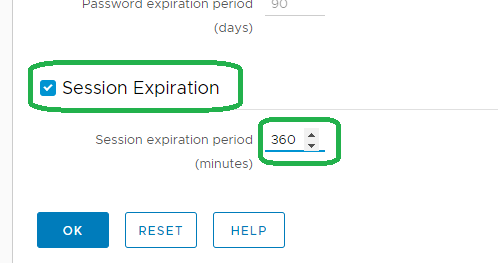
Note: The above feature was introduced on 18.2.
Contact support for more information.
Contact support for more information.
受影响的产品
Data Protection Advisor产品
Data Protection Advisor文章属性
文章编号: 000173588
文章类型: Solution
上次修改时间: 10 6月 2026
版本: 5
从其他戴尔用户那里查找问题的答案
支持服务
检查您的设备是否在支持服务涵盖的范围内。