How to Run the Dell D1918H, D2421H, D2421DS, and D2721H Monitor Self-Test
摘要: The following article provides information about running the self-test on Dell D1918H, D2421H, D2421DS, and D2721H monitors.
本文适用于
本文不适用于
本文并非针对某种特定的产品。
本文并非包含所有产品版本。
说明
Monitor Self-Test
The self-test (integrated diagnostic tool) helps you determine if any screen abnormality you experience is an inherent problem with: (For example: Your monitor, video cable, video card, driver, or computer.)
Steps for running the self-test:
- Disconnect all video cables from the monitor and turn off your monitor.
- Turn on the monitor.
- When the Dell logo disappears and the screen shows "No signal," press buttons 2 + 3 + 5 on the monitor simultaneously.
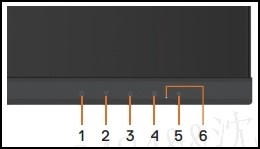
The monitor enters the self-test screen. - Carefully inspect the screen for abnormalities as the display turns to red, green, blue, black, and white automatically.
- Press button 5 to exit the self-test screen.
If you do not detect any screen abnormalities while using the self-test tool, the monitor is functioning properly. Check your video cable, video card, drivers, and computer.
受影响的产品
Dell D1918H, Dell D2421H, Dell D2721H文章属性
文章编号: 000188980
文章类型: How To
上次修改时间: 13 11月 2025
版本: 12
从其他戴尔用户那里查找问题的答案
支持服务
检查您的设备是否在支持服务涵盖的范围内。