PowerProtect: backup Kubernetes non riuscito con errore "controller pod is not running"
摘要: PPDM: backup Kubernetes non riuscito con errore "controller pod is not running"
本文适用于
本文不适用于
本文并非针对某种特定的产品。
本文并非包含所有产品版本。
症状
Nel caso in cui sia stato osservato questo comportamento, tutti i backup di PPDM Kubernetes iniziano a non riuscire dopo il ripristino di PPDM dal backup del ripristino di emergenza del server. Tuttavia, potrebbe applicarsi ad altre situazioni.
Backup Kubernetes non riuscito con errore "controller pod is not running".
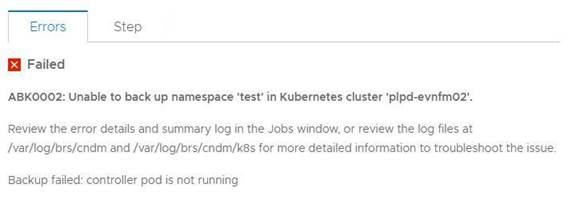
L'errore seguente può essere osservato nei registri:
2021-07-21T03:49:48.340Z ERROR [] [task-5011a057-340f-40fb-8cd8-12414685d058] [][][][TRACE_ID:a66ce529604914ad;JOB_ID:a9b8915af1637407][] [K8sHelperApi.isDone(90)] - Failed to wait on job com.emc.dpsg.ecdm.baseresourceservice.exception.ValidationServiceException: controller pod is not running
2021-07-21T03:50:14.065Z WARN [] [dsSource-plpd-testcluster] [][][][][] [c.e.b.c.s.p.K8sHealthMonitor.checkPodHealth(200)] - Controller Pod is down, cluster: , age=PT153H49M43.065S
Output del comando kubectl describe pod -n powerprotect for that k8s cluster:
powerprotect powerprotect-controller-666ffccbbf-p5rwh 0/1 ImagePullBackOff 0 6d12h
velero-ppdm backup-driver-587cfcdf59-2mc8p 1/1 Running 0 49d
velero-ppdm velero-5df5fcd896-p68rw 1/1 Running 0 49d
Backup Kubernetes non riuscito con errore "controller pod is not running".
L'errore seguente può essere osservato nei registri:
2021-07-21T03:49:48.340Z ERROR [] [task-5011a057-340f-40fb-8cd8-12414685d058] [][][][TRACE_ID:a66ce529604914ad;JOB_ID:a9b8915af1637407][] [K8sHelperApi.isDone(90)] - Failed to wait on job com.emc.dpsg.ecdm.baseresourceservice.exception.ValidationServiceException: controller pod is not running
2021-07-21T03:50:14.065Z WARN [] [dsSource-plpd-testcluster] [][][][][] [c.e.b.c.s.p.K8sHealthMonitor.checkPodHealth(200)] - Controller Pod is down, cluster: , age=PT153H49M43.065S
Output del comando kubectl describe pod -n powerprotect for that k8s cluster:
powerprotect powerprotect-controller-666ffccbbf-p5rwh 0/1 ImagePullBackOff 0 6d12h
velero-ppdm backup-driver-587cfcdf59-2mc8p 1/1 Running 0 49d
velero-ppdm velero-5df5fcd896-p68rw 1/1 Running 0 49d
原因
PowerProtect - Il pod del controller non riesce a estrarre l'immagine richiesta da Internet.
解决方案
1. Verificare se il cluster Kubernetes può accedere a Docker Hub all'indirizzo https://hub.docker.com/ e a Quay all'indirizzo https://quay.io/ per estrarre le immagini richieste.
2. Se un cluster Kubernetes non è in grado di accedere a questi siti a causa di firewall o altre restrizioni, è possibile estrarre queste immagini in un registro locale accessibile al cluster. Seguire la procedura riportata di seguito.
1). Creare un file application.properties /usr/local/brs/lib/cndm/config/application.properties sull'appliance
PowerProtect Data Manager con il seguente contenuto:
k8s.docker.registry=fqdn:port Ad esempio, k8s.docker.registry=artifacts.example.com:8446
k8s.image.pullsecrets=secret resource name Specificare questa voce solo se è necessario un segreto per l'estrazione dell'immagine.
2). Eseguire cndm restart per applicare le proprietà.
Nota: per maggiori dettagli, consultare il documento PPDM Administration and User Guide.
3. Poiché il cluster Kubernetes è già stato aggiunto come origine asset nella GUI di PPDM, è necessaria un'individuazione manuale del cluster Kubernetes dopo aver verificato/eseguito il passaggio 1 o 2.
2. Se un cluster Kubernetes non è in grado di accedere a questi siti a causa di firewall o altre restrizioni, è possibile estrarre queste immagini in un registro locale accessibile al cluster. Seguire la procedura riportata di seguito.
1). Creare un file application.properties /usr/local/brs/lib/cndm/config/application.properties sull'appliance
PowerProtect Data Manager con il seguente contenuto:
k8s.docker.registry=fqdn:port Ad esempio, k8s.docker.registry=artifacts.example.com:8446
k8s.image.pullsecrets=secret resource name Specificare questa voce solo se è necessario un segreto per l'estrazione dell'immagine.
2). Eseguire cndm restart per applicare le proprietà.
Nota: per maggiori dettagli, consultare il documento PPDM Administration and User Guide.
3. Poiché il cluster Kubernetes è già stato aggiunto come origine asset nella GUI di PPDM, è necessaria un'individuazione manuale del cluster Kubernetes dopo aver verificato/eseguito il passaggio 1 o 2.
受影响的产品
PowerProtect Data Manager文章属性
文章编号: 000190024
文章类型: Solution
上次修改时间: 27 8月 2022
版本: 6
从其他戴尔用户那里查找问题的答案
支持服务
检查您的设备是否在支持服务涵盖的范围内。