RecoverPoint for VM: ESXi Splitter VIB installation and start-up issues with on ESXi host
摘要: The Splitter(Kdriver) installation or startup fails on ESXi hosts that have VMkernel.Boot.execInstalledOnly set to true. This may cause RecoverPoint for Virtual Machines installation failure due to missing splitter. ...
本文适用于
本文不适用于
本文并非针对某种特定的产品。
本文并非包含所有产品版本。
症状
The Splitter(Kdriver)
Event in
ESXi Splitter fails to start after an ESXi host reboot, with errors in
Note: This issue also causes RecoverPoint for VM cluster installation to fail due to error deploying the ESXi splitter.
VIB installation fails with many errors, such as:
[root@localhost:~] esxcli software vib install -v /scratch/kdriver_RPESX-00.5.3.1.1.0.m.149.000.vib --no-sig-check
 [LiveInstallationError]
 Error in running ['/etc/init.d/rp-splitterd', 'start', 'install']:
 Return code: 1
 Output: Wed Nov 10 18:24:18 UTC 2021: rp_splitterd: Starting rp_splitter
 Wed Nov 10 18:24:18 UTC 2021: rp_splitterd: DEBUG (notice true==0): isKdriverRunning=1, isSplitterRunning=1
 --- /etc/vmware/esx.conf
 +++ /tmp/auto-backup.2100162//etc/vmware/esx.conf
 @@ -1,18 +1,299 @@
 -/adv/UserVars/RP_IP_Discovery_5 = ""
 -/adv/UserVars/RP_IP_Discovery_8 = ""
...
 Saving current state in /bootbank
 Clock updated.
 Time: 18:24:19   Date: 11/10/2021   UTC
 Successfully created /opt/emc/rp/kdriver/mod/esx_splitter
 Creating symbolic link /usr/lib/vmware/vmkmod/esx_splitter ...
 Ready to load ESX splitter
 Cannot load module esx_splitter: Failure
 Cannot load module esx_splitter: Failure

 Failed to launch splitter. For assistance, please run launch_splitter.sh --help

 Wed Nov 10 18:24:20 UTC 2021: rp_splitterd: start_kdriver_from_boot.sh Failed to execute. failing service.

 It is not safe to continue. Please reboot the host immediately to discard the unfinished update.
 Please refer to the log file for more details.
/var/run/log/vmkernel.log:
2021-11-10T18:24:18.411Z cpu1:2100089)VisorFSTar: 1994: emcrpspl.t00 (797949359604956901) as emcrpspl.t00 for 44144640 bytes
2021-11-10T18:24:20.285Z cpu3:2100373)UserMem: 7388: mmap denied: boot opt execInstalledOnly is set: file not installed
/var/run/log/vmkernel.log:
2021-11-12T15:53:29.004Z cpu2:525352)UserMem: 7576: mmap denied: boot opt execInstalledOnly is set: file not installed
2021-11-12T15:53:29.029Z cpu0:525042)Jumpstart plugin rp-splitterd activation failed: Method invocation failed
Note: This issue also causes RecoverPoint for VM cluster installation to fail due to error deploying the ESXi splitter.
原因
The ESXi host has a setting VMKernel.Boot.execInstalledOnly set to true.
This setting prevents the kdriver vib to install correctly using live installation.
RecoverPoint Splitter cannot function with VMKernel.Boot.execInstalledOnly set to true.
解决方案
Procedure:
- On the ESXi host, change the
VMKernel.Boot.execInstalledOnlysetting to false.
- Run the following ESXCLI command:
esxcli system settings encryption set --require-exec-installed-only=F
- Verify the change:
esxcli system settings encryption get
Mode: TPM
Require Executables Only From Installed VIBs: false
Require Secure Boot: true
Confirm that Require Executables Only From Installed VIB displays false.
- To save the setting, run the following command:
/sbin/auto-backup.sh
The TPM no longer enforces the
execInstalledOnly boot option.
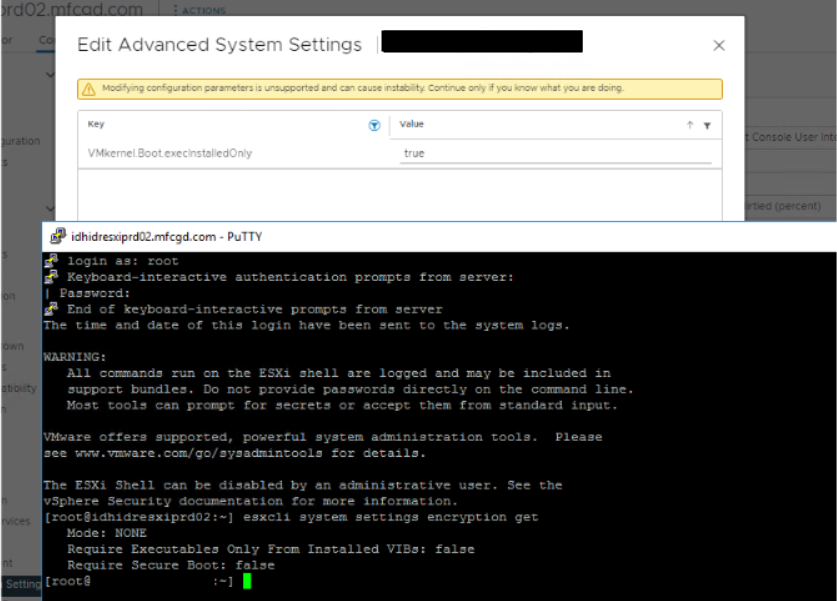
- Note: Sometimes the value is set to false by checking it from the CLI steps above. However from vSphere UI, the value is set to true from below field, the value must be modified from UI as well.
- Reboot the ESXi host.
- Run the
vibinstallation again.
VMware document Broadcom VMware Tech Docs Portal 
其他信息
This issue may also impact working RecoverPoint systems when customers run the STIG Hardening procedure.
The procedure sets the default STIG Values which change the parameter VMKernel.Boot.execInstalledOnly = True.
The procedure changes the ESXi configuration but is applied during the next reboot or upgrade. It may cause VxRail upgrade issues, since the upgraded hosts cannot run RecoverPoint for VM protected VM.
受影响的产品
RecoverPoint for Virtual Machines文章属性
文章编号: 000193437
文章类型: Solution
上次修改时间: 20 11月 2025
版本: 9
从其他戴尔用户那里查找问题的答案
支持服务
检查您的设备是否在支持服务涵盖的范围内。