Dell Unity: Impossibile accedere all'interfaccia di gestione di Unity utilizzando https://FQDN o https://ip.address (correggibile dall'utente)
摘要: Impossibile accedere all'interfaccia di gestione di Unity utilizzando https://FQDN o https://ip.address L'accesso a Unity avviene utilizzando https://FQDN/?casHome=LOCAL e https://ip.address/?casHome=LOCAL ...
本文适用于
本文不适用于
本文并非针对某种特定的产品。
本文并非包含所有产品版本。
症状
Impossibile accedere all'interfaccia di gestione di Unity tramite https://FQDN o https://ip.address
L'accesso a Unity avviene utilizzando https://FQDN/?casHome=LOCAL e https://ip.address/?casHome=LOCAL
L'accesso a Unity avviene utilizzando https://FQDN/?casHome=LOCAL e https://ip.address/?casHome=LOCAL
原因
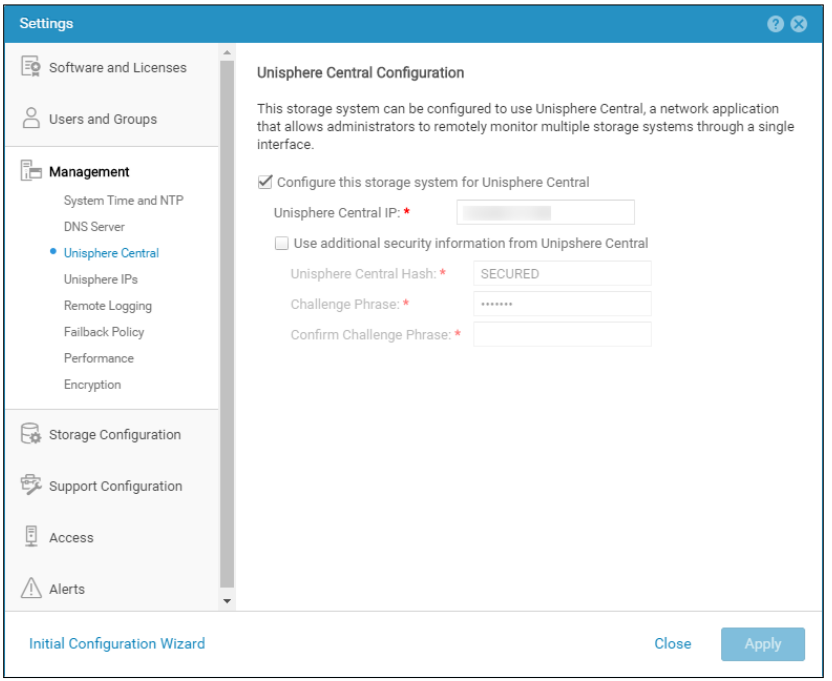
Unisphere Central è abilitato su Unity anche se Unisphere Central non è in uso.
解决方案
Selezionare "Configure this storage system for Unisphere Central" solo se Unisphere Central è in uso. In caso contrario, rimuovere il controllo abilitando Unisphere Central.
受影响的产品
Dell EMC Unity文章属性
文章编号: 000205133
文章类型: Solution
上次修改时间: 12 12月 2025
版本: 5
从其他戴尔用户那里查找问题的答案
支持服务
检查您的设备是否在支持服务涵盖的范围内。