Cloudlink sftp backup store error “auth fail” fixing
摘要: Resolving error “Auth fail” when testing access to an sftp backup store.
本文适用于
本文不适用于
本文并非针对某种特定的产品。
本文并非包含所有产品版本。
症状
Auth fail” when testing access to an sftp backup store:

原因
- Password is incorrect.
- Password authentication on the target server is disabled (only Challenge response is enabled) - Cloudlink is using password authentication for sftp backup store, but not challenge response.
解决方案
If it is not the incorrect password case, check the file /etc/ssh/sshd_config on the target server, find “PasswordAuthentication” setting.
If PasswordAuthentication is set to “no”, change to “yes”, then restart the ssh service.
For example: “systemctl restart sshd.service”.
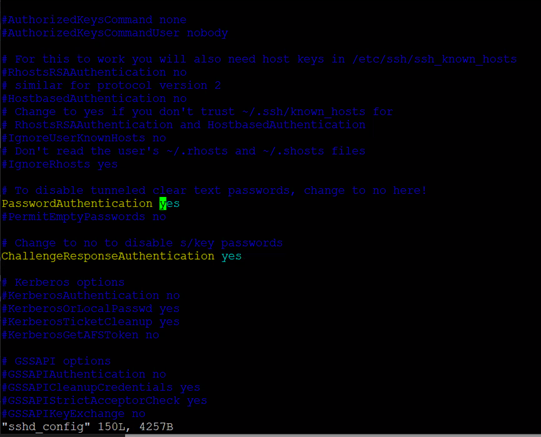
If PasswordAuthentication is set to “no”, change to “yes”, then restart the ssh service.
For example: “systemctl restart sshd.service”.
受影响的产品
CloudLink SecureVM, CloudLink文章属性
文章编号: 000210190
文章类型: Solution
上次修改时间: 26 6月 2023
版本: 5
从其他戴尔用户那里查找问题的答案
支持服务
检查您的设备是否在支持服务涵盖的范围内。