NetWorker: How to Enable Client File Index Backups During Data Backups
摘要: This article discusses new functionality added in NetWorker 19.8 to enable Client File Indexes (CFI) backups in the same policy data backups are performed.
本文适用于
本文不适用于
本文并非针对某种特定的产品。
本文并非包含所有产品版本。
说明
NetWorker 19.8 added functionality to allow backup admins to configure Client File Index (CFI) backups to be performed immediately after a client finishes data backups. This can be done within the backup action the client is protected in. Previously this was only possible using the NetWorker "Server Protection Policy."
Requirements:
- The NetWorker server must be on NetWorker 19.8.0.0 or later: https://www.dell.com/support/home/product-support/product/networker/overview
- This functionality is intended for "traditional" (client-based) backups.
When this functionality is enabled, the index backup is performed after the data backup completes:
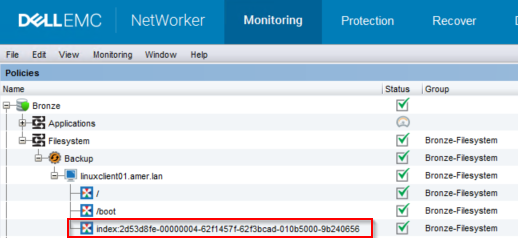
Figure 1: NetWorker Backup Monitoring
root@linux1:~# mminfo -avot -t today
 volume        type   client           date     time         size ssid      fl   lvl name
ClientBackupPool.001 Data Domain linux1.amer.lan 02/27/2023 12:38:30 PM 74 MB 4277998791 cr 9 index:linuxclient01.amer.lan
ClientBackupPool.001 Data Domain linuxclient01.amer.lan 02/27/2023 12:39:32 PM 13 MB 16585916 cb incr /
ClientBackupPool.001 Data Domain linuxclient01.amer.lan 02/27/2023 12:39:37 PM 4  B 4294776000 cb incr /boot
NOTE: Enabling this functionality does not exclude clients who perform their index backup in a data protection policy from the Server Protection Policy. When the Server Protection Policy is run, the index backup is performed again.
There are two methods for enabling this feature.
Nsradmin CLI:
- From a root or admin command prompt on the NetWorker server, run the command:
nsradmin
- From the
nsradminprompt, use the following command syntax to print the backup action details:
nsradmin> show Enable Cfi
nsradmin> print type: nsr protection policy action; name: ACTION_NAME; policy name: POLICY_NAME; workflow name: WORKFLOW_NAME
Example:
nsradmin> show Enable Cfi
nsradmin> print type: nsr protection policy action; name: backup; policy name: Bronze; workflow name: Filesystem
Enable Cfi: No;
nsradmin>
- To enable Cfi backups in the backup action, enter the following command from the
nsradminprompt:
nsradmin> update Enable Cfi: Yes
- Rerun the print command to display the changes:
nsradmin> print type: nsr protection policy action; name: backup; policy name: Bronze; workflow name: Filesystem
                  Enable Cfi: Yes;
Nsrpolicy CLI:
- From a root or admin command prompt on the NetWorker server, run the following
nsrpolicycommand to display the backup action attributes:
nsrpolicy action display -p POLICY_NAME -w WORKFLOW_NAME -A ACTION_NAME
OR:
nsrpolicy action display --policy_name POLICY_NAME --workflow_name WORKFLOW_NAME --action_name ACTION_NAME
Example:
root@linux1:~# nsrpolicy action display -p Bronze -w Filesystem -A backup
{
    "actionName": "Backup",
    "actionSpecific": {
        "actions": {
            "actionType": "backup",
            "actionBackupSubtypeSpecific": {
                "backupSubtypes": {
                    "abBackupSubtype": "traditional",
                    "abtDestinationPool": "ClientBackupPool",
                    "abForceBackupLevel": "",
                    "abtBrowsePeriod": "1 Months",
                    "abtDDRetentionLockTime": "",
                    "abtEnableCfiBackup": false,
                    "abtEnableDDRetentionLock": false,
                    "abtEstimate": false,
                    "abtFileInactivityAlertThreshold": 0,
                    "abtFileInactivityThreshold": 0,
                    "abtRevertToFullWhenSyntheticFullFails": true,
                    "abtTimestampFormat": "none",
                    "abtVerifySyntheticFull": true
                }
...
...
2. To enable CFI backups, run the following nsrpolicy command against the backup action:
nsrpolicy action update backup traditional -p POLICY_NAME -w WORKFLOW_NAME -A ACTION_NAME --enable_cfi yes
OR:
nsrpolicy action update backup traditional --policy_name POLICY_NAME --workflow_name WORKFLOW_NAME --action_name ACTION_NAME --enable_cfi yes
Example:
root@linux1:~# nsrpolicy action update backup traditional -p Bronze -w Filesystem -A backup --enable_cfi yes
128947:nsrpolicy: Action 'backup' was successfully updated
- To confirm the changes, rerun the
nsrpolicydisplay command:
root@linux1:~# nsrpolicy action display -p Bronze -w Filesystem -A backup
{
    "actionName": "Backup",
    "actionSpecific": {
        "actions": {
            "actionType": "backup",
            "actionBackupSubtypeSpecific": {
                "backupSubtypes": {
                    "abBackupSubtype": "traditional",
                    "abtDestinationPool": "ClientBackupPool",
                    "abForceBackupLevel": "",
                    "abtBrowsePeriod": "1 Months",
                    "abtDDRetentionLockTime": "",
                    "abtEnableCfiBackup": true,
                    "abtEnableDDRetentionLock": false,
                    "abtEstimate": false,
                    "abtFileInactivityAlertThreshold": 0,
                    "abtFileInactivityThreshold": 0,
                    "abtRevertToFullWhenSyntheticFullFails": true,
                    "abtTimestampFormat": "none",
                    "abtVerifySyntheticFull": true
                }
...
...
受影响的产品
NetWorker产品
NetWorker Family, NetWorker, NetWorker Series文章属性
文章编号: 000210224
文章类型: How To
上次修改时间: 25 3月 2025
版本: 6
从其他戴尔用户那里查找问题的答案
支持服务
检查您的设备是否在支持服务涵盖的范围内。