Data Domain: How to access the iDRAC v5.10.00.00 UI using hostname after upgrading DDOS
摘要: Summary: iDRAC v5.10.00.00 adds an enhanced security check for accessing iDRAC using a hostname. After the upgrade, you cannot reach the iDRAC using the hostname.
本文适用于
本文不适用于
本文并非针对某种特定的产品。
本文并非包含所有产品版本。
说明
The iDRAC user interface is no longer accessible after upgrading DDOS.
The user sees the error message 400 Bad Request.

There are two ways to work around this issue.
1) Add the hostname with racadm set idrac.webserver.ManualDNSEntry <hostname>
2) Disable the hostname check with racadm set idrac.webserver.HostHeaderCheck 0
Example for adding the hostname:
The user sees the error message 400 Bad Request.
There are two ways to work around this issue.
1) Add the hostname with racadm set idrac.webserver.ManualDNSEntry <hostname>
2) Disable the hostname check with racadm set idrac.webserver.HostHeaderCheck 0
Example for adding the hostname:
- Connect using SSH to the iDRAC interface.
- Using an SSH application such as PuTTY, connect to the iDRAC using the iDRAC IP address and with the root username.
- Run racadm get idrac.webserver
- Notice the ManualDNSEntry is blank
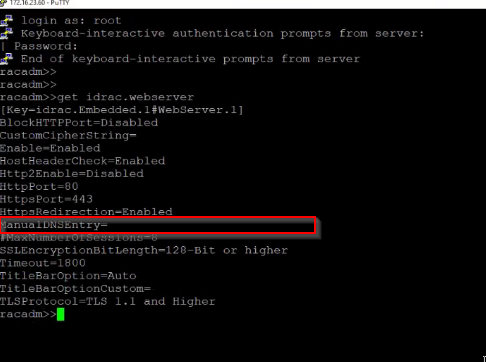
- Notice the ManualDNSEntry is blank
- racadm set idrac.webserver.ManualDNSEntry <hostname>
- Enter the iDRAC hostname in the command

- Run racadm get idrac.webserver
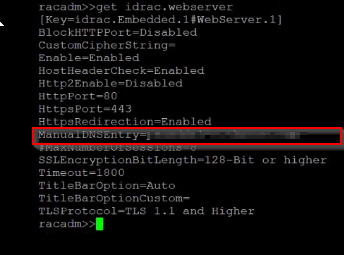
- The ManualDNSEntry should show the hostname.
- You can now access the iDRAC UI using the hostname.
受影响的产品
DD3300 Appliance, DD6400 Appliance, DD6900 Appliance, DD9400 Appliance, DD9900 Appliance文章属性
文章编号: 000210557
文章类型: How To
上次修改时间: 26 7月 2023
版本: 5
从其他戴尔用户那里查找问题的答案
支持服务
检查您的设备是否在支持服务涵盖的范围内。