IDPA: ACM could not change password on UI after disabling the ACM LDAP anonymous lookup
摘要: On or before IDPA version 2.7.3, after following Dell article 196092 to disable the ACM LDAP anonymous lookup, ACM reports an error "ACM Secure openLDAP-Failed to validate connection for idpauser user" when changing the password from UI. ...
本文适用于
本文不适用于
本文并非针对某种特定的产品。
本文并非包含所有产品版本。
症状
After following Dell article 196092, PowerProtect DP Series Appliance and IDPA: LDAP Anonymous Directory Access Permitted on Appliance Configuration Manager, to disable ACM LDAP anonymous lookup, ACM reports an error "ACM Secure openLDAP-Failed to validate connection for idpauser user" when trying to change appliance password from UI:
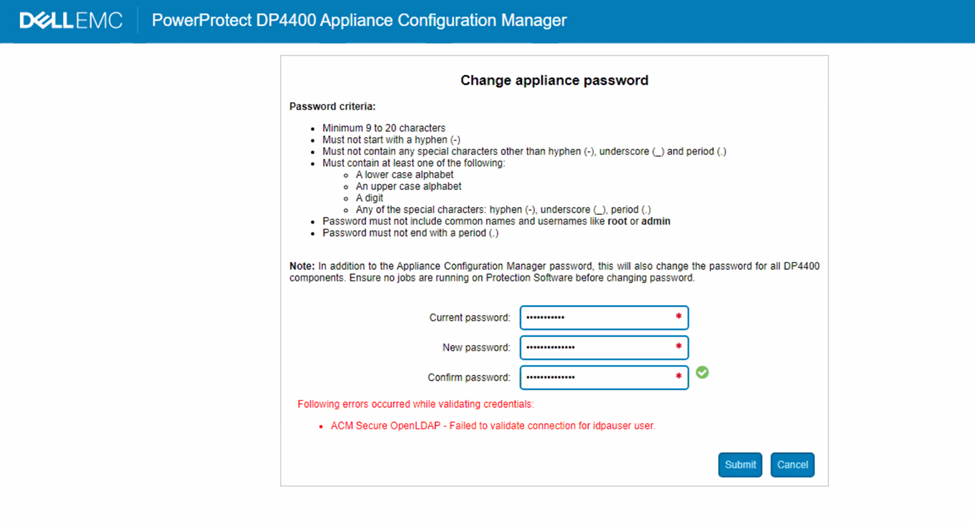
Figure 1: Screenshot of DP series error message, Failed to validate connection to idpauser user
原因
The ACM server.log shows the following error during the password validation:
2023-05-01 06:59:28,768 INFO  [https-openssl-apr-8543-exec-1]-util.SSHUtil: Remote command using SSH execution status:  Host     : [ACM IP] User     : [root]       Password : [**********] Command  : [ldapsearch -x -b "dc=idpa,dc=local" -h <ACM FQDN> "(&(objectClass=posixGroup)(cn=idpagroup)(gidNumber=1000))"]   STATUS   : [48]
2023-05-01 06:59:28,768 INFO  [https-openssl-apr-8543-exec-1]-util.SSHUtil:     STDOUT   : [ldap_bind: Inappropriate authentication (48)^M
                        additional info: anonymous bind disallowed^M]
2023-05-01 06:59:28,769 INFO  [https-openssl-apr-8543-exec-1]-util.SSHUtil:     STDERR   : []
2023-05-01 06:59:28,769 ERROR [https-openssl-apr-8543-exec-1]-util.SSHUtil: Failed to executed remote command using SSH.
2023-05-01 06:59:28,769 ERROR [https-openssl-apr-8543-exec-1]-ldapintegration.LDAPIntegrationService: validatePosixGroup --> Failed to execute command - ldapsearch -x -b "dc=idpa,dc=local" -h <ACM FQDN> "(&(objectClass=posixGroup)(cn=idpagroup)(gidNumber=1000))"
2023-05-01 06:59:28,769 INFO  [https-openssl-apr-8543-exec-1]-ldapintegration.LDAPIntegrationService: validatePosixGroup --> Failed to validate posix group name.
com.emc.vcedpa.common.exception.ApplianceException: Failed to validate posix group.
2023-05-01 06:59:58,298 INFO  [https-openssl-apr-8543-exec-1]-appliancecredentialsmanager.ApplianceCredentialsManager: ACM test connection is successful for root
2023-05-01 06:59:58,298 INFO  [https-openssl-apr-8543-exec-1]-appliancecredentialsmanager.ApplianceCredentialsManager: Change password validation status: ApplianceCredentialsConnectionStatus [productCredentialsStatusList=[ProductCredentialsStatus [productName=ACM Secure OpenLDAP, failedCredentialsStatusList=[ACM Secure OpenLDAP - Failed to validate connection for idpauser user.], sameCredentialsStatusList=[]], ProductCredentialsStatus [productName=Protection Storage, failedCredentialsStatusList=[], sameCredentialsStatusList=[]], ProductCredentialsStatus [productName=Protection Software, failedCredentialsStatusList=[], sameCredentialsStatusList=[]], ProductCredentialsStatus [productName=Data Protection Central, failedCredentialsStatusList=[], sameCredentialsStatusList=[]], ProductCredentialsStatus [productName=Reporting & Analytics, failedCredentialsStatusList=[], sameCredentialsStatusList=[]], ProductCredentialsStatus [productName=Search, failedCredentialsStatusList=[], sameCredentialsStatusList=[]], ProductCredentialsStatus [productName=Hypervisor Manager, failedCredentialsStatusList=[], sameCredentialsStatusList=[]], ProductCredentialsStatus [productName=Hypervisor, failedCredentialsStatusList=[], sameCredentialsStatusList=[]], ProductCredentialsStatus [productName=Appliance Configuration Manager, failedCredentialsStatusList=[], sameCredentialsStatusList=[]]], resultStatus=false, sameCredentialStatus=false]
The server.log shows that the LDAP anonymous lookup was disabled when trying to run the command:
acm-:/ # ldapsearch -x -b "dc=idpa,dc=local" -h <ACM FQDN> "(&(objectClass=posixGroup)(cn=idpagroup)(gidNumber=1000))"
ldap_bind: Inappropriate authentication (48)
        additional info: anonymous bind disallowed
acm-: #
In the current ACM changing appliance password workflow, on or before IDPA version 2.7.3, an anonymous LDAP lookup is used for password verification. When the LDAP anonymous lookup is disabled in ACM, the password verification fails.
An Engineering escalation has been submitted, and a permanent resolution is expected in an upcoming software release. Follow the workaround below to change the appliance password until a permanent solution is available.
解决方案
Workaround:
Follow the steps to enable anonymous LDAP lookup in ACM:
- SSH to ACM using root user
- Go to the "/etc/openldap" folder.
cd /etc/openldap
- Create a "ldif" file using the following command:
vi ldap_enable_bind_anon.ldif
Use "i" to enter the vi Insert mode and then paste the following content in the file:
dn: cn=config
changetype: modify
delete: olcDisallows
olcDisallows: bind_anon

dn: cn=config
changetype: modify
delete: olcRequires
olcRequires: authc

dn: olcDatabase={-1}frontend,cn=config
changetype: modify
delete: olcRequires
olcRequires: authc
- Save the file. Press "Esc" on the keyboard to return to vi command mode. Press ":wq!" to save the file.
- Verify the file content using the command:
cat ldap_enable_bind_anon.ldif
Example output:
acm:/etc/openldap # cat ldap_enable_bind_anon.ldif
dn: cn=config
changetype: modify
delete: olcDisallows
olcDisallows: bind_anon

dn: cn=config
changetype: modify
delete: olcRequires
olcRequires: authc

dn: olcDatabase={-1}frontend,cn=config
changetype: modify
delete: olcRequires
olcRequires: authc
acm:/etc/openldap #
- Enable anonymous LDAP lookup with the following command:
ldapadd -Y EXTERNAL -H ldapi:/// -f /etc/openldap/ldap_enable_bind_anon.ldif
Example output:
acm:/etc/openldap # ldapadd -Y EXTERNAL -H ldapi:/// -f /etc/openldap/ldap_enable_bind_anon.ldif
SASL/EXTERNAL authentication started
SASL username: gidNumber=0+uidNumber=0,cn=peercred,cn=external,cn=auth
SASL SSF: 0
modifying entry "cn=config"

modifying entry "cn=config"

modifying entry "olcDatabase={-1}frontend,cn=config"

acm-:/etc/openldap #
- Restart LDPA server:
systemctl restart slapd
- Run the following command to verify anonymous LDAP lookup is enabled:
ldapsearch -x -b "dc=idpa,dc=local" -h <ACM FQDN> "(&(objectClass=posixGroup)(cn=idpagroup)(gidNumber=1000))"
or
ldapsearch -x -b "dc=idpa,dc=local" -h `hostname -f` "(&(objectClass=posixGroup)(cn=idpagroup)(gidNumber=1000))"
Example output:
acm:/etc/openldap # ldapsearch -x -b "dc=idpa,dc=local" -h `hostname -f` "(&(objectClass=posixGroup)(cn=idpagroup)(gidNumber=1000))"
# extended LDIF
#
# LDAPv3
# base <dc=idpa,dc=local> with scope subtree
# filter: (&(objectClass=posixGroup)(cn=idpagroup)(gidNumber=1000))
# requesting: ALL
#

# idpagroup, Group, idpa.local
dn: cn=idpagroup,ou=Group,dc=idpa,dc=local
objectClass: top
objectClass: posixGroup
cn: idpagroup
memberUid: idpauser
gidNumber: 1000

# search result
search: 2
result: 0 Success

# numResponses: 2
# numEntries: 1
acm:/etc/openldap #
- Log in to the ACM UI and change the appliance password again. It should complete without issue:
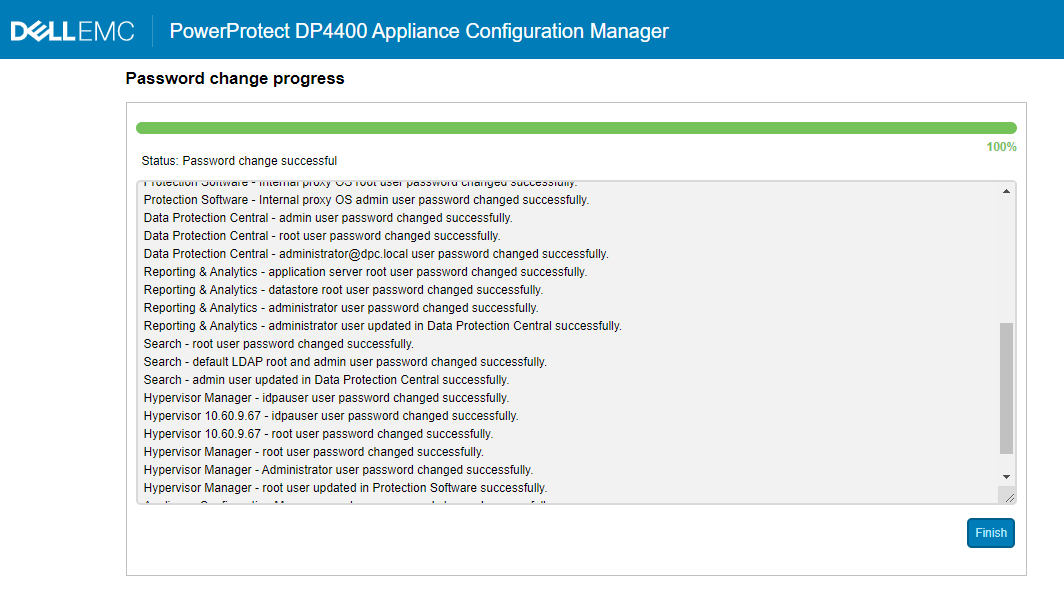
Figure 2: Screenshot of DP series password change in progress
- Review if ACM anonymous LDAP lookup must be disabled or not. If yes, follow Dell article 196092, PowerProtect DP Series Appliance and IDPA: LDAP Anonymous Directory Access Permitted on Appliance Configuration Manager, to disable the anonymous lookup again.
受影响的产品
PowerProtect DP4400, PowerProtect DP5300, PowerProtect DP5800, PowerProtect DP8300, PowerProtect DP8800, PowerProtect Data Protection Software, Integrated Data Protection Appliance Family, Integrated Data Protection Appliance Software
, PowerProtect DP5900, PowerProtect DP8400, PowerProtect DP8900
...
文章属性
文章编号: 000212941
文章类型: Solution
上次修改时间: 01 8月 2025
版本: 5
从其他戴尔用户那里查找问题的答案
支持服务
检查您的设备是否在支持服务涵盖的范围内。