PowerStore: Partial data collection cannot be downloaded
摘要: Partial data collection cannot be downloaded.
本文适用于
本文不适用于
本文并非针对某种特定的产品。
本文并非包含所有产品版本。
症状
Partial data collection can occur in a multi appliance setup when data collection fails in one of the appliances.
When this occurs, the status of the data collection is 'PARTIAL' and in PowerStore Manager UI, when choosing this DC for downloading, displays the message "Support material not available for download" as seen in the following screenshot:.
Example:
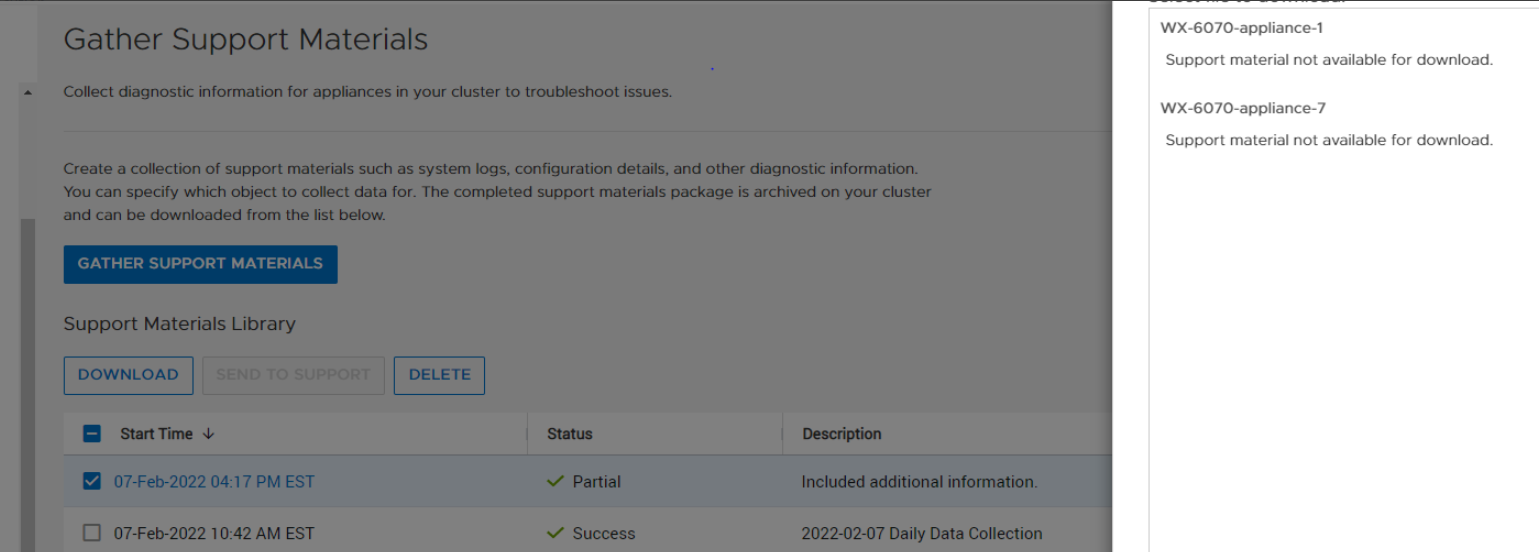
When this occurs, the status of the data collection is 'PARTIAL' and in PowerStore Manager UI, when choosing this DC for downloading, displays the message "Support material not available for download" as seen in the following screenshot:.
Example:
原因
The root cause is download for a data collection with 'dc_status' of 'PARTIAL' is not supported.
解决方案
To download the PARTIAL data collection bundle, use 'scp' from the command line in the service docker.
On the service docker of the appliance that has the PARTIAL data collection, do the following:
- Run 'svc_dc list' as shown below and identify the data collection to download.
[SVC:service@ABCDEF-B ~]$ svc_dc list |
- Elevate to root.
- Go to /cyc_var/cyc_service/data_collection/ and 'scp' the data collection to your target location as shown below:
root@ABCDEF-A:/home/service/user>cd /cyc_var/cyc_service/data_collection |
Resolution
This issue is fixed in PowerStore 3.0 and above where partial DCs can be downloaded for the PowerStore Manager UI.
受影响的产品
PowerStore文章属性
文章编号: 000213481
文章类型: Solution
上次修改时间: 13 6月 2025
版本: 4
从其他戴尔用户那里查找问题的答案
支持服务
检查您的设备是否在支持服务涵盖的范围内。