NetWorker SNMPV3 Configuration
摘要: NetWorker SNMPV3 Configuration
本文适用于
本文不适用于
本文并非针对某种特定的产品。
本文并非包含所有产品版本。
说明
Instructions are provided in the NetWorker Administration Guide for the configuration of SNMPV3 traps. This should be used for the initial configuration, along with KB: How to configure NetWorker for using SNMP.
The article below provides a working example for the configuration files on Linux operating system.
Below is a sample configuration, provided to a customer which allowed a nonfunctioning SNMPV3 trap environment to work successfully.
/etc/snmp/snmpd.conf
/etc/snmp/snmptrapd.conf

Start a second putty session from the NetWorker Server and run:
The article below provides a working example for the configuration files on Linux operating system.
Below is a sample configuration, provided to a customer which allowed a nonfunctioning SNMPV3 trap environment to work successfully.
/etc/snmp/snmpd.conf
# Please see /usr/share/doc/packages/net-snmp/EXAMPLE.conf for a
# more complete example and snmpd.conf(5).
#
# Writing is disabled by default for security reasons.  If you'd like
# to enable it uncomment the rwcommunity line and change the community
# name to something nominally secure (keeping in mind that this is
# transmitted in clear text).

# don't use ' < > in strings for syslocation or syscontact
# Note that if you define the following here you won't be able to change
# them with snmpset
# syslocation Server Room
# syscontact Sysadmin (root@localhost)

# These really aren't meant for production use.  They include all MIBS
# and can use considerable resources.  See snmpd.conf(5) for information
# on setting up groups and limiting MIBS.
rocommunity public 127.0.0.1

# sec.name source community
traptest snmpv3_user 192.168.xxx.xxx/24 public

# sec.model sec.name
group incremental usm snmpv3_user
rouser traptest
/etc/snmp/snmptrapd.conf
###########################################################################
#
# snmptrapd.conf
#
#- created by the snmpconf configuration program
#
###########################################################################
# SECTION: Authentication options
#
#   Authentication options
# ignoreauthfailure: Ignore authentication failure traps
#   arguments: (1|yes|true|0|no|false)
#authCommunity log,net,execute public
#disableAuthorization yes
#snmpTrapdAddr udp:162
createUser -e 3136353137373138 traptest MD5 password123 DES password123
authUser log traptest
The highlighted values are obtained and set from the NSR server properties:
NOTE: Any changes to configuration files require a restart of snmpd and snmptrapd.
Testing
Start a putty session on the trap receiver host (this could also be the NetWorker Server) and run:snmptrapd -f -C -c /etc/snmp/snmptrapd.conf -Le -M /usr/share/snmp/mibs -m NETWORKER-MIB * Note: Add -D switch for Debug output
Start a second putty session from the NetWorker Server and run:
nsrtrap -i 3 -v trapreceiver_hostname
This is a V3 Test
ctrl <D>
If successful you should see in the log for your first putty session;
2024-03-01 13:10:45 nwserv1 [UDP: [192.168.xxx.xxx]:33276->[192.168.xx.xxx]:162]:
SNMPv2-SMI::mib-2.1.3.0 = Timeticks: (7254049) 20:09:00.49      SNMPv2-SMI::snmpModules.1.1.4.1.0 = OID: NETWORKER-MIB::nwServerNotification    SNMPv2-SMI::mib-2.1.1.0 = STRING: "This is a V3 Test"
Configuring Backup Notifications:
On the SNMP trap server, run the following command:
snmptrapd -f -C -c /etc/snmp/snmptrapd.conf -Le -M /usr/share/snmp/mibs -m NETWORKER-MIB &
Note;
- Backup configuration on action level only supports SNMPv2
- Backup configuration on the policy level supports both SNMPv2 and v3
/usr/sbin/nsrtrap trapreceiver_hostname -i 3
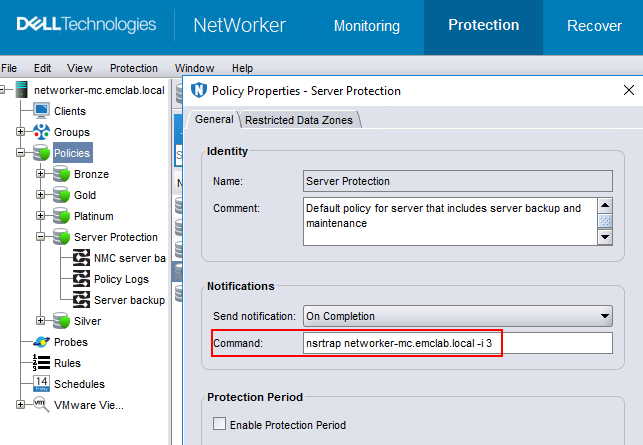
The /var/log/snmptrap.log contains:
root@networker-mc:~# tail -n 71 /var/log/snmptrap.log
SNMPv2-SMI::mib-2.1.3.0 = Timeticks: (301392549) 34 days, 21:12:05.49   SNMPv2-SMI::snmpModules.1.1.4.1.0 = OID: NETWORKER-MIB::nwServerNotification    SNMPv2-SMI::mib-2.1.1.0 = STRING: "--- Server Backup Action Report ---
Policy name:Server Protection
Workflow name:Server backup
Action name:Server db backup
Action status:succeeded
Action start time:03/05/24 13:23:22
Action duration:0 hours 0 minutes 25 seconds
--- Successful Server Backup Save Sets ---
        3102171936/1709663008 networker-mc.emclab.local: index:networker-mc.emclab.local level=1, 53 MB, 62 files
        ...(removed for brevity)...
        2917622576/1709663024 networker-mc.emclab.local: bootstrap level=full, 9692 KB, 294 files
--- Bootstrap backup report ---
      date     time       ssid        volume            device                      access info
  02/05/2024 10:00:24 AM  3485530120  ddveBootstrap.002 ddve.emclab.local_Bootstrap ddve.emclab.local:/networker-mc/Bootstrap
  ...(removed for brevity)...
  03/05/2024 01:23:44 PM  2917622576  ddveBootstrap.002 ddve.emclab.local_Bootstrap ddve.emclab.local:/networker-mc/Bootstrap
--- Failed Server Backup Save Sets ---
        none"
2024-03-05 13:23:49 networker-mc.emclab.local [UDP: [192.168.25.10]:54540->[192.168.25.10]:162]:
SNMPv2-SMI::mib-2.1.3.0 = Timeticks: (301392681) 34 days, 21:12:06.81   SNMPv2-SMI::snmpModules.1.1.4.1.0 = OID: NETWORKER-MIB::nwServerNotification    SNMPv2-SMI::mib-2.1.1.0 = STRING: "---Summary notification report---
Policy name:Server Protection
        Workflow name:Server backup, Workflow status:succeeded, Workflow start time:03/05/24 13:23:22, Duration:0 hours 0 minutes 26 seconds
                Action name:Server db backup, Action status:succeeded, Action start time:03/05/24 13:23:22, Duration:0 hours 0 minutes 25 seconds
                Action name:Expiration, Action status:succeeded, Action start time:03/05/24 13:23:47, Duration:0 hours 0 minutes 1 seconds"
其他信息
Additional information regarding SNMP traps can be found in the NetWorker Administration Guide: https://www.dell.com/support/home/product-support/product/networker/docs
受影响的产品
NetWorker Family文章属性
文章编号: 000222671
文章类型: How To
上次修改时间: 05 3月 2024
版本: 1
从其他戴尔用户那里查找问题的答案
支持服务
检查您的设备是否在支持服务涵盖的范围内。