Dell Networking SONiC 如何設定靜態任一傳送閘道 (任一傳送位址)
摘要: 本文說明如何在 Dell Networking Enterprise SONiC 中設定靜態任播閘道 (任播位址)。
本文适用于
本文不适用于
本文并非针对某种特定的产品。
本文并非包含所有产品版本。
说明
先決條件我們使用標準介面命名來演示這些概念。請參閱文章 Dell Networking S 系列:基本介面組態 – SONiC 4.0,如需有關介面命名的詳細資訊 |
索引
靜態任一傳播閘道
靜態任播閘道 (SAG) 使多個交換機能夠在主動/主動路由器配置中使用共用閘道位址同時路由數據包。每個交換器都配置有任播虛擬 IP 位址和任播虛擬 MAC 位址。任播虛擬 MAC 在所有配置的任播 IP 位址之間共用。
在脊葉 EVPN 設置中,所有閘道路由的枝葉交換機都具有一致的任播配置。具體而言,每個交換機都設置了相同的任播虛擬IP位址和任播虛擬MAC位址。
MCLAG 中的 SAG
在 Dell SONiC 中使用多機箱連結聚合 (MCLAG) 時,請在 VRRP 上改用靜態任播閘道。在相同 vlan 介面的兩個 MCLAG 對等方上設定相同的任播 IP 位址和任播 MAC 位址。
在 Dell Enterprise SONiC 中,MCLAG 目前不支援 VRRP。截至最新版本 (Dell SONiC 4.2),此聲明仍然正確無誤。如需日後的相容性,請參閱您所使用版本的使用者指南。
例如,在以下拓撲中,我們在兩個 MCLAG 對等方中為 vlan 100 使用相同的任播 IP 位址 10.0.0.254/24。
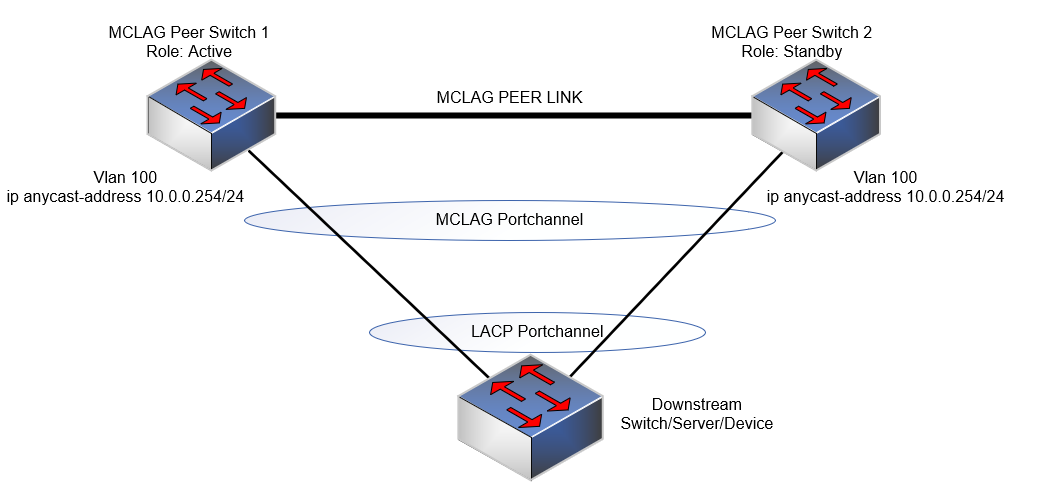
注意:
- 任一傳送 IP 位址無法用於管理目的。
- 任播虛擬 MAC 位址不能是多播 MAC 位址。
組態語法
| 組態 | 說明 |
|---|---|
admin@DELLSONiC:~$ sonic-cli |
輸入 Dell SONiC CLI |
DELLSONiC# configure terminal |
進入設定模式。 |
DELLSONiC(config)# ip anycast-address enable |
啟用任一傳播閘道位址 |
DELLSONiC(config)# ip anycast-mac-address xx:xx:xx:xx:xx:xx |
設定任一傳播 MAC 位址 |
DELLSONiC(config)# interface Vlan <vlan ID> |
設定 vlan |
DELLSONiC(config-if-Vlan-<ID>)# ip anycast-address <A.B.C.D/mask> |
設定任一傳送閘道位址 |
若要停用任一傳播閘道:
| 組態 | 說明 |
|---|---|
DELLSONiC(config)# ip anycast-address disable |
停用任一傳播閘道位址 |
使用以下命令確認:
| 組態 | 說明 |
|---|---|
DELLSONiC# show ip static-anycast-gateway |
檢視靜態任播閘道的詳細資訊 |
範例組態
在 Vlan 100 中設定 IP 任播位址: admin@DELLSONiC:~$ sonic-cli DELLSONiC# configure terminal DELLSONiC(config)# ip anycast-mac-address 00:11:22:33:44:55 DELLSONiC(config)# ip anycast-address enable Lets configure anycast IP in interface vlan 100 DELLSONiC(config)# interface Vlan 100 DELLSONiC(config-if-Vlan100)# ip anycast-address 10.0.0.254/24 DELLSONiC(config-if-Vlan100)# end DELLSONiC# |
若要確認 Vlan 100 的 IP 位址:
DELLSONiC# show ip interfaces Flags: U-Unnumbered interface, A-Anycast IP ----------------------------------------------------------------------------------------------------------------- Interface IP address/mask VRF Admin/Oper Flags ----------------------------------------------------------------------------------------------------------------- Vlan100 10.0.0.254/24 up/up A |
若要驗證靜態任播閘道:
DELLSONiC# show ip static-anycast-gateway Configured Anycast Gateway MAC address: 00:11:22:33:44:55 IPv4 Anycast Gateway MAC address: enable Total number of gateway: 1 Total number of gateway admin UP: 1 Total number of gateway oper UP: 1 Interfaces Gateway Address Vrf Admin/Oper ------------------- --------------- --------------- ---------- Vlan10 10.0.0.254/24 up/up |
受影响的产品
Enterprise SONiC Distribution, PowerSwitch E3200-ON Series, Dell EMC Networking N3200-ON, PowerSwitch S5212F-ON, PowerSwitch S5224F-ON, PowerSwitch S5232F-ON, PowerSwitch S5248F-ON, PowerSwitch S5296F-ON, PowerSwitch Z9100-ON, PowerSwitch Z9264F-ON
, PowerSwitch Z9332F-ON, PowerSwitch Z9432F-ON
...
文章属性
文章编号: 000223335
文章类型: How To
上次修改时间: 20 3月 2024
版本: 3
从其他戴尔用户那里查找问题的答案
支持服务
检查您的设备是否在支持服务涵盖的范围内。