No Disconnect Option in Bluetooth Settings After Connecting Monitor Using Wireless Display
摘要: This article provides information about wireless display (WIDI) missing the Disconnect button.
本文适用于
本文不适用于
本文并非针对某种特定的产品。
本文并非包含所有产品版本。
症状
Affected Platforms:
- Dell 14 Plus DB14250
- Dell 14 Plus 2-in-1 DB04250
- Dell 16 Plus DB16250
- Dell 16 Plus 2-in-1 DB06250
When connecting to a Wireless display using Bluetooth, there is no Disconnect option available for WIDI under Add a Bluetooth Devices setting.
Expected behavior:
Show the connected device and there is a Disconnect button.
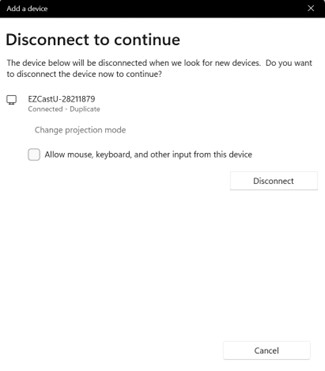
Issue:
The Add a Device screen does not show any connected devices and there is no disconnect button.
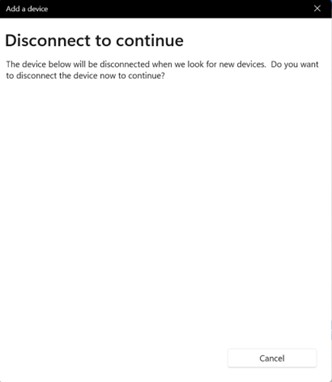
原因
This is a Windows UI issue in 24H2, missing the wireless display Disconnect button.
解决方案
Microsoft will release a Hotfix to resolve this issue.
Workaround:
- Win + P set computer screen only to disconnect.
- Click Disconnect in Bluetooth & Devices settings.
受影响的产品
Dell 14 Plus 2-in-1 DB04250, Dell 16 Plus 2-in-1 DB06250, Dell 14 Plus DB14250, Dell 16 Plus DB16250文章属性
文章编号: 000286293
文章类型: Solution
上次修改时间: 22 4月 2025
版本: 2
从其他戴尔用户那里查找问题的答案
支持服务
检查您的设备是否在支持服务涵盖的范围内。