如何确认安装了 DSA-2025-053 中列出的修正的 ControlVault3 版本
摘要: 本文提供有关如何确认安装 DSA-2025-053 中列出的修正的 ControlVault3 版本的信息。
本文适用于
本文不适用于
本文并非针对某种特定的产品。
本文并非包含所有产品版本。
说明
目录
使用设备管理器确认 ControlVault3 版本
查找 ControlVault 驱动程序包版本的最佳方法是在设备管理器中查找 ControlVault 的版本。
- 在命令之前键入
devmgmt.msc,然后按 Enter 键 - 查找并展开 ControlVault 设备,右键单击 Dell ControlVault,选择 属性,转至 版本控制 选项卡
提醒:该设备可能列出了没有指纹触摸传感器的 ControlVault
- 确保您的固件版本为 5.15.7.0(对于 ControlVault3)或 6.2.24.0(对于 ControlVault3+)
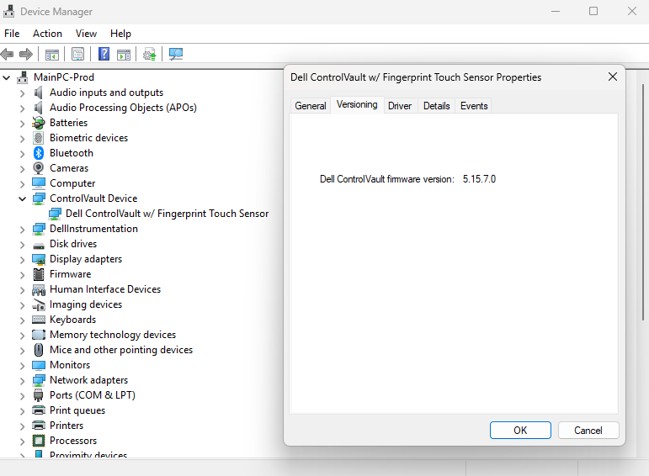
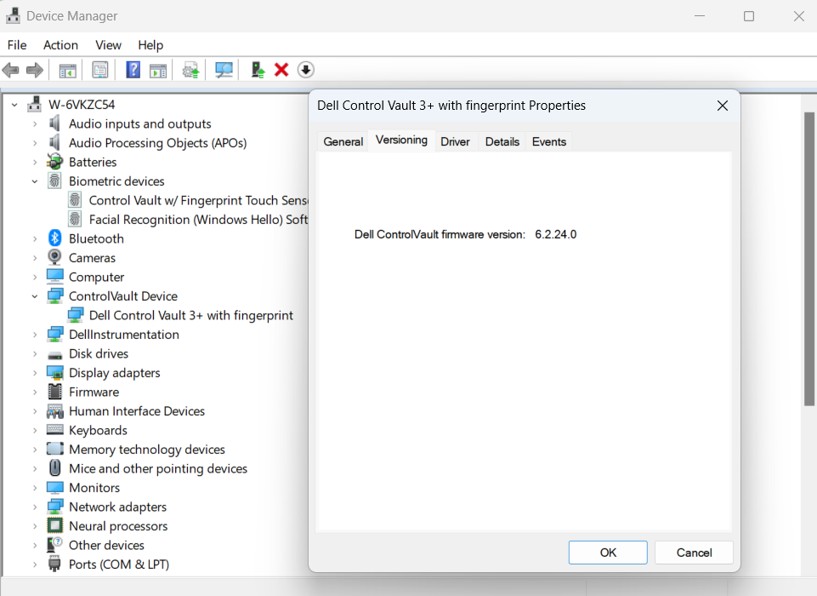
使用 PowerShell 脚本确认 ControlVault3 版本
这些说明旨在直接在利用下面的 PowerShell 脚本进行测试的计算机上运行。
- 使用本文底部的脚本,创建名为以下内容的文件:
Verify_ControlVault_dsa-2025-053_Standalone_V1.ps1- 此脚本:
- 检查计算机上是否安装了 Dell Control Vault 驱动程序并将结果返回到
$ControlVaultDriver - 如果找到 Control Vault 驱动程序,请从以下位置提取最后一行:
CVFirmwareUpgradeLog.txt并将固件 (FW) 版本与 DSA 中 CV3 和 CV3+ 所需的固件版本进行比较。如果所需的固件满足,则输出到控制台
- 检查计算机上是否安装了 Dell Control Vault 驱动程序并将结果返回到
- 此脚本:
- 打开 PowerShell
- 按 Windows 键 + R,键入
PowerShell并按 Enter
或, - 在“开始”菜单中搜索 PowerShell 并选择它
- 按 Windows 键 + R,键入
- PowerShell 可能会阻止脚本,具体取决于计算机的策略,您必须通过将此脚本复制并粘贴到 PowerShell 中并按 Enter 键来临时更改此限制:
Set-ExecutionPolicy -Scope Process -ExecutionPolicy Bypass
- 使用 cd 将保存脚本的目录更改为其中的目录,例如:
cd “C:\Users\UserName\Documents\Scripts"
- 将以下内容复制并粘贴到 PowerShell 中,然后按 Enter 键以运行脚本:
.\Verify_ControlVault_dsa-2025-053_Standalone_V1.ps1
- 将返回以下结果之一:
- ControlVault 固件应已更新。
- 最新的 ControlVault 固件包括 DSA-2025-053 的缓解措施
- 您的计算机没有 ControlVault
- 您的计算机必须重新启动
- 如果脚本无法解释固件版本,则出错
<#PSScriptInfo
.VERSION V1.0 - 8/14/2025
#>

<#
.DESCRIPTION
	This script is intended to verify a Dell system against the vulnerabilities disclosed here https://www.dell.com/support/kbdoc/000276106/dsa-2025-053
	and is not intended to be supported/updated
	It is not intended to be used for keeping ControlVault firmware or drivers up-to-date
	Checks if Dell Control Vault Driver is installed on System and returns result to $ControlVaultDriver
	If Control Vault Driver is found, pull the last line from CVFirmwareUpgradeLog.txt and compare the FW revision to the
	required FW revision from DSA for CV3 and CV3+.  If required firmware meet, output to console

.USEAGE
	This script, Verify_ControlVault_dsa-2025-053_Standalone_V1.ps1 is intended to be run directly on the system intended for testing.
	Verify_ControlVault_dsa-2025-053_inTune_XX.ps1 still in development intended to be run for multiple device compliance reporting through Intune

	RETURNS: ControlVault firmware should be updated.
	RETURNS: Verification Success: ControlVault firmware includes mitigations for DSA-2025-053
	RETURNS: Verification Success: Your computer does not have ControlVault
	RETRUNS: ControlVault maybe updated but needs to complete firmware update validation, Please reboot computer
	RETRUNS: There appears to be an issue parsing the CVFirmwareUpgradeLog.txt; this is likely caused by the last entry of this log not containing the expected data
#>

# Static variables with firmware versions with remediation for ControlVault3 and ControlVault3+
$cv3_required_FWver = [Version]"5.15.7.0"
$cv3plus_required_FWver = [Version]"6.2.24.0"

# Static variables for messaging
$DSA_URL = "https://www.dell.com/support/kbdoc/000276106/dsa-2025-053"
$checkmark = [char]0x2705
$xmark = [char]0x2612
$CVoutofdate = "$xmark ControlVault firmware should be updated. Please refer to $DSA_URL"
$CVcompliant = "$checkmark Verification Success: ControlVault firmware includes mitigations for DSA-2025-053"
$CVnotfound = "Verification Success: Your computer does not have ControlVault"
$CVerror = "There appears to be an issue parsing the CVFirmwareUpgradeLog.txt; this is likely caused by the last entry of this log not containing the expected data"
$CVreboot = "ControlVault maybe updated but needs to complete firmware update validation, Please reboot computer"

# Checks if Dell Control Vault Driver is installed on System and returns result to $ControlVaultDriver
$controlVaultDriver = Get-WmiObject Win32_PnPSignedDriver | Where-Object { $_.DeviceName -like "*Control Vault*" }
$resultstatus = 3

# Find the last entry of the firmwareupgrade log and determine if the firmware version is greater than the firmware version required
if ($ControlVaultDriver){
	$matchingLines = Get-Content "c:\Windows\System32\CVFirmwareUpgradeLog.txt" | Where-Object { $_ -match "Will not update ControlVault firmware from" -or $_ -match "Updating ControlVault firmware from" }
	$lastLine = $matchingLines | Select-Object -Last 1

	if ($lastLine -match "Updating ControlVault firmware from") {
		$resultstatus = 5
		Write-Host "$CVreboot"
	}
	else{
		if ($lastLine -match "Will not update ControlVault firmware from\s+(\d+\.\d+\.\d+\.\d+)") {
			$versionStr = $matches[1]
			$version = [Version]$versionStr

			if (($version.Major -eq 5 -and $version -ge $cv3_required_FWver) -or
				($version.Major -eq 6 -and $version -ge $cv3plus_required_FWver)) {
				$resultstatus = 4
				Write-Host "$CVcompliant"
			}
			else{
				$resultstatus = 2
				Write-Host "$CVoutofdate"
			}
		}
		else{
			$resultstatus = 3
			Write-Host "$CVerror"
		}
	}
}
else{
	$resultstatus = 1
	Write-Host "$CVnotfound"
}


# Create result object
$result = [PSCustomObject]@{
    ComputerName = $env:COMPUTERNAME
    Timestamp = Get-Date -Format "yyyy-MM-dd HH:mm:ss"
    ControlVaultInstalled = $null -ne $controlVaultDriver
	Resultstatus = $resultstatus
    DriverDetails = if ($controlVaultDriver) {

		$controlVaultDriver | Select-Object DeviceName
    } else {
        $null
    }
}

# Return as JSON
$result | ConvertTo-Json -Depth 3
其他信息
另一个脚本正在开发中,将通过 inTune 运行以实现多设备合规性,本文将在可用时更新这些详细信息。
有关更多详细信息,请参阅 DSA-2025-053 。
受影响的产品
Dell Pro Max 14 MC14250, Dell Pro Max 16 MC16250, Dell Pro 13 Plus PB13250, Dell Pro 14 Plus PB14250, Dell Pro 16 Plus PB16250, Dell Pro Rugged 13 RA13250, Dell Pro Rugged 14 RB14250, Latitude 7030 Rugged Extreme Tablet, Latitude 7200 2-in-1
, Latitude 7210 2-in-1, Latitude 7220EX Rugged Extreme Tablet, Latitude 7220 Rugged Extreme Tablet, Latitude 7230 Rugged Extreme Tablet, Latitude 5300 2-in-1, Latitude 5300, Latitude 5310 2-in-1, Latitude 5310, Latitude 5320, Latitude 5330, Latitude 5340, Latitude 5350, Latitude 7300, Latitude 7310, Latitude 7320, Latitude 7320 Detachable, Latitude 7330, Latitude 7330 Rugged Extreme, Latitude 7340, Latitude 7350, Latitude 7350 Detachable, Latitude 9330, Latitude 5400, Latitude 5401, Latitude 5410, Latitude 5411, Latitude 5421, Latitude 5430 Rugged, Latitude 5431, Latitude 5440, Latitude 5450, Latitude 7400 2-in-1, Latitude 7400, Latitude 7410, Latitude 7420, Latitude 7430, Latitude 7440, Latitude 7450, Latitude 9410, Latitude 9420, Latitude 9430, Latitude 9440 2-in-1, Latitude 9450 2-in-1, Latitude 5500, Latitude 5501, Latitude 5510, Latitude 5511, Latitude 5520, Latitude 5521, Latitude 5530, Latitude 5531, Latitude 5540, Latitude 5550, Latitude 7520, Latitude 7530, Latitude 9510, Latitude 9520, Latitude 7640, Latitude 7650, Latitude 5420, Latitude 5430, Precision 3470, Precision 3480, Precision 3490, Precision 5470, Precision 5480, Precision 5490, Precision 3540, Precision 3541, Precision 3550, Precision 3551, Precision 3560, Precision 3561, Precision 3570, Precision 3571, Precision 3580, Precision 3581, Precision 3590, Mobile Precision 3591, Precision 7540, Precision 7550, Precision 7560, Precision 5680, Mobile Precision 5690, Precision 7670, Precision 7680, Precision 7740, Precision 7750, Precision 7760, Precision 7770, Precision 7780
...
文章属性
文章编号: 000353975
文章类型: How To
上次修改时间: 20 10月 2025
版本: 5
从其他戴尔用户那里查找问题的答案
支持服务
检查您的设备是否在支持服务涵盖的范围内。