PowerStore: PUHC fails for "CA serial number validity check failed. Please call Support. (invalid_ca)"
摘要: The PowerStore Pre Upgrade Health Check (PUHC) fails for "CA serial number validity check failed. Please call Support. (invalid_ca)".
本文章適用於
本文章不適用於
本文無關於任何特定產品。
本文未識別所有產品版本。
症狀
The PowerStore Pre Upgrade Health Check (PUHC) fails for "CA serial number validity check failed. Please call Support. (invalid_ca)".
PUHC failed with invalid_ca on both the nodes.
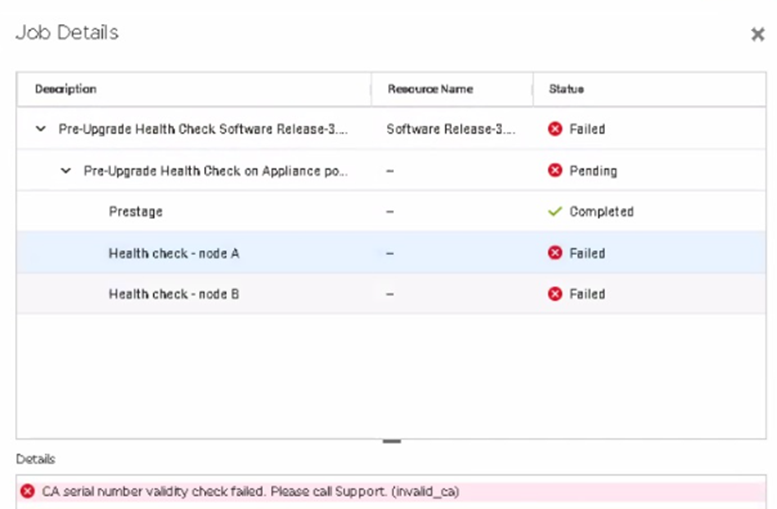
PUHC failed with invalid_ca on both the nodes.
原因
The CA certificate on PowerStore has an invalid serial number, due to a strongSwan bug. This issue can occur on appliances running PowerStore OS 2.1 and below that are later upgraded to PowerStore OS 3.0 or 3.2.
A check was added to the 3.5 release of PUHC to identify this issue and allow for corrective action before performing an NDU.
A check was added to the 3.5 release of PUHC to identify this issue and allow for corrective action before performing an NDU.
解析度
Workaround:
If this issue is encountered contact Dell Technical Support and reference this article so a plan of action can be performed to resolve the CA certificate invalid serial number and allow PUHC to complete successfully.
Fix:
This issue is fixed in PowerStore OS 3.5.0.0
If this issue is encountered contact Dell Technical Support and reference this article so a plan of action can be performed to resolve the CA certificate invalid serial number and allow PUHC to complete successfully.
Fix:
This issue is fixed in PowerStore OS 3.5.0.0
受影響的產品
PowerStore文章屬性
文章編號: 000218891
文章類型: Solution
上次修改時間: 29 7月 2025
版本: 3
向其他 Dell 使用者尋求您問題的答案
支援服務
檢查您的裝置是否在支援服務的涵蓋範圍內。