How to Back Up and Restore Dell Security Management Server
摘要: Dell Security Management Server and Dell Data Protection Enterprise Edition Server can be backed up and restored by following these instructions.
本文章適用於
本文章不適用於
本文無關於任何特定產品。
本文未識別所有產品版本。
症狀
Dell Security Management Server (formerly Dell Data Protection | Enterprise Edition Server) may be backed up and restored in order to:
- Migrate the server.
- Troubleshoot the product.
- Address operating system incompatibility.
This article covers the steps to back up and restore the product.
Affected Products:
- Dell Security Management Server
- Dell Data Protection | Enterprise Edition Server
Affected Versions:
- v8.0.0 and Later
原因
Not applicable
解析度
Upon completing a successful Backup, an administrator must Restore it. Click the appropriate function for more information.
Note: Front-end Dell Security Management Servers are not required to be backed up or restored.
Backup
Dell Security Management Server
Note: Backups should be stored on an external source, for example, network-attached storage (NAS).
A weekly backup should be created on the back-end Dell Security Management Server for:
%ENV:SYSTEMDRIVE%\Program Files\Dell\Enterprise Edition\Compatibility Server\conf\server_config.xml%ENV:SYSTEMDRIVE%\Program Files\Dell\Enterprise Edition\Compatibility Server\conf\secretKeyStore%ENV:SYSTEMDRIVE%\Program Files\Dell\Enterprise Edition\Compatibility Server\conf\gkresource.xml
Note: The default path may differ if modified during installation. Confirm the directory where these files are stored before creating a backup task.
Customers should also reference:
- How to Back Up and Import Custom Compliance Reports in Dell Security Management Server if custom Compliance Reporter reports are in use.
- How to Back Up and Restore the Advanced Threat Prevention Certificate for Dell Data Security Servers if Advanced Threat Prevention is in use.
SQL Server
The Dell Security Management Server SQL database should be backed up nightly using full backups with transactional logging enabled. For more information, reference Backup Overview (SQL Server)
Restore
- Perform a clean install of the same version of Dell Security Management Server or Dell Data Protection | Enterprise Edition Server that was previously installed. During installation, when prompted to select a SQL database, select create a new database.
Note:
- For more information, reference How to Install Dell Security Management Server.
- For more information about identifying the version, reference How to Identify the Dell Data Security / Dell Data Protection Server Version.
- Restore the Dell Security Management Server SQL database. For more information, reference Restore and Recovery Overview (SQL Server)
- Configure the restored SQL database for use with the Dell Security Management Server. For more information, reference How to Configure SQL for Dell Security Management Server / Dell Data Protection Enterprise Edition Server.
- Stop the Dell Security Management Server services. For more information, reference How to Stop and Start Services in Dell Security Management Server.
- Restore the backed-up files:
%ENV:SYSTEMDRIVE%\Program Files\Dell\Enterprise Edition\Compatibility Server\conf\server_config.xml%ENV:SYSTEMDRIVE%\Program Files\Dell\Enterprise Edition\Compatibility Server\conf\secretKeyStore%ENV:SYSTEMDRIVE%\Program Files\Dell\Enterprise Edition\Compatibility Server\conf\gkresource.xml
- Go to
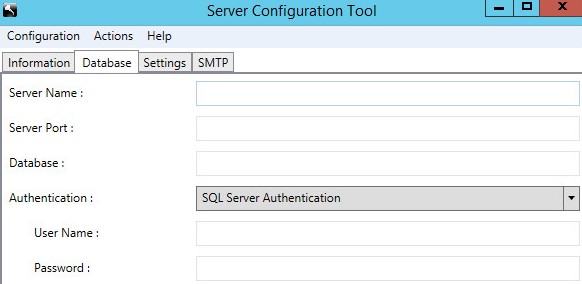
%ENV:SYSTEMDRIVE%\Program Files\Dell\Enterprise Edition\Server Configuration Tooland run the Server Configuration Tool, Credant.Configuration.exe. Click the Database tab and populate the fields.
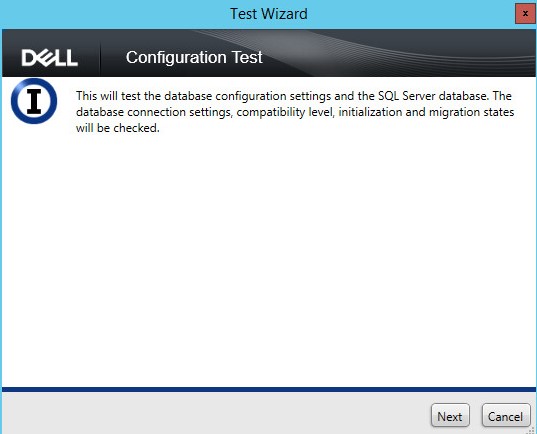
- Click the Actions menu and then select Test Database Configuration.

- Click Next.
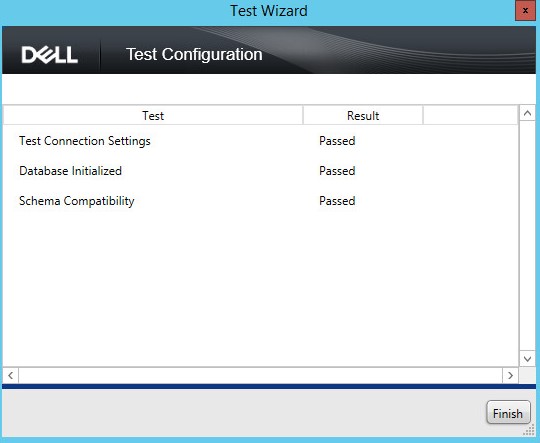
- Click Finish.
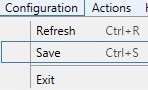
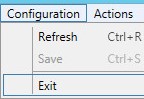
- Click the Configuration menu and then select Save.
- Click the Configuration menu and then select Exit.
- Start the Dell Security Management Server services. For more information, reference How to Stop and Start Services in Dell Security Management Server.
Customers should also reference:
- How to Back Up and Import Custom Compliance Reports in Dell Security Management Server if custom Compliance Reporter reports must be restored.
- How to Back Up and Restore the Advanced Threat Prevention Certificate for Dell Data Security Servers if the Advanced Threat Prevention certificate must be restored.
To contact support, reference Dell Data Security International Support Phone Numbers.
Go to TechDirect to generate a technical support request online.
For additional insights and resources, join the Dell Security Community Forum.
受影響的產品
Dell Encryption文章屬性
文章編號: 000124922
文章類型: Solution
上次修改時間: 01 11月 2023
版本: 10
向其他 Dell 使用者尋求您問題的答案
支援服務
檢查您的裝置是否在支援服務的涵蓋範圍內。