M.2 NVMe SSD Sorting Issue with Intel VROC (Virtual RAID on CPU) Applications
摘要: This article provides workaround to identify the NVMe SSD ports location on Dell Precision 5860 Tower and Dell Precision 7960 Tower.
本文章適用於
本文章不適用於
本文無關於任何特定產品。
本文未識別所有產品版本。
症狀
The NVMe SSD ports information shown in Intel Virtual RAID on CPU (Intel VROC) application does not include the Front or Rear information of SSD ports location (Figure 1).
This issue is seen when NVMe SSD is installed to Hot Swap Backplane (HSBP).
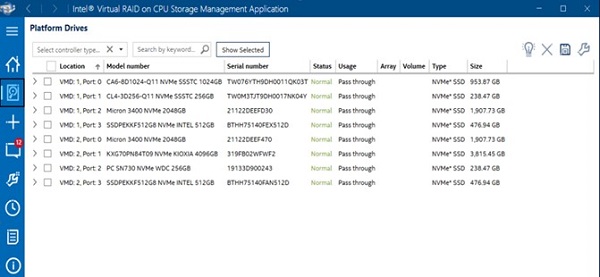
(Figure 1. Missing Front or Rear information of SSD ports location)
Affected Models:
- Precision 5860 Tower
- Precision 7960 Tower
原因
Intel current VROC application has no NVMe SSD ports location.
解析度
Workaround to identify SSD location on Precision 5860 Tower or Precision 7960 Tower
It is recommended to check SSD's port labels listed in the Intel-VROC Pre-OS or UEFI Human Interface Infrastructure (HII) which is built into system BIOS setup screen to identify SSD location.
It is not recommended to open the computer’s chassis to check the motherboard and HSBP labels of NVMe ports for SSD location.
See the following table for the ports label, mapping of motherboard, and HSBP silkscreen labels.
- Connect two M.2 SSDs through HSBP and Front NVME 0 and 1 port. The SSD port will show as Port 3:0 and Port 3:1 in Intel-VROC PreOS or UEFI HII.
- Connect two M.2 SSD through HSBP and Rear NVME 2-3 port. The SSD port will show as Port 2:2 and Port 2:3 in Intel-VROC PreOS or UEFI HII (Figure 2).
Note: Power off the computer before unplugging or removing NVMe SSD devices.
| Motherboard Silkscreen | PEG port |
HSBP board Silkscreen | |
| HSBP 0/2 | HSBP 1/3 | ||
| FRONT NVME 2-3 | PE3 | Port 3:2 | Port 3:3 |
| FRONT NVME 0-1 | Port 3:0 | Port 3:1 | |
| FRONT NVME 2-3 | PE2 | Port 2:2 | Port 2:3 |
| FRONT NVME 0-1 | Port 2:0 | Port 2:1 | |
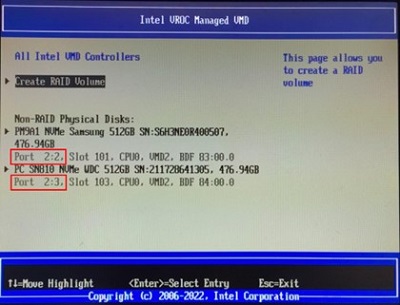
(Figure 2. The SSD port shown in Intel-VROC PreOS or UEFI HII)
Resolution
For a long-term resolution, Intel plans to add drives location customization features on the next generation of version 8.5 that will be released around the end of 2023.
受影響的產品
Precision 5860 Tower, Precision 7960 Tower文章屬性
文章編號: 000211782
文章類型: Solution
上次修改時間: 22 4月 2025
版本: 3
向其他 Dell 使用者尋求您問題的答案
支援服務
檢查您的裝置是否在支援服務的涵蓋範圍內。