PowerFlex 4.X How To Use Internal PowerFlex Manager HTTP Share for 4.X Uploads
摘要: This article explains how to use the internal HTTP share for 4.x PowerFlex Manager Release Certification Matrix (RCM), Intelligent Catalog (IC), ISO uploads.
本文章適用於
本文章不適用於
本文無關於任何特定產品。
本文未識別所有產品版本。
說明
PowerFlex Manager 4.x has an internal HTTP file share that can be used to upload ISOs, RCMs, or IC bundles.
This can be useful if Common Internet File System (CIFS) shares are not available or not working properly for any reason.
- Find the PowerFlex Manager Platform (PFMP) node that is hosting the HTTP share pod:
# kubectl get pod -n powerflex -o json http-share-0 | jq -r '.spec.nodeName'
pfmp1
- Copy the needed file to the /opt/platform/fileshare directory on that node, pfmp1 in this example.
- Useful tools to accomplish this are WinSCP, Filezilla, or SCP from another Linux host.
- Any utility allowing a copy of the needed files to the Linux PFMP host can be used.
- Check that the file is now seen from the HTTP share.
- Use a web browser and connect to
"https://<PFMP_FQDN>/httpshare/download/
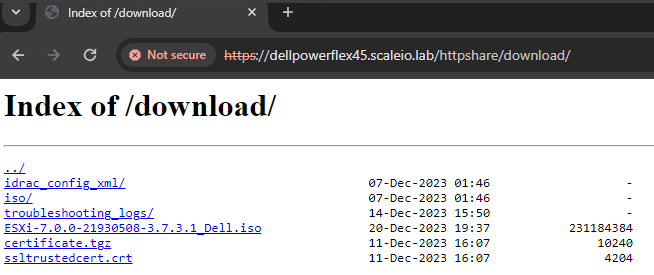
- There should be a few files there, including the file copied in step 2
- In this screenshot below, note the ESXi ISO file that shows in the browser
- Collect the link to the needed file by right-clicking the file and selecting "Copy link address."
- Go to the Settings section of PFxM dependent upon the file that must be uploaded:
- RCM, IC bundle: Settings > Compliance Versions
- ISOs: Settings > OS Images
- Click the "Add" button and fill out the file path as collected from step 4, along with any other pertinent information. No credentials are needed for this HTTP share.
- Click the "Test Connection" button to ensure the path and file are reachable.
- Finalize the RCM, IC, or ISO image repository by clicking the "Add" button on the lower right.
The RCM, IC bundle, or ISO is now added as a repository to use for deployments.
受影響的產品
PowerFlex appliance R650, PowerFlex appliance R640產品
PowerFlex rack, VxFlex Ready Nodes, PowerFlex custom node, PowerFlex appliance R6525, PowerFlex appliance R660, PowerFlex appliance R6625, Powerflex appliance R750, PowerFlex appliance R760, PowerFlex appliance R7625, PowerFlex appliance R740XD
, PowerFlex appliance R7525, PowerFlex appliance R840
...
文章屬性
文章編號: 000220681
文章類型: How To
上次修改時間: 24 12月 2024
版本: 2
向其他 Dell 使用者尋求您問題的答案
支援服務
檢查您的裝置是否在支援服務的涵蓋範圍內。