Microsoft Edge Runtime Error when Opening SupportAssist
摘要: Microsoft Edge WebView2 runtime error is displayed when opening SupportAssist for Home PCs v4.0 on computers that does not have the WebView2 runtime installed.
本文章適用於
本文章不適用於
本文無關於任何特定產品。
本文未識別所有產品版本。
症狀
Affected Products:
- SupportAssist for Home PCs
Affected Versions:
- v4.0
When you open the SupportAssist for Home PCs v4.0 on computers that do not have the WebView2 runtime installed, Edge displays the following messages:
- A suitable version of Microsoft Edge Webview2 Runtime was not detected. Download and install WebView2 Runtime.
- Error occurred while initializing webview2: Object reference not set to an instance of an object.
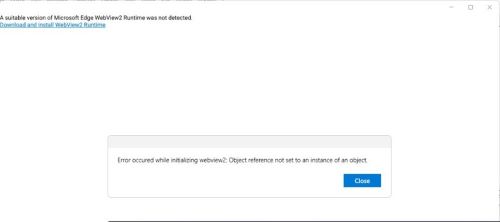
Figure 1: (English Only) Messages displayed when attempting to open SupportAssist without the WebView2 runtime installed
原因
Microsoft Edge WebView2 runtime is not installed or corrupted.
解析度
- Open the control panel and verify that the Microsoft edge webview2 runtime is installed.
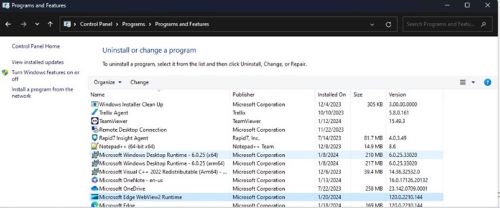
Figure 2: (English Only) Microsoft Edge WebView2 Runtime listed under Programs and Features
- If not installed, then go to step 5.
- If installed, double-click on Microsoft Edge Webview2 Runtime and select repair option and let it complete.
- Now Open SupportAssist UI from the Start menu, the UI should open fine, or else proceed with the next step.
- Download and install the latest version of Microsoft Edge Webview2 Runtime
.
- After you open the above URL, you will find multiple Builds or versions available.
- Sort the latest available version using Last Updated.

Figure 3: (English Only) Sort by Last Updated
- To identify your System Type, go to search bar and type System Information.
- Reference to System Type for the bit version and use appropriate build from the list.
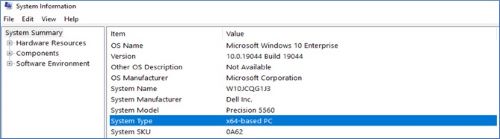
Figure 4: (English Only) Reference System Type for bit version
受影響的產品
SupportAssist for Home PCs文章屬性
文章編號: 000221725
文章類型: Solution
上次修改時間: 16 9月 2025
版本: 3
向其他 Dell 使用者尋求您問題的答案
支援服務
檢查您的裝置是否在支援服務的涵蓋範圍內。